
Kindle Paperwhite 7th Gen: Models and Case Compared

The Kindle Paperwhite 7th gen match here is the clear case, which names older Paperwhite generations and model numbers EY21 and DP75SDI; the four readers are newer models. Choose a reader instead only if you want a new 7-inch Paperwhite, not an accessory fitted to the older device.
Check your e-reader’s model number against the case’s supported numbers before ordering, since generation names alone may not confirm fit.
We earn a commission if you buy through links on this page. As an Amazon Associate I earn from qualifying purchases. Products are compared on manufacturer specifications, not hands-on testing.
- Best overall: LaoShuSheng Clear Paperwhite Case – It is the only option expressly made for older Paperwhite generations, including the 7th gen.
- Best for basic new reader: Kindle Paperwhite 16GB (2024) – It offers a 16GB newer Paperwhite with adjustable white-to-amber display light.
- Best for wireless charging: Kindle Paperwhite Signature Edition 32GB (2024) – The 32GB Signature Edition adds wireless charging and an auto-adjusting front light.
| Product | Best for | Type / fit | Storage | Key feature | Shop |
|---|---|---|---|---|---|
| LaoShuSheng Clear Paperwhite Case | Older device fit | Case for 5th/6th/7th gen | — | Clear silicone | Check Price on Amazon |
| Kindle Paperwhite 16GB (2024) | Basic replacement | Reader, newer model | 16GB | Warm light, waterproof | Check Price on Amazon |
| Kindle Paperwhite Signature Edition 32GB (2024) | Wireless charging | Reader, newer model | 32GB | Wireless charging | Check Price on Amazon |
| Kindle Paperwhite 16GB (newest model) | Replaceable battery | Reader, newer model | 16GB | Warm light, waterproof | Check Price on Amazon |
Kindle Paperwhite 7th Gen Options
The clear case is the generation-specific match; the newer readers are alternatives for replacing the device, not cases for the older model.
LaoShuSheng Clear Paperwhite Case

Unlike the other options, this is an accessory for older Paperwhite e-readers, including the 7th generation, rather than a replacement reader. The clear silicone cover weighs about 0.11 pounds and measures about 6.8 by 4.7 inches. The limitation is straightforward: this case does not add a screen, storage, or reading functions, and it is not meant for the newer 7-inch readers.
Bottom line: Pick this if you are keeping a compatible older Paperwhite and need a clear protective cover.
Kindle Paperwhite 16GB (2024)
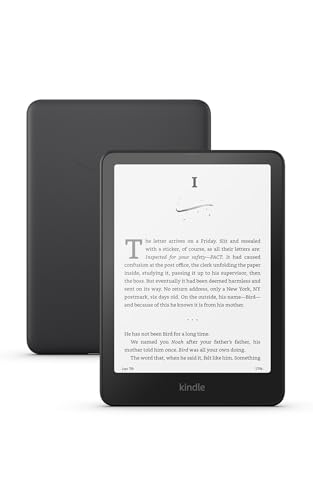
This is a newer Paperwhite reader, not an accessory for the 7th gen; its key distinction from the Signature Editions is 16GB storage without wireless charging or an auto-adjusting light. The 7-inch glare-free display can shift from white to amber, and the device is waterproof. The manufacturer says one USB-C charge lasts up to 12 weeks. Its dimensions are 0.31 inches thick and 6.96 inches long. Choose it to replace an older reader with a standard-capacity model; it will not fit an older-generation case.
Bottom line: Choose this if you want a newer 16GB reader with manual warm-light adjustment.
Kindle Paperwhite Signature Edition 32GB (2024)

Wireless charging is the distinguishing extra here: this newer 32GB Signature Edition also has an auto-adjusting front light, unlike the standard 16GB reader. Its 7-inch glare-free screen and USB-C charging make it a replacement-reader choice, not a 7th-generation accessory. The manufacturer says battery life reaches up to 12 weeks on one charge; a wireless charging dock is sold separately. At 0.31 inches thick and 6.96 inches long, it shares the dimensions of the standard 2024 reader. The added charging option matters most if you plan to use a compatible dock; it does not help with fitting the old device.
Bottom line: Pick this for 32GB storage, automatic lighting, and the option to charge wirelessly.
Kindle Paperwhite 16GB (newest model)

Battery serviceability sets this newer 16GB Paperwhite apart: the manufacturer says its back panel opens for a replaceable battery. The reader also has a 7-inch high-contrast glare-free display, adjustable warm light, and a waterproof design. The manufacturer says a charge lasts up to 12 weeks. Those are features of a replacement reader, not a cover or fit solution for the 7th-generation device. Choose it if the replaceable-battery design is your priority and you want 16GB; allow for the fact that older-generation cases are not a match.
Bottom line: Choose this newer reader if a replaceable battery is the deciding feature.
How to identify a 7th-generation Paperwhite
Match the model number, not just the Paperwhite name, when buying an accessory. The compatible-case option names older generations and gives EY21 and DP75SDI as model identifiers, while every reader here has a 7-inch display and is presented as a newer model. Paperwhite generation labels can be confused with model years or case generations, so check the device’s settings or rear label for its model number before purchasing a cover. A model-number mismatch is a reason to skip the case even if the device is called a Paperwhite.
Case versus replacement reader
A case protects an existing device; a reader supplies the screen and e-reading functions. This distinction decides the choice here: the older-generation clear silicone case is the only exact match, while the three 16GB and 32GB devices are newer Paperwhite readers. A 7-inch screen is a useful way to recognize the newer reader options in this group, but screen size alone is not enough to confirm case fit. For an existing 7th-gen device, stay with an accessory whose generation and model number match. For a replacement, decide whether 16GB is enough or whether 32GB and Signature Edition features matter.
Use this comparison to choose by purpose:
| Need | Option type | Deciding detail |
|---|---|---|
| Keep older reader protected | Clear case | Compatibility names older generations and model numbers |
| Replace older reader | 16GB Paperwhite | Warm-light adjustment and waterproof design |
| Replace with extra charging/storage features | 32GB Signature Edition | Wireless charging and auto-adjusting light |
Choosing storage and lighting
Choose storage based on how many books, documents, and audiobooks you want on the device at once; these options separate into 16GB standard models and 32GB Signature Editions. The Signature Edition options add auto-adjusting front light, while the 2024 standard reader describes manual adjustment from white to amber. Warm light changes the screen’s color tone for nighttime reading, while automatic adjustment responds to surrounding brightness. Do not treat those lighting features as evidence of compatibility with an old case: they are functions of the reader itself. If wireless charging is a requirement, only the 2024 Signature Edition here explicitly includes it, and its dock is sold separately.
Using an e-reader near water
Waterproof design does not make a reader safe to use carelessly around water; wet hands and a slippery tub or pool edge can still lead to drops. The three reader products describe themselves as waterproof, but the specifications provide no depth or duration rating, so avoid assuming a specific immersion limit. Dry the device before charging, and keep charging accessories away from water. A soft case can add grip and help with scratches, but the clear silicone option is for older generations and its compatibility must be checked before use. If a damaged seal or cracked housing is present, keep the reader away from water until it is repaired.
Frequently Asked Questions
How can I tell if my Kindle is 7th generation?
Check the model number in the device settings or on its rear label, then compare it with the accessory’s supported model numbers. The compatible case names EY21 and DP75SDI, so confirm the exact identifier before ordering.
Will a 7th-generation Paperwhite case fit a 7-inch model?
Do not assume so based on the Paperwhite name or screen size. The case here is for older generations, while the reader options are newer 7-inch models; match the exact generation and model number.
Is 16GB enough storage for a Kindle Paperwhite?
For a library kept mostly in the cloud, 16GB may be adequate; choose 32GB if you want more books or files stored locally at once. E-books generally use far less space than audiobooks or large document files.
Can a waterproof Kindle be submerged in a bath?
A waterproof design is intended for wet environments, but the reader options here do not provide a depth or immersion-time limit. Keep the device away from water if its casing is cracked, and dry it before charging.
Does the Signature Edition charge without a cable?
The 2024 Signature Edition includes wireless charging, but the charging dock is sold separately. It also supports USB-C charging, so a dock is optional rather than the only charging method.