
KLIM Everest Laptop Cooling Pad Models Compared

For the KLIM Everest laptop cooling pad, choose the original Everest if you want a sealed-foam design with two 4,300 RPM fans; the Everest Plus is the closest alternative, with dual 6,300 RPM fans. The right choice depends on laptop size and whether its vents can align with the pad.
Choose a different style if you need an adjustable stand, RGB lighting, or a larger fit range than the Everest models offer.
We earn a commission if you buy through links on this page. As an Amazon Associate I earn from qualifying purchases. Products are compared on manufacturer specifications, not hands-on testing.
- Best overall: KLIM Everest Cooling Pad – Two 4,300 RPM turbo fans and a detachable foam seal define the original Everest.
- Best for higher fan speed: KLIM Everest Plus – Dual 6,300 RPM fans distinguish the Everest Plus.
- Best for adjustable incline: KLIM Wind Cooling Pad – The KLIM Wind has adjustable rear legs and four 1,200 RPM fans.
| Product | Best for | Fan speed | Laptop fit | Distinctive design | Shop |
|---|---|---|---|---|---|
| KLIM Everest Cooling Pad | Sealed foam cooling | 4,300 RPM, 2 fans | 14–17.3 in | Detachable foam seal | Check Price on Amazon |
| KLIM Everest Plus | Higher fan speed | 6,300 RPM, 2 fans | 11–17.3 in | Detachable foam seal | Check Price on Amazon |
| KLIM Wind Cooling Pad | Adjustable incline | 1,200 RPM, 4 fans | 11–19 in | Adjustable rear legs | Check Price on Amazon |
| KLIM Turbofrost Cooling Pad | RGB desk setup | 16,000 RPM combined, 4 fans | Up to 17.3 in | Aluminum base, RGB | Check Price on Amazon |
| llano V12 Cooling Pad | Large gaming laptops | 5.5 in fan | 15.6–19 in | Touch control, 3-port hub | Check Price on Amazon |
KLIM Everest Laptop Cooling Pads and Alternatives
Compare fan speed, laptop fit, and design to find the cooling pad that matches your laptop’s vents and desk setup.
KLIM Everest Cooling Pad
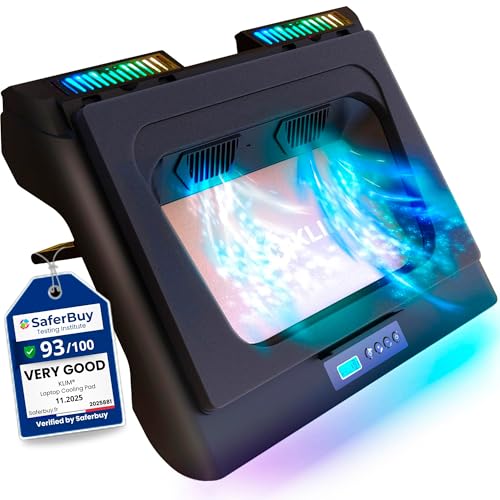
The original KLIM Everest is the direct match for shoppers seeking the Everest’s sealed-foam format, with two 4,300 RPM turbo fans. KLIM says the fans can cool a laptop in under 30 seconds; actual results depend on the laptop’s vent layout and operating conditions. The detachable foam is intended to seal airflow around the laptop. This model suits compatible 14–17.3-inch laptops whose intake vents align with the pad. Its key limitation is the narrower stated fit range than some alternatives, so measure the laptop and check vent placement before choosing it.
Bottom line: Pick this if your 14–17.3-inch laptop has intake vents that work with the sealed-foam layout.
KLIM Everest Plus

The Everest Plus separates itself from the original with dual 6,300 RPM fans and a broader stated fit range that includes laptops from 11 to 17.3 inches. KLIM says the fans can cool a laptop in under 30 seconds, and the detachable foam is designed to seal airflow. It suits buyers who want the Everest-style format but prioritize the higher fan-speed figure. The fit guidance also requires ventilation openings on the laptop, so a matching screen size alone is not enough; confirm that the vents can draw air through the pad.
Bottom line: Choose this for a compatible laptop up to 17.3 inches when higher fan speed is the priority.
KLIM Wind Cooling Pad

The KLIM Wind trades the Everest’s sealed-foam arrangement for a stand with four 1,200 RPM fans, adjustable rear legs, and front retaining pegs. KLIM describes 11–16-inch laptops as covered by the pad; 17.3–19-inch laptops can extend beyond its edges while remaining stable. That makes it a better fit for someone who values incline adjustment or needs to accommodate a larger laptop than the Everest range. The limitation is its open, stand-style design rather than a sealed airflow chamber, so choose it for positioning and size flexibility rather than the Everest format.
Bottom line: Pick this if adjustable incline and a fit for larger laptops matter more than sealed foam.
KLIM Turbofrost Cooling Pad

The Turbofrost is the gaming-oriented alternative, combining four 4,000 RPM fans with an aluminum base, adaptive sealing foam, and RGB lighting. KLIM says the foam keeps fan volume low; fan and lighting settings save between sessions. It fits laptops up to 17.3 inches and can use a DC adapter or laptop USB-C power, with three USB-A ports. The added lighting, controls, and power choices suit a feature-rich desk setup, but this model is not an Everest-branded pad. Choose it only if those extras and its 17.3-inch maximum fit your needs.
Bottom line: Choose this for RGB, an aluminum base, and multiple power options in a gaming setup.
llano V12 Cooling Pad

The llano V12 uses a single 5.5-inch turbo fan and an airtight pressure chamber, rather than the Everest’s two-fan setup. It is designed for 15.6–19-inch laptops and adds adjustable speed, touch controls, a three-port hub, and a dust filter with an extra filter included. The larger fit range makes it worth considering for a gaming laptop above 17.3 inches. The main limitation is its 15.6-inch minimum, which excludes smaller laptops; check the laptop’s dimensions and vent locations before selecting this larger-format cooler.
Bottom line: Pick this for a 15.6–19-inch laptop if you want a single large fan and touch controls.
How to choose a KLIM Everest cooling pad
Choose between the Everest models by comparing fan speed, fit, and vent alignment. The original has two 4,300 RPM fans; the Plus has two 6,300 RPM fans. Both use detachable foam intended to direct airflow, so the laptop’s intake vents must work with the pad’s sealed area. Laptop screen size is measured diagonally, while the pad must physically support the laptop’s width and depth; check both dimensions rather than relying on screen size alone. A cooling pad cannot force air through a laptop with blocked or poorly positioned intake vents. If your laptop’s vents are on the bottom, confirm that the pad’s airflow can reach them; if the vents are elsewhere, a stand-style option may be a better match.
Laptop size and vent fit
A screen-size range is a starting point, not a guarantee of airflow compatibility. The Everest and Everest Plus are aimed at laptops up to 17.3 inches, while the KLIM Wind can accommodate larger devices overhanging its edges and the llano V12 covers 15.6–19-inch laptops. Measure the laptop’s width and depth, then locate its intake vents before choosing a pad. A useful decision rule is to avoid a sealed pad if the laptop’s intake vents do not sit over its airflow area; consider an open stand instead. Keep vents clear of fabric, papers, and other obstructions, since restricting intake can undermine the purpose of a cooling stand.
Use this fit guide to narrow the style before comparing extras:
| Need | Model fit | What to prioritize |
|---|---|---|
| Everest format | 14–17.3 inches | Original Everest |
| Everest with higher fan speed | 11–17.3 inches | Everest Plus |
| Adjustable stand | 11–19 inches | KLIM Wind |
| Large gaming laptop | 15.6–19 inches | llano V12 |
Sealed foam versus open laptop stands
Sealed-foam pads try to concentrate airflow around the laptop’s intake, while open stands emphasize positioning and broader support. The Everest models and Turbofrost use foam seals; the KLIM Wind uses adjustable rear legs and front pegs, and the llano V12 uses a pressure chamber. A seal can be a poor match when a laptop’s vents do not align with it, so vent placement should decide the style before fan speed does. Stand angle also matters: a stable base keeps the laptop from shifting, and a clear intake path matters more than lighting or hub features. Keep the laptop secured and its vents unobstructed during use.
Using and maintaining a laptop cooling pad
Keep the pad and laptop on a hard, level surface so the laptop stays stable and the intake area remains open. Dust buildup can restrict airflow, especially in a sealed chamber or around a dust filter; inspect those areas periodically and clean the filter or fan openings when dust is visible. Disconnect power before cleaning fan openings, and do not put fingers or tools near moving blades. USB-powered pads also draw power from the laptop, while a separate adapter can provide a different power source on models that support one. Route cables away from the fan area and avoid placing the cooler on bedding or other soft surfaces.
Frequently Asked Questions
Will the KLIM Everest fit a 17.3-inch laptop?
The original Everest is specified for 14–17.3-inch laptops, so 17.3 inches is within its range. Check the laptop’s width, depth, and vent placement as well, because diagonal screen size does not establish airflow alignment.
Do laptop cooling pads work with side vents?
A pad is most useful when its airflow reaches the laptop’s intake vents, which are often on the bottom. If the laptop draws air only from the sides, a sealed pad may not direct airflow to the right place; keep those side vents clear.
How often should I clean a laptop cooling pad?
Inspect the fan openings and any dust filter whenever dust is visible or airflow seems obstructed. Unplug the pad before cleaning, and keep fingers and tools clear of moving fan blades.
Is a higher fan RPM always better for laptop cooling?
Higher RPM is a fan-speed figure, not a guarantee of lower laptop temperatures. Vent alignment, airflow path, and unobstructed laptop intakes determine whether a pad can help the device shed heat.