
Light Box to View Slides: Sizes and Features Compared

For a general-purpose light box to view slides, Slide Viewer Light Box 12×8 stands out for its 12-by-8-inch panel and continuously adjustable brightness. Choose DigitPro A4 Slide Viewer instead if magnetic pins for curled film matter more, or KODAK Photo Light Box 7×5 if a smaller panel and USB or AAA power suit your setup better.
A slide-viewing light box is a flat, illuminated surface that shines through transparent film; matching its lit area to your slides and camera setup helps avoid awkward cropping.
We earn a commission if you buy through links on this page. As an Amazon Associate I earn from qualifying purchases. Products are compared on manufacturer specifications, not hands-on testing.
- Best overall: Slide Viewer Light Box 12×8 – Its 12-by-8-inch area and continuous brightness adjustment suit general slide viewing and digitizing.
- Best for curled film: DigitPro A4 Slide Viewer – Four removable magnetic pins hold curled 35mm negatives flat against the panel.
- Best for portable power: KODAK Photo Light Box 7×5 – It can run from USB or AAA batteries and has a 7-by-5-inch viewing area.
| Product | Best for | Viewing area | Brightness control | Color temperature | Shop |
|---|---|---|---|---|---|
| Slide Viewer Light Box 12×8 | General slide viewing | 12 × 8 in | Continuous adjustment | 5,600K ± 200K | Check Price on Amazon |
| DigitPro A4 Slide Viewer | Curled film strips | A4 | 3 levels | 10,000–12,000K | Check Price on Amazon |
| BEONEGLOBAL Letter-Size Light Box | Larger slide batches | 13.4 × 9.8 in active area | 3 levels; long-press dimming | Daylight-balanced | Check Price on Amazon |
| KODAK LED Light Box 12×8 | Slide digitizing | 12 × 8 in | — | — | Check Price on Amazon |
| KODAK Photo Light Box 7×5 | Compact viewing | 7 × 5 in | — | — | Check Price on Amazon |
Light Boxes to View Slides
Compare the illuminated area and lighting controls to find a panel that fits your film and digitizing setup.
Slide Viewer Light Box 12×8

Slide Viewer Light Box 12×8 combines a 12-by-8-inch panel with continuous brightness adjustment, giving it a useful balance of viewing area and control. The maker says its 5,600K light simulates natural white light and reports a CRI above 95; those traits may appeal when viewing slides or photographing film with a phone or camera. A single touch switches the panel on or off, while holding the control changes brightness. The limitation is that the maker does not establish a power source, so buyers who need a particular cable or battery setup should verify compatibility before ordering.
Bottom line: Choose it for a medium-size panel and fine brightness adjustment.
DigitPro A4 Slide Viewer
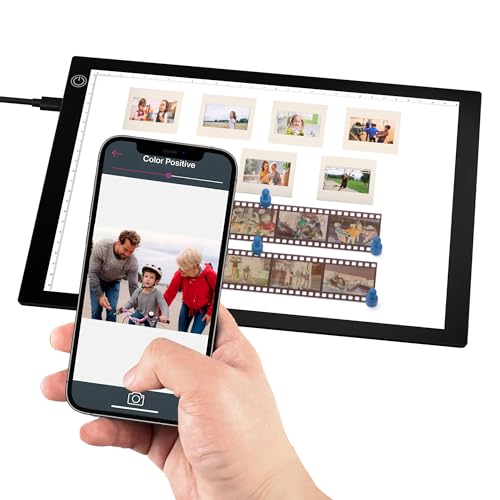
DigitPro A4 Slide Viewer is the only option here with four removable magnetic pins, a practical distinction for holding curled 35mm negatives flat while viewing or photographing them. The maker describes its illumination as flicker-free and even, with three selectable brightness levels and a 10,000–12,000K color temperature. The panel is described as 0.2 inches thick, and the maker also says a scanning app is included. Three brightness steps offer less fine control than a continuously adjustable panel, so this model suits buyers who value film-holding pins more than precise dimming.
Bottom line: Pick it when curled 35mm film needs to stay flat.
BEONEGLOBAL Letter-Size Light Box

BEONEGLOBAL Letter-Size Light Box offers the largest active area in this group at 13.4 by 9.8 inches, making it a sensible choice for viewing or scanning several slides at once. The maker says the double-sided LEDs provide up to 4,330 lux of even, flicker-free illumination, and the panel can display or scan up to 20 slides at once. It is 0.26 inches thick and includes touch control with a memory function. The broader work surface takes more room than a 7-by-5-inch panel, so it is less suitable if compact storage is the main priority.
Bottom line: Choose it when a wide active area matters more than compact storage.
KODAK LED Light Box 12×8
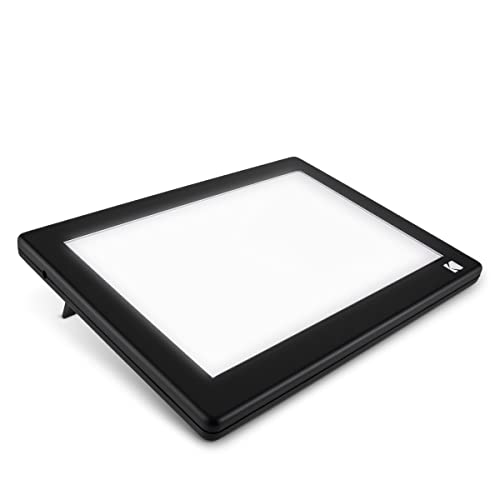
KODAK LED Light Box 12×8 is a 12-by-8-inch KODAK panel aimed at viewing and scanning negatives and slides, with a glare-free surface called out as a distinguishing feature. The maker says it offers up to 98% color restoration accuracy and can be used with an existing smartphone or DSLR camera for DIY film digitizing. Its broader uses include drawing and stenciling, which may suit a buyer who wants one illuminated board for more than film. The maker does not give a brightness-control method, so buyers who need dimming should confirm that feature before choosing it.
Bottom line: Pick it for a 12-by-8-inch KODAK panel with a glare-free surface.
KODAK Photo Light Box 7×5

KODAK Photo Light Box 7×5 has the smallest viewing area here, 7 by 5 inches, and stands apart with USB or AAA battery power. That compact size can fit a limited work surface or a portable setup, while the maker says the panel provides 98% color accuracy and flicker-free, glare-free lighting. It is also described for tracing and other light-table tasks, so it can serve beyond slide viewing. The smaller area gives less room for arranging multiple slides than the larger panels, which matters if you want to inspect or photograph a batch at once.
Bottom line: Choose it for compact viewing and flexible power options.
How to Choose a Slide Viewing Light Box
Start with the lit area: choose a panel that fully covers the slide or film strip and leaves room for your camera framing. Standard 35mm slides have a 2-by-2-inch mount, while the image area inside is about 24 by 36 mm; the mount dimensions are the useful starting point for checking panel coverage. Color temperature also changes the appearance of the light: 5,600K is near daylight, while higher Kelvin values appear cooler or bluer. For digitizing, even illumination and a stable camera position matter as much as brightness. If you need to photograph a mounted slide, a 7-by-5-inch panel can hold one mount with margin; a larger panel is more convenient for several at once.
Panel Size and Slide Fit
A 35mm slide mount measures about 2 inches square, so one slide fits on even a compact panel, but multiple slides need more area. A letter-size work surface is about 8.5 by 11 inches, while A4 is about 8.27 by 11.69 inches; the formats are close but not identical. For a decision rule, choose a lit area at least as wide as the full film strip or group of mounts you plan to inspect, rather than relying on the outer panel dimensions alone. Active area can be smaller than the panel itself. Keep clear margins around film so a phone or camera can frame the image without catching an edge.
This size guide helps match the panel to a common task.
| Need | Useful illuminated area | Why |
|---|---|---|
| One mounted 35mm slide | At least 2 × 2 in | Covers the mount, with room to inspect the image |
| Several slides together | Letter-size or larger | Allows a wider arrangement and camera framing |
| Compact storage | About 7 × 5 in | Smaller footprint for occasional viewing |
Light Color and Brightness for Viewing Film
Color temperature is measured in kelvins: around 5,000K to 6,500K is commonly used for daylight-balanced viewing, while 10,000K to 12,000K looks noticeably cooler. A cooler panel can change how film colors appear to your eye, so compare slides under consistent lighting rather than switching between panels mid-inspection. Brightness control helps prevent a glowing panel from overwhelming a phone camera; lower the light if highlights clip or film edges flare. Continuous dimming allows finer adjustment than three fixed levels, but fixed steps are straightforward when they match your needs. For camera capture, keep the lens square to the film and avoid reflections from room lights.
Digitizing Slides Without Common Framing Errors
Keep the camera parallel to the light box so rectangular slide mounts stay rectangular rather than skewing into a trapezoid. A phone macro mode or close-focus camera lens helps fill the frame, but maintain enough distance to keep the whole 35mm image sharp. Dust on film becomes conspicuous under backlighting, so use a clean, soft film-safe brush and avoid touching the image area. Do not press curled film directly with a hard object; use a purpose-made holder or magnetic pins designed for film. If a slide is mounted behind glass, reflections can reduce contrast, so adjust the angle and block nearby stray light before capturing it.
Frequently Asked Questions
What size light box works for 35mm slides?
A 2-by-2-inch lit area can cover one standard mounted 35mm slide. For several mounts or a phone-camera frame with margins, choose a larger area such as 7 by 5 inches or more.
Is 5600K light suitable for viewing slides?
Yes, 5,600K is within the commonly used daylight-balanced range of roughly 5,000K to 6,500K. A higher 10,000K to 12,000K panel will look cooler and may shift perceived colors.
How do I photograph slides with a phone?
Place the phone lens parallel to the slide and center the image area before capturing. Keep the phone steady and reduce panel brightness if the camera clips bright areas or loses shadow detail.
Can a light box flatten curled film?
A plain illuminated panel does not necessarily hold film flat; curled negatives can lift at the edges and blur during capture. Use film holders or suitable retaining pins, and avoid pressing directly on the image.
Should I clean slides before using a light box?
Remove loose dust with a clean, soft film-safe brush before backlighting, because light from behind makes particles easier to see. Avoid fingers, household cleaners, and abrasive cloths on the image surface.