
Light Socket Cameras: 3 Models Compared by Fit

Picturesky 3MP Light Bulb Camera 2-Pack suits most buyers who want a two-camera setup, 3MP video, and dual-band Wi-Fi in light socket cameras. Choose 52HZ 2K Light Bulb Camera if 2.4GHz Wi-Fi is your network requirement, or 2K Light Bulb Camera 4-Pack if you need a four-camera pack.
Light socket cameras screw into compatible powered sockets, so socket location and power control are as important as resolution.
We earn a commission if you buy through links on this page. As an Amazon Associate I earn from qualifying purchases. Products are compared on manufacturer specifications, not hands-on testing.
- Best overall: Picturesky 3MP Light Bulb Camera 2-Pack – Combines a two-camera pack, 3MP video, and 2.4GHz/5GHz dual-band Wi-Fi.
- Best for 2.4GHz networks: 52HZ 2K Light Bulb Camera – Uses 2.4GHz Wi-Fi and supports E27 sockets.
- Best for multi-camera coverage: 2K Light Bulb Camera 4-Pack – Includes four cameras and 2K video.
| Product | Best for | Video resolution | Wi-Fi | Pack size | Shop |
|---|---|---|---|---|---|
| Picturesky 3MP Light Bulb Camera 2-Pack | Dual-band coverage | 3MP | 2.4/5GHz | 2 cameras | Check Price on Amazon |
| 52HZ 2K Light Bulb Camera | 2.4GHz networks | 2K | 2.4GHz | 1 camera | Check Price on Amazon |
| 2K Light Bulb Camera 4-Pack | Four-camera coverage | 2K | 2.4/5GHz | 4 cameras | Check Price on Amazon |
Light Socket Cameras Compared
Compare each camera’s resolution, network band, and number of units before matching it to your socket locations.
Picturesky 3MP Light Bulb Camera 2-Pack
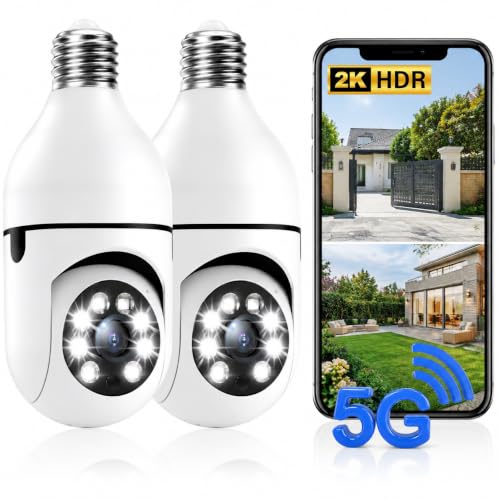
Picturesky 3MP Light Bulb Camera 2-Pack is the only option here with 3MP video, and its two-camera pack pairs that resolution with 2.4GHz and 5GHz Wi-Fi support. The maker also describes Bluetooth-assisted pairing, remote PTZ control, two-way audio, human detection, and color night vision. It screws into a compatible E26/E27 socket, so it suits homes with powered sockets positioned for the views needed. The main limitation is placement: the socket determines camera height and direction, and the specifications do not establish whether a particular fixture gives a useful view.
Bottom line: Choose this if you want two cameras, 3MP video, and dual-band Wi-Fi.
52HZ 2K Light Bulb Camera

52HZ 2K Light Bulb Camera is a single-camera 2K option for buyers whose setup uses 2.4GHz Wi-Fi rather than dual-band connectivity. The maker says it fits an E27 socket rated for AC 110–240V and offers two-way talk, human detection, and color night vision; the product name also identifies 355-degree coverage. This model may suit one entry or garage area when an E27 socket is already well placed. Its limitation is the single-unit pack and 2.4GHz-only connectivity, so it is a less direct match for buyers seeking a multi-camera pack or 5GHz support.
Bottom line: Choose this for one E27-socket camera on a 2.4GHz network.
2K Light Bulb Camera 4-Pack

2K Light Bulb Camera 4-Pack provides the largest pack here, with four 2K cameras and support for both 2.4GHz and 5GHz Wi-Fi. The maker describes E27 bases, motion detection, alarms, two-way audio, color night vision, and human detection, with EseeCloud app setup. That combination suits buyers planning to cover several socket locations rather than start with one or two cameras.
Bottom line: Choose this when four camera locations matter more than the higher resolution of Picturesky 3MP Light Bulb Camera 2-Pack.
How to Choose a Light Socket Camera
Choose a light socket camera by matching the Wi-Fi band, camera count, and socket position to the area you want to cover. A camera that only supports 2.4GHz needs a router network with that band enabled; dual-band support adds compatibility with 5GHz networks, but does not guarantee stronger reception through walls. Resolution is another distinction: 2K and 3MP are different labels, and they should not be treated as identical pixel counts. Make a short map of the intended views before choosing a pack, since a socket camera cannot be repositioned like a wired camera on a mount. If the socket is controlled by a wall switch, verify that it stays powered when monitoring is needed.
Socket Fit and Camera Placement
For US fixtures, E26 is the common medium screw-base size; E27 is close in size but is not the same standard, so confirm the camera and fixture compatibility rather than assuming the labels are interchangeable. Socket position also sets the camera’s height and direction, which can leave blind areas behind door frames or under eaves. Before installation, check the fixture rating and whether the bulb camera’s body clears any shade or enclosure. Turn off power at the switch before screwing in or removing a camera, and avoid forcing a base that does not thread smoothly. A camera attached to a switched socket also loses power when that switch is off, so choose a continuously powered location for ongoing monitoring.
Wi-Fi Bands and Video Resolution
2.4GHz Wi-Fi generally reaches farther and passes through walls better than 5GHz, while 5GHz can offer more bandwidth over shorter distances. Actual results depend on router placement, wall materials, interference, and distance; test the intended socket with the home network before relying on remote viewing. A dual-band camera can be useful where the network offers both bands, but the camera still needs a stable connection at its installed location. Resolution labels also deserve care: 2K and 3MP are not interchangeable measurements, and field of view, compression, and app settings affect how much detail appears in saved footage. Prioritize a stable connection and a clear angle over choosing only by the largest resolution label.
Plan Camera Count Around Coverage
Count the views you need before selecting a pack: one camera can cover one socket position, while a multi-camera set can address several approaches or entrances. Overlapping angles can reduce gaps around corners, but they do not guarantee full coverage if a fixture faces a wall or sits behind an obstruction. A wide-angle view also trades detail at a distant subject for coverage across more of the scene. For an entryway, aim the camera so a visitor remains in view as they approach rather than only after reaching the door. Check that each intended location has both a compatible socket and dependable Wi-Fi before deciding how many cameras to install.
Frequently Asked Questions
Can a light socket camera work when the wall switch is off?
No, a camera powered by that socket will stop receiving power when the switch cuts power. Use a socket that remains energized whenever monitoring is needed.
Will an E27 camera fit a US E26 socket?
E26 is the common US medium screw base, and E27 is close but not identical. Verify the camera maker’s compatibility guidance and do not force the threads if they resist.
Does 5GHz Wi-Fi reach farther than 2.4GHz?
No; 2.4GHz generally reaches farther and penetrates walls better, while 5GHz can provide more bandwidth at shorter range. Router distance, walls, and interference affect the connection at the socket.
Should I put a bulb camera in an enclosed fixture?
Check the fixture and camera guidance before using an enclosed fixture, because enclosure can trap heat around powered electronics. Turn off power before installation and do not use a fixture that does not accommodate the camera body.
How many socket cameras cover a house entrance?
One well-positioned camera can cover a single approach, but corners or multiple entrances may call for separate views. Map each approach and check socket power and Wi-Fi at each spot before choosing a camera count.