
M.2 E Key to PCIe Adapters Compared by Fit

For most desktop Wi-Fi modules, GLOTRENDS WA01 M.2 E Key to PCIe X1 is the clearest match because it converts an M.2 E-key module to PCIe x1 and includes antenna hardware. Choose ELFJMZP M.2 A/E Key to PCIe Riser if you need a flexible cable and expansion-slot placement, or M.2 NGFF Key E to Mini PCIe Adapter if your destination is a Mini PCIe slot; these are different connector setups.
M.2 E-key modules commonly carry Wi-Fi over PCIe and Bluetooth over USB, so verify that your motherboard has the required internal USB connection if Bluetooth matters.
We earn a commission if you buy through links on this page. As an Amazon Associate I earn from qualifying purchases. Products are compared on manufacturer specifications, not hands-on testing.
- Best overall: GLOTRENDS WA01 M.2 E Key to PCIe X1 – Converts an M.2 E-key module to PCIe x1 and includes dual-band antenna hardware.
- Best for flexible placement: ELFJMZP M.2 A/E Key to PCIe Riser – Its 22 cm riser cable places the expansion connector away from the M.2 slot.
- Best for Mini PCIe: M.2 NGFF Key E to Mini PCIe Adapter – Converts an M.2 E-key card for a Mini PCIe slot and supports 3030 and 3042 modules.
| Product | Best for | Host interface | Module fit | Extra connection | Shop |
|---|---|---|---|---|---|
| GLOTRENDS WA01 M.2 E Key to PCIe X1 | Wi-Fi modules | PCIe x1 | M.2 2230 E or A+E key | USB for Bluetooth; antenna pigtails | Check Price on Amazon |
| ELFJMZP M.2 A/E Key to PCIe Riser | Flexible placement | PCIe 3.0 x1 bandwidth | M.2 Wi-Fi A/E key | SATA power; 22 cm cable | Check Price on Amazon |
| M.2 NGFF Key E to Mini PCIe Adapter | Mini PCIe slots | Mini PCIe | M.2 Key E; 3030/3042 | PCIe and USB | Check Price on Amazon |
M.2 E Key to PCIe Adapters
Compare the connection direction and module support before choosing an adapter for your desktop build.
GLOTRENDS WA01 M.2 E Key to PCIe X1

For an M.2 Wi-Fi module that needs antenna connections, this adapter combines a PCIe x1 host interface with two U.FL/IPEX4-to-RP-SMA pigtails and 6-dBi antennas. It supports M.2 2230 E-key and A+E-key Wi-Fi modules, and can also accommodate the named Coral TPU module type. Wi-Fi uses PCIe; Bluetooth uses USB, so Bluetooth requires connecting the included USB cable to a motherboard USB port. The limitation is that the USB connection is separate: a PCIe slot alone will not enable Bluetooth.
Bottom line: Choose this if you want antenna connections and can connect the USB lead for Bluetooth.
ELFJMZP M.2 A/E Key to PCIe Riser

This riser is the option for moving an expansion connector away from the motherboard slot: its 22 cm braided cable runs from an M.2 Wi-Fi A/E-key connection to a PCIe x16-size connector. Despite that connector shape, the product specifies actual PCIe 3.0 x1 bandwidth, matching the A/E-key interface. A SATA power lead and mounting kit are included. It suits builds where a rigid adapter would be awkward, but it is not a full-bandwidth x16 link; buyers needing more than x1 should choose a different host interface.
Bottom line: Choose this when flexible placement matters and PCIe x1 bandwidth is sufficient.
M.2 NGFF Key E to Mini PCIe Adapter
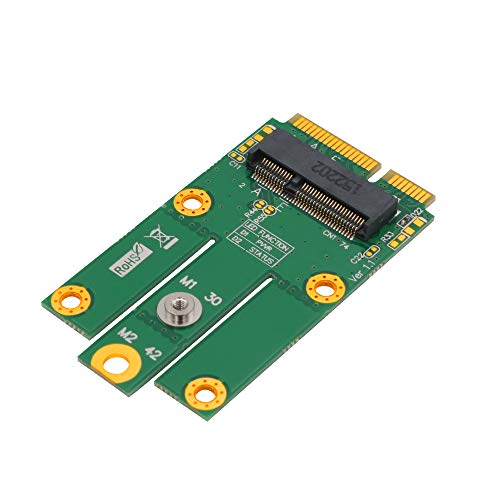
Unlike the desktop PCIe x1 cards, this adapter targets a Mini PCIe slot and accepts an M.2 Key E card. It supports full- and half-size Mini PCIe slots and M.2 card dimensions 3030 and 3042, with PCIe and USB signal paths. The PCI Express base specification is 1.1, with a maximum of 2.5 Gbps. This is a fit for equipment built around Mini PCIe rather than a desktop expansion slot; confirm the host has Mini PCIe before selecting it.
Bottom line: Choose this for a Mini PCIe host and a supported 3030 or 3042 module.
How to choose an M.2 E key to PCIe adapter
Start with the direction of conversion: an E-key module needs an adapter with an M.2 E-key socket on the module side and a compatible host connector on the other side. Desktop PCIe x1 cards, flexible risers, and Mini PCIe adapters are not interchangeable. M.2 Key E sockets commonly use PCIe and USB 2.0 signals; Wi-Fi may use PCIe while Bluetooth uses USB, so a board adapter may need an additional USB lead. For a Wi-Fi module, choose a model with antenna connectors if the module relies on external antennas. If Bluetooth is required, select an adapter with USB wiring and connect it to an internal motherboard USB header.
Use the host socket and module key as a hard filter, then compare placement and signal needs. A card with a PCIe x16-size connector can still run only at x1 bandwidth.
Check M.2 module size and keying
Most desktop M.2 Wi-Fi modules use the 2230 size, which is 22 mm wide and 30 mm long. The key notch is as important as the dimensions: E-key and A+E-key modules fit different socket arrangements than an M-key SSD. A+E modules can use either of their key positions, but the adapter still must support the module’s electrical interface. Some specialty adapters support 3030 or 3042 modules instead of the common 2230 Wi-Fi format. Measure the card and check its printed key designation before ordering; matching only the card’s width is not enough to establish compatibility.
For a desktop build, check the expansion slot position and case clearance too. A flexible riser can relocate the connector, while a rigid card stays near the motherboard slot.
PCIe, USB, and antenna connections
Wi-Fi and Bluetooth may use separate signal paths even when they share one M.2 module. A typical M.2 Wi-Fi adapter routes Wi-Fi through PCIe and Bluetooth through USB 2.0, so the card may appear to support Wi-Fi but lack Bluetooth until its USB lead is connected to the motherboard. Antenna leads matter as well: many wireless modules use tiny U.FL-style connectors, while desktop antennas attach to external SMA connectors via pigtails. Avoid pulling on miniature antenna connectors; align them carefully and press straight down. Before choosing, identify whether the module needs external antenna leads and whether the host provides the required USB connection.
Connector types and intended use
Pick the adapter by the destination connector, not by the largest-looking slot. A PCIe x1 card mounts directly in a desktop expansion slot; a riser extends that connection; a Mini PCIe adapter targets a different host connector. An x16-size plastic connector does not prove x16 electrical bandwidth, so check the lane count. The table summarizes the practical distinction.
| Adapter type | Host connection | Best fit |
|---|---|---|
| PCIe x1 card | Desktop PCIe x1 | Fixed desktop installation |
| Flexible riser | PCIe x16-size connector, x1 bandwidth | Relocated expansion connector |
| Mini PCIe adapter | Mini PCIe | Systems with a Mini PCIe slot |
Confirm the host connector before buying: Mini PCIe and desktop PCIe are different interfaces, and an adapter for one does not substitute for the other.
Frequently Asked Questions
Does an M.2 E key adapter enable Bluetooth automatically?
Not always: many Wi-Fi modules route Bluetooth over USB 2.0 rather than PCIe. If the adapter has a USB lead, connect it to a motherboard USB header to enable that signal path.
Will an M.2 E key adapter work with an M-key SSD?
No, an E-key Wi-Fi adapter is intended for E-key or supported A+E-key modules, not M-key SSDs. M-key SSDs commonly use a different connector arrangement and storage interface.
What does a PCIe x1 adapter mean for Wi-Fi?
PCIe x1 means the adapter uses one PCIe lane, not that the M.2 module is an x1 card. Check the module’s interface and host slot; a larger x16-size connector may still carry only x1 bandwidth.
How do I connect antennas to an M.2 Wi-Fi card?
Many M.2 Wi-Fi modules use small U.FL-style antenna sockets, while external desktop antennas use larger SMA connectors. Use matching pigtails and press each miniature connector straight onto its socket rather than twisting it.
Can an M.2 E key adapter fit any Wi-Fi card size?
No, check both keying and card dimensions before installation. Many desktop Wi-Fi modules are 2230, while some adapters are designed for 3030 or 3042 cards.