
M.2 to SATA Adapter: 4 Types Compared by Fit

The right M.2 to SATA adapter depends on whether you want to add SATA ports to a computer or connect an M.2 SATA SSD to a standard SATA connection. These products cover both jobs; choose a different type if your drive is PCIe NVMe and the adapter only accepts M.2 SATA.
We earn a commission if you buy through links on this page. As an Amazon Associate I earn from qualifying purchases. Products are compared on manufacturer specifications, not hands-on testing.
- Best overall: 10Gtek ASM1166 6-Port Adapter – Adds six SATA 3.0 ports through an M.2 slot and uses the ASM1166 chipset.
- Best for reusing an SSD: M.2 NGFF B+M-Key to SATA Adapter – Converts a compatible M.2 SATA SSD to a standard SATA connection and supports four drive lengths.
- Best for a 2.5-inch bay: RIITOP ASM1166 6-Port Adapter – Mounts an M.2 SATA SSD in a 2.5-inch SATA application.
| Product | Best for | Connection direction | M.2 compatibility | Drive support | Shop |
|---|---|---|---|---|---|
| 10Gtek ASM1166 6-Port Adapter | Adding SATA ports | M.2 slot to SATA ports | — | 6 SATA drives | Check Price on Amazon |
| M.2 NGFF B+M-Key to SATA Adapter | Reusing M.2 SATA | M.2 SSD to SATA | M.2 SATA, B+M key | SSD; 2230–2280 | Check Price on Amazon |
| RIITOP ASM1166 6-Port Adapter | M.2 NVMe slot | M.2 slot to SATA ports | M.2 NVMe slot | 6 SATA ports | Check Price on Amazon |
| StarTech.com M.2 SATA to 2.5-Inch Adapter | 2.5-inch mounting | M.2 SSD to 2.5-inch SATA | M.2 SATA only | 2230–2280 SSD | Check Price on Amazon |
M.2 to SATA Adapter Types
First decide whether you need extra SATA ports or a SATA connection for an M.2 SATA SSD.
10Gtek ASM1166 6-Port Adapter

For adding several SATA connections to a desktop, this card provides six SATA 3.0 ports through an M.2 slot. It uses the ASMedia ASM1166 chipset and supports SATA hard drives and SSDs. The maker says it works without additional software or drivers across Windows, Linux, FreeBSD and VMware ESXi. Port multiplication is supported outside a RAID configuration. This is for expanding a computer’s SATA ports, not converting one M.2 SATA SSD to a 2.5-inch drive connection. Hot-swapping is not supported, so choose another setup if you need to connect or disconnect drives while powered on.
Bottom line: Pick this if you need six SATA connections and do not need hot-swapping.
M.2 NGFF B+M-Key to SATA Adapter
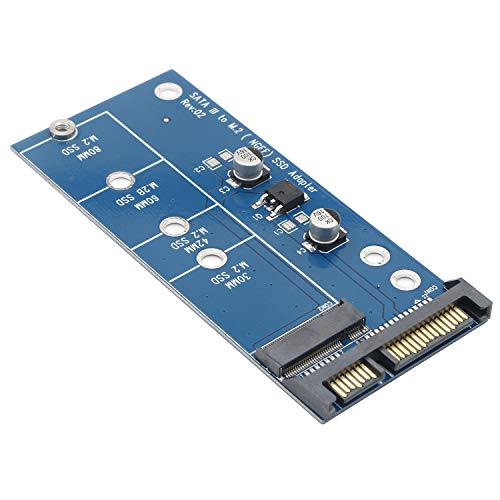
For reusing a compatible M.2 SATA SSD, this adapter converts the drive to a standard SATA connection rather than adding multiple SATA ports. It accepts 2230, 2242, 2260 and 2280 drive sizes and is explicitly incompatible with PCIe NVMe SSDs. The maker says it is driver-free and can be used to run an operating system from an M.2 SATA SSD. A new drive needs partitioning and formatting before recognition, and the maker notes that operation can produce heat. Choose this only when the SSD uses SATA signaling, not merely because its connector fits.
Bottom line: Choose this to connect a compatible M.2 SATA SSD to a standard SATA port.
RIITOP ASM1166 6-Port Adapter

For a system with a spare M.2 NVMe slot and a need for more drive connections, this card adds six standard SATA ports. The maker describes it as an option for storage systems with few PCIe slots and spare M.2 slots. Its aluminum-alloy cover is intended to act as a heatsink and support the card when SATA devices are connected. Unlike an M.2 SATA-to-SATA adapter, this product uses the M.2 slot to expand the number of SATA ports. The maker does not establish operating-system or RAID support, so verify those requirements before choosing it.
Bottom line: Pick this when the available slot is M.2 NVMe and you need six SATA ports.
StarTech.com M.2 SATA to 2.5-Inch Adapter
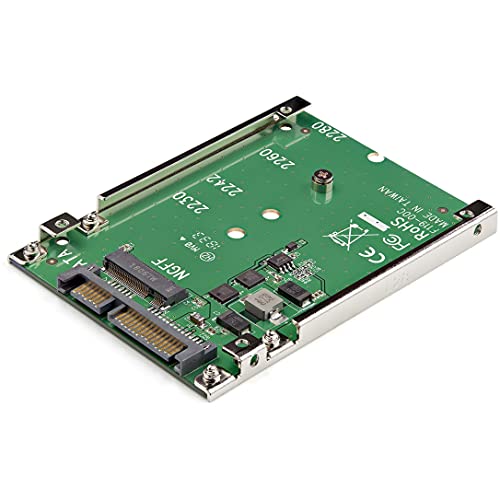
For placing an M.2 SATA SSD in a 2.5-inch SATA application, this open-frame bracket supports drive lengths from 2230 through 2280 and multiple drive heights. Its 7 mm height and open design distinguish it from a small port-expansion card. The maker says the open frame maximizes heat dissipation and supports the full speed of a SATA III controller. It does not accept NVMe or AHCI PCIe SSDs, so it is not a match for those protocols even if the drive can physically fit. Choose it for mounting a SATA M.2 drive, not for adding SATA ports.
Bottom line: Choose this for a SATA M.2 SSD that needs a 2.5-inch SATA form factor.
How to Choose an M.2 to SATA Adapter
Start by identifying whether the adapter adds SATA ports or adapts an M.2 SATA SSD for a SATA connection. M.2 describes a physical form factor; drives can use SATA or PCIe/NVMe signaling, and the two are not interchangeable. A drive that fits a slot may still use the wrong protocol for the adapter. For a 2.5-inch installation, select a SATA-only bracket; for more drive connections, select a port-expansion card designed for the computer’s M.2 slot. A practical decision rule: if the goal is six connected SATA drives, choose a six-port card; if the goal is to reuse one M.2 SATA SSD, choose a single-drive converter. Check the drive’s interface and the host slot before ordering.
M.2 Keying, Protocol and Drive Size
M.2 drive length is commonly identified by four-digit sizes: 2230 is 22 mm wide and 30 mm long, while 2280 is 22 mm wide and 80 mm long. The 2242 and 2260 sizes use the same 22 mm width with 42 mm and 60 mm lengths. Keying helps with physical fit, but it does not by itself guarantee protocol compatibility: SATA and PCIe/NVMe are different interfaces. A B+M-keyed SSD may physically fit more than one socket type, so confirm that both the drive and adapter support SATA when using a SATA converter. Match the adapter’s supported length to the SSD, then ensure the computer has the correct bay or M.2 slot for the chosen direction of conversion.
Port Expansion Versus 2.5-Inch Conversion
Port-expansion cards and 2.5-inch converters solve different storage problems. A port-expansion card uses a computer’s M.2 slot to provide additional SATA ports; a drive converter connects one M.2 SATA SSD to a standard SATA connection. SATA III has a signaling rate of 6 Gb/s, but that figure is not the same as guaranteed drive throughput. A multi-port card also depends on the host slot and card controller, while a bracket does not create extra motherboard ports. Before choosing, count how many SATA devices you need to attach and identify whether the available connection is an M.2 slot or a SATA cable and bay. Do not buy based on the phrase “M.2 to SATA” alone.
Frequently Asked Questions
Can an M.2 SATA adapter work with an NVMe SSD?
Only if the adapter explicitly supports PCIe/NVMe; SATA-only converters do not. M.2 describes the form factor, while SATA and NVMe use different interfaces.
What does 2280 mean on an M.2 SSD?
2280 means the drive is 22 mm wide and 80 mm long. Other common lengths include 2230, 2242 and 2260.
Does an M.2 to SATA adapter add SATA ports?
Some adapters do, while single-drive converters do not. A port-expansion card uses an M.2 slot to provide SATA connections; a drive converter adapts one M.2 SATA SSD to standard SATA.
Do new M.2 SATA SSDs need formatting?
A new SSD may need partitioning and formatting before an operating system recognizes it as usable storage. Formatting is separate from whether the adapter supports the drive’s interface.
Can I hot-swap drives on a six-port adapter?
The 10Gtek six-port adapter does not support hot-swapping. Disconnecting storage while powered can risk data loss, so shut down before changing connections unless the hardware and system explicitly support hot-plugging.