
Memory Stick Pro Reader: 5 Readers Compared by Fit

For most Memory Stick Pro Duo users, 7-in-1 Memory Stick Pro Duo Reader is the clearest match because it is specifically named for Pro Duo and has a dedicated MS slot. Choose Bawanfa 4-in-1 Memory Stick Pro Duo Reader instead if you need Lightning, USB-C, and USB-A connectors; buyers with standard Memory Stick Pro cards should verify the slot’s compatibility with that card format before ordering.
We earn a commission if you buy through links on this page. As an Amazon Associate I earn from qualifying purchases. Products are compared on manufacturer specifications, not hands-on testing.
- Best overall: 7-in-1 Memory Stick Pro Duo Reader – Specifically names Memory Stick Pro Duo and includes an MS slot among its seven ports.
- Best for Lightning devices: Bawanfa 4-in-1 Memory Stick Pro Duo Reader – Supports Lightning, USB-C, and USB-A connectors.
- Best for included USB adapter: 4-in-1 USB-C MS Card Reader – Includes a detachable USB-C-to-USB adapter alongside its USB-C connector.
| Product | Best for | Card slots | Device connectors | Simultaneous cards | Shop |
|---|---|---|---|---|---|
| 7-in-1 Memory Stick Pro Duo Reader | Pro Duo cards | SD, TF, CF, XD, MS | USB-C | 5 | Check Price on Amazon |
| Bawanfa 4-in-1 Memory Stick Pro Duo Reader | Lightning devices | SD, TF, MS, xD | Lightning, USB-C, USB-A | — | Check Price on Amazon |
| 4-in-1 USB-C MS Card Reader | USB-C devices | SD, TF, CF, MS | USB-C, USB-A adapter | — | Check Price on Amazon |
| BENFEI 4-in-1 USB-C/USB 3.0 Reader | USB-C and USB-A | SD, microSD, MS, CF | USB-C, USB-A | 4 | Check Price on Amazon |
| SmartQ C368 USB 3.0 Card Reader | Compact USB 3.0 | SD, microSD, MS, CF | USB 3.0 | — | Check Price on Amazon |
Memory Stick Pro Readers
Compare the supported card formats and device connections to find a reader that matches your Memory Stick and host device.
7-in-1 Memory Stick Pro Duo Reader

For a reader explicitly named for Memory Stick Pro Duo, this 7-in-1 model includes a dedicated MS slot and also supports SD, TF, CF, and XD cards. Its seven ports comprise two SD slots, two TF slots, one CF slot, one MS slot, and one XD slot; the maker says it can read five cards simultaneously. It connects through USB-C and is described as plug-and-play with no app required. The five-card capacity is useful for multi-card transfers, but buyers needing older USB-A hosts should choose a model with that connector instead.
Bottom line: Choose this if your priority is a named Pro Duo reader with several card slots.
Bawanfa 4-in-1 Memory Stick Pro Duo Reader

The triple-interface design separates this reader from USB-only choices: it has Lightning, USB-C, and USB-A connectors for a range of Apple, Android, and computer hosts. Its four card formats are SD, microSD, MS, and xD, and the maker says it reads Memory Stick Pro Duo, Pro-HG, and Duo cards. The maker gives a 480 Mbps transfer figure. This is a practical fit when one reader must connect to different device ports, but it offers four card formats rather than the seven-port layout of 7-in-1 Memory Stick Pro Duo Reader.
Bottom line: Pick this when connector variety, including Lightning, matters more than extra slots.
4-in-1 USB-C MS Card Reader

The detachable USB-C-to-USB adapter makes this model a flexible option for switching between newer USB-C devices and older USB hosts. Its four slots support SD, SDHC, SDXC, microSD, microSDHC, microSDXC, CF, and Memory Stick Pro Duo, among other card types named by the maker. The reader connects directly through USB-C, including to compatible phones, tablets, and computers. It is a focused choice for Pro Duo transfers when you do not need Lightning or xD support; confirm that the host device accepts external card readers.
Bottom line: Choose this for Pro Duo and broad card support with a USB-A adapter included.
BENFEI 4-in-1 USB-C/USB 3.0 Reader
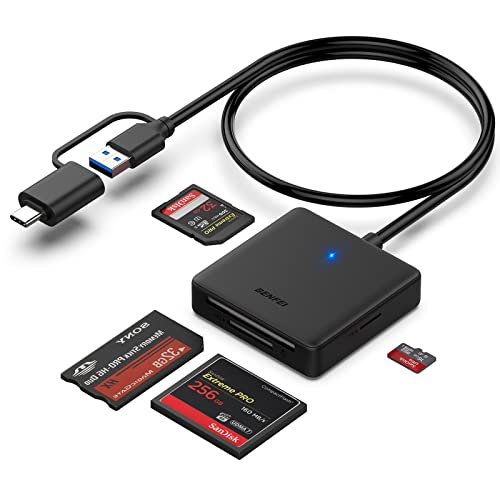
Unlike readers that name Pro Duo specifically, this BENFEI model lists the broader MS format alongside SD, microSD, and CF, and claims four-card simultaneous reading and writing. Its integrated dual connector supports USB-C and USB 3.0, with backward compatibility to USB 2.0 and 1.1. The maker gives an up-to-160 MB/s transfer rate in UHS-I mode, with final speed dependent on the setup. Choose it when USB-C and USB-A connectivity plus CF support are useful; verify that its MS slot matches your exact Memory Stick card.
Bottom line: Pick this when you need USB-C and USB-A plus simultaneous multi-card access.
SmartQ C368 USB 3.0 Card Reader

The SmartQ C368 is the most compact option by the dimensions at 2.78 by 1.67 by 0.6 inches, and it includes a cable. It supports SD, microSD, MS, and CF cards, with independent reading, and works with Windows, Mac OS, and Linux without a driver according to the maker. A blue LED indicates power. The connector is USB 3.0, so this is less suitable than dual-connector alternatives when the host has only USB-C; check the host port before choosing it.
Bottom line: Choose this compact reader for a USB 3.0 host and four common card families.
How to choose a Memory Stick Pro reader
Start by matching the exact Memory Stick format, then check the host connector. Memory Stick PRO and Memory Stick PRO Duo are different physical formats; a reader that names PRO Duo is not automatically a fit for the larger standard PRO card. The reader’s card-slot labels matter more than a broad “MS” label when your card is older or unusual. Host ports are another deciding factor: USB-C, USB-A, and Lightning are distinct connections, and a detachable adapter only helps with the connector it is made for. For a single card transfer, one matching MS slot is enough; choose multi-slot capacity when you routinely move files from several card types. Avoid assuming that a familiar USB plug guarantees your phone supports external storage access.
Memory Stick Pro and Pro Duo fit
Memory Stick Pro Duo cards are smaller than standard Memory Stick Pro cards, so confirm the exact format printed on the card before selecting a reader. Pro Duo measures about 31 by 20 by 1.6 millimeters; standard Memory Stick is about 50 by 21.5 by 2.8 millimeters. The smaller card does not simply become a standard card through a software setting: the slot must physically accept it. A reader explicitly specifying Pro Duo or Pro-HG gives a clearer match than one that only says “MS.” If the card is already inside a full-size adapter, check whether the reader supports the adapter-and-card combination. Do not force a card into a slot that resists insertion, since the contacts can be damaged.
USB reader connections and transfer speed
Choose a connector that physically matches the host: USB-C devices need USB-C, while many older computers use USB-A. USB 3.0 has a theoretical signaling rate of 5 Gbps, but that is not the same as a guaranteed card-transfer rate; the card, reader, host port, file size, and protocol all affect actual throughput. UHS-I cards can advertise bus speeds up to 104 MB/s, but a compatible card and reader are both necessary to reach that interface limit. For large photo or video transfers, use the fastest common interface supported by both card and reader. For occasional small files, connector compatibility and card-format support are usually more important than a headline speed claim.
| Need | What to prioritize |
|---|---|
| Memory Stick Pro Duo transfer | Explicit Pro Duo support and an MS slot |
| Older USB-A computer | USB-A connector or included adapter |
| Multiple card types at once | Documented simultaneous-card capacity |
| Phone or tablet connection | Matching USB-C or Lightning connector and host support |
Safe card handling and file transfer
Memory cards are removable storage, so finish file writes and safely eject the reader before pulling a card; removing power during a write can corrupt files. Keep the card’s contacts clean and dry, and hold it by the edges rather than touching the contact surface. A card’s lock switch, where present, is a write-protection control rather than a guarantee that files are backed up. For important photos, copy files to a second storage location before formatting or reusing the card. Insert cards in the orientation shown by the slot, and stop if a card does not slide in freely. These steps matter especially with older Memory Stick formats, which can be confused with physically different card families.
Frequently Asked Questions
Can a Memory Stick Pro Duo reader read standard Memory Stick Pro cards?
Not automatically; Pro Duo and standard Memory Stick Pro use different physical card sizes. Choose a reader that explicitly supports the format printed on your card, or confirm fit before ordering.
What does UHS-I mean for card reader speed?
UHS-I is a bus interface with a theoretical maximum of 104 MB/s. Actual transfers depend on the card, reader, host connection, and file workload.
Does USB 3.0 guarantee 5 Gbps file transfers?
No; 5 Gbps is USB 3.0’s theoretical signaling rate, not a promise of file-copy speed. The card and reader often set a lower practical limit.
Can a phone use a USB card reader?
Many phones can access external card readers, but the phone must support the connector and external storage access. USB-C or Lightning plug fit alone does not guarantee compatibility.
Should I remove a card during a file transfer?
No; wait for copying to finish and safely eject the reader before removing the card. Interrupting a write can corrupt files.