
Mini Keyboard Rii i8: Models Compared by Fit

The Rii i8+ is the direct match for a mini keyboard Rii i8 search, with a 92-key QWERTY layout, touchpad and rechargeable battery. Choose a different model if you need Bluetooth plus 2.4 GHz switching or a specific backlight style.
These compact wireless keyboards combine typing with a touchpad; device ports and Bluetooth support decide which connection will work.
We earn a commission if you buy through links on this page. As an Amazon Associate I earn from qualifying purchases. Products are compared on manufacturer specifications, not hands-on testing.
- Best overall: Rii i8+ 2.4GHz Mini Keyboard – The i8+ combines a 92-key QWERTY keyboard with touchpad gestures and LED backlighting.
- Best for Bluetooth: Rii i8+ Bluetooth Backlight Keyboard – This i8+ variant is identified as a Bluetooth backlight touchpad keyboard.
- Best for dual-mode switching: Rii X8 Bluetooth + 2.4G Keyboard – The X8 supports Bluetooth 5.0 and 2.4 GHz RF connections.
| Product | Best for | Wireless connection | Touchpad | Backlighting | Shop |
|---|---|---|---|---|---|
| Rii i8+ 2.4GHz Mini Keyboard | i8+ controls | 2.4 GHz | Multi-finger gestures | LED backlit | Check Price on Amazon |
| Rii i8+ Bluetooth Backlight Keyboard | Bluetooth i8+ | Bluetooth | Touchpad | Backlit | Check Price on Amazon |
| Rii X8 Bluetooth + 2.4G Keyboard | Dual-mode switching | Bluetooth 5.0, 2.4 GHz RF | Multi-finger touchpad | RGB backlit | Check Price on Amazon |
| Rii Mini 2.4G Bluetooth Keyboard | Longer runtime claim | 2.4 GHz, Bluetooth | Touchpad | White LED | Check Price on Amazon |
| Rii X8 2.4G RGB Keyboard | 2.4G media control | 2.4 GHz | Multi-touch touchpad | 8-color RGB | Check Price on Amazon |
Rii i8 Mini Keyboards and Alternatives
Compare the i8+ models with related Rii mini keyboards by connection mode and control features.
Rii i8+ 2.4GHz Mini Keyboard

The Rii i8+ is the closest match to the named i8 family, with a 92-key QWERTY layout and touchpad in a compact keyboard. Its touchpad supports single-finger left click, two-finger right click and two-finger scrolling, while LED backlighting supports typing in dim rooms. The built-in rechargeable Li-ion battery and auto-sleep and auto-wake modes suit occasional media-center control. Its connection is 2.4 GHz, so choose another model if you need Bluetooth pairing instead of a USB receiver.
Bottom line: Choose this if you want the i8+ layout and touchpad gestures over Bluetooth connectivity.
Rii i8+ Bluetooth Backlight Keyboard

This i8+ variant is identified as a Bluetooth keyboard with backlight and touchpad, making it the i8-family option for a Bluetooth setup. It is a straightforward fit for buyers prioritizing those three functions in a mini keyboard. Bluetooth support on the host device is essential; consider a receiver-based option for a device without Bluetooth.
Bottom line: Pick this when the Bluetooth i8+ identity matters more than a confirmed key count or gesture set.
Rii X8 Bluetooth + 2.4G Keyboard

The Rii X8 differs from the i8+ by offering both Bluetooth 5.0 and 2.4 GHz RF connections, which suits buyers who switch among compatible devices. It has a multi-finger touchpad, RGB backlighting and a rechargeable lithium-ion battery with Type-C charging. Its dimensions are 5.43 by 3.78 by 0.82 inches. The X8 is a related model rather than an i8+, so choose it for dual-mode connectivity, not for the i8+ name or its specifically described gesture controls.
Bottom line: Choose this if Bluetooth and 2.4 GHz flexibility matter more than an i8+ model.
Rii Mini 2.4G Bluetooth Keyboard

This Rii mini keyboard pairs with two devices using Bluetooth and 2.4 GHz, a distinction from the i8+ model’s 2.4 GHz connection. Its touchpad and white LED backlighting make it a compact media or presentation controller, and its built-in 500 mAh battery is described as lasting over 30 days on a charge. Treat that runtime as the maker’s claim rather than a guarantee for every usage pattern. Confirm the target device can use the selected connection before choosing this alternative.
Bottom line: Select this for dual-device wireless pairing and a 500 mAh battery.
Rii X8 2.4G RGB Keyboard
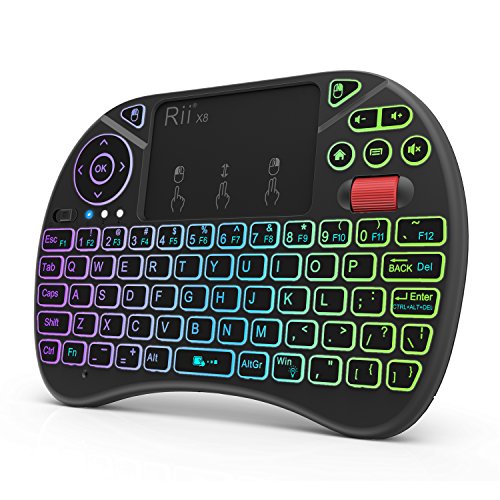
This Rii X8 uses a 2.4 GHz USB dongle rather than the dual-mode connection of the other X8. It adds an eight-color RGB backlight, media buttons, direction keys, a power switch and a scroll wheel alongside its touchpad. The handheld layout is aimed at Android TV boxes, HTPCs and PCs, among other devices. Its single connection mode makes it less suited to buyers needing Bluetooth pairing; choose it when dongle-based operation and dedicated media controls are the priority.
Bottom line: Choose this for 2.4 GHz dongle use with dedicated media controls.
How to choose a Rii mini keyboard
Choose the connection your host device can accept before comparing backlights or touchpad gestures. A 2.4 GHz keyboard typically communicates through its USB receiver, while Bluetooth pairs directly with a host that supports Bluetooth input devices. If the device has no usable USB port and no Bluetooth input support, neither route is a safe assumption; confirm compatibility before ordering. A combo keyboard can reduce the need to reach for a separate mouse, but a small touchpad is not a full-size pointing surface. For a TV across the room, prioritize the wireless method and a touchpad; for frequent typing, also check the key layout and placement of media controls.
| Need | Choose by |
|---|---|
| USB receiver connection | 2.4 GHz model |
| Pairing without a receiver | Bluetooth model, with host support |
| Switching between wireless methods | Dual-mode model |
Bluetooth and 2.4 GHz compatibility
Bluetooth and 2.4 GHz are different connection routes, not interchangeable labels. Bluetooth requires the host device to accept a Bluetooth keyboard, while 2.4 GHz generally uses the keyboard’s paired USB receiver. Smart TVs and streaming devices can differ in supported keyboard inputs, and some devices limit which USB accessories work. Before selecting a keyboard, identify the exact host and verify whether it accepts Bluetooth input or a USB keyboard receiver. A dual-mode keyboard only helps if the host supports at least one of its connection methods. If the receiver must be plugged into a TV or box, check for an accessible compatible port rather than assuming the device supports every USB peripheral.
Touchpad gestures and keyboard layout
Touchpad gestures vary by model, so do not assume every mini keyboard offers the same mouse actions. The i8+ describes one-finger left click, two-finger right click and two-finger scrolling; other models only identify a touchpad or multi-touch function. These compact keyboards also trade a full-size typing area for a handheld form, which can make prolonged typing less comfortable than a standard desktop keyboard. For navigation on a couch, a built-in pad can replace a separate mouse; for long work sessions, prioritize key spacing and a larger pointing surface. Backlight color or brightness does not establish how easy a particular layout is to type on.
Battery and backlight considerations
Rechargeable mini keyboards need periodic charging, and backlighting can affect how often charging is needed because LEDs draw power while illuminated. The models include rechargeable lithium-ion batteries, and some specify USB-C or Type-C charging; that connector describes charging, not a guarantee that every USB-C cable or power source is included. A runtime claim such as over 30 days is a maker’s estimate and can change with usage, especially frequent backlight use. For a keyboard kept near a TV, place it where the charging port is reachable and avoid letting a cable obstruct movement. Turn off the backlight when it is not useful to reduce unnecessary battery use.
Frequently Asked Questions
Can an i8+ keyboard connect to a Smart TV?
A Smart TV needs to support the keyboard’s connection method for the i8+ to work. The i8+ model here uses 2.4 GHz, so the TV must accept its USB receiver; Bluetooth support alone is not enough.
What does the i8+ touchpad do?
The described i8+ touchpad supports one-finger left click, two-finger right click and two-finger scrolling. Those gestures let a user navigate without a separate mouse, though the compact pad is smaller than a desktop mouse surface.
Does a 2.4 GHz mini keyboard need Bluetooth?
No, a 2.4 GHz model uses its USB receiver rather than Bluetooth pairing. The host device must have a compatible USB port that accepts keyboard receivers.
How often does a rechargeable mini keyboard need charging?
Charging frequency depends on use, especially how often the backlight is on. One model makes a claim of over 30 days from a 500 mAh battery, but runtime is not identical across models or usage.
Is an RGB backlight the same as white LED backlighting?
No, RGB identifies multicolor lighting while white LED describes a single lighting color. Backlight type does not determine wireless compatibility or touchpad gestures.