
Mount PS5 Behind TV: Mount Kits Compared by Fit

For mounting a PS5 behind a TV, PS5 Wall Mount Kit, Black is the straightforward choice because it fits Disc, Digital, Slim, and Pro consoles and includes two controller holders. Choose PS5 Wall Mount with Fan and Charger instead if you want a built-in cooling fan and dual-controller charging; choose a model limited to original or Pro consoles only if that matches your PS5.
We earn a commission if you buy through links on this page. As an Amazon Associate I earn from qualifying purchases. Products are compared on manufacturer specifications, not hands-on testing.
- Best overall: PS5 Wall Mount Kit, Black – Fits original, Slim, and Pro PS5 models and includes two controller holders.
- Best for charging: PS5 Wall Mount with Fan and Charger – Combines a cooling fan with a dual-controller charger and headset holder.
- Best for white setups: Adjustable PS5 Wall Mount Kit, White – Fits all PS5 models and has an adjustable sliding structure.
| Product | Best for | Included extras | Mount dimensions | Shop |
|---|---|---|---|---|
| PS5 Wall Mount Kit, Black | All-model compatibility | 2 controller holders | 15.5 × 5 × 2.6 in | Check Price on Amazon |
| PS5 Wall Mount with Fan and Charger | Charging and cooling | Fan, dual charger, headset holder, USB port | 8.86 × 7.28 × 3.35 in | Check Price on Amazon |
| Adjustable PS5 Wall Mount Kit, White | Adjustable white mount | 2 controller holders | 15.5 × 5 × 2.6 in | Check Price on Amazon |
PS5 mounts for behind the TV
Compare console compatibility and included accessories before choosing a mount for your setup.
PS5 Wall Mount Kit, Black

PS5 Wall Mount Kit, Black pairs broad PS5 compatibility with two controller holders, making it a practical fit when the console model or controller storage matters. The mount has ventilation holes and smooth contact surfaces; the maker says its heavy-duty structure supports up to 33 lb. Its dimensions are 15.5 × 5 × 2.6 inches. The correct mounting slot must be selected for the console, so check the model before installation. This kit suits buyers who want a simple mount and controller storage, but it does not include a charging station or cooling fan.
Bottom line: Pick this if you want one mount compatible with every PS5 model and space for two controllers.
PS5 Wall Mount with Fan and Charger
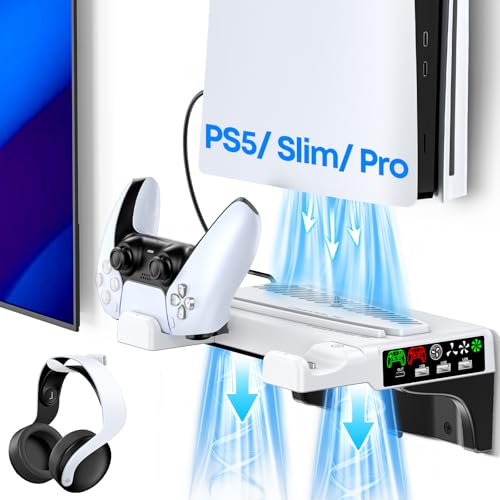
PS5 Wall Mount with Fan and Charger stands apart by combining a cooling fan, dual-controller charger, headset holder, and an extra USB port in one wall-mounted setup. It fits original, Slim, and Pro Disc and Digital consoles. The maker says two controllers can fully charge in 2.5 hours, with orange and blue LEDs indicating charging and full status. Its dimensions are about 8.86 × 7.28 × 3.35 inches. Choose it when charging and accessory organization are priorities; the added electronics and shelf-style footprint may be unnecessary if you only need a basic console bracket.
Bottom line: Choose this if you want charging and accessory storage built into the wall setup.
Adjustable PS5 Wall Mount Kit, White

Adjustable PS5 Wall Mount Kit, White offers a white finish and an adjustable sliding structure to adapt to different PS5 console sizes. It fits Disc, Digital, Slim, and Pro models and includes two controller holders. The maker says the heavy-duty structure supports up to 33 lb, and ventilation holes are intended to help airflow. Its dimensions are 15.5 × 5 × 2.6 inches. This option suits buyers coordinating a white setup or wanting adjustable positioning. As with any mount, confirm the selected position does not obstruct console vents or access to ports.
Bottom line: Pick this for a white setup where adjustable fit and controller storage matter.
How to choose a PS5 mount for behind a TV
Start with console fit, then decide whether you need storage or charging features. A mount compatible with original, Slim, and Pro versions avoids a model mismatch; a model-specific bracket may limit which console can use it. Check the mount’s load capacity against the console and any accessories it will hold, and use the mounting hardware only where it suits the wall material. For drywall, locate a stud when the mount’s instructions call for one; wall anchors must be rated for the load and substrate. Measure the space behind the TV before installation, including cable plugs and room to reach the console’s ports.
Keep the console’s air intake and exhaust unobstructed. A mount with ventilation holes does not compensate for a cramped recess or a TV pressed close to the wall.
PS5 airflow and behind-TV clearance
Leave open space around the PS5’s ventilation openings rather than enclosing the console in a tight cavity. The console needs an unobstructed path for air to enter and leave, so avoid placing it against fabric, curtains, or other items that can block vents. A fan-equipped mount adds airflow hardware, but it should not be treated as permission to cover the console’s own openings. Before drilling, hold the console and TV in their intended positions and check that cables can bend without pushing against vents or straining connectors.
Dust can accumulate around vents and fan inlets over time. Inspect the area periodically and clean dust with the console powered off, using a dry, soft cloth around external openings. Avoid liquids and do not force objects into ventilation slots.
Mounting and cable-access mistakes to avoid
Measure twice before drilling: include the bracket, console, TV position, and cable clearance in the planned space. A mount that fits the console can still leave too little room for a power plug, HDMI connector, or USB access. Mark the console’s orientation and mounting points using the mount’s fit guidance, then verify that buttons and ports remain reachable. Secure the bracket to a suitable wall surface with hardware appropriate to that surface; do not rely on an unsuitable anchor for a suspended console.
After installation, check that the console sits firmly in the bracket and that cables do not pull it sideways. Keep the area around the mount clear so the console can be removed for cleaning or service.
Frequently Asked Questions
Can a PS5 be mounted behind a TV?
Yes, a compatible wall mount can hold a PS5 behind a TV if the console’s vents remain open and the wall supports the mount. Check port access and cable clearance before drilling.
How do I keep a mounted PS5 from overheating?
Keep the console’s intake and exhaust vents uncovered and leave open space around them. Do not place the console in a tight cabinet or against curtains, and inspect vents periodically for dust.
Can I use one mount for PS5 Slim and Pro?
Some mounts are made to fit original, Slim, and Pro consoles, while others exclude Slim or cover only selected models. Verify that the bracket explicitly matches your console version before installation.
Should I mount a PS5 vertically or horizontally?
Use the orientation the mount is designed to support, and keep the console stable with its vents unobstructed. Check that the chosen orientation leaves enough room for cables and access to buttons and ports.
What should I check before drilling behind my TV?
Measure the bracket and console space, including cable plugs and room for ventilation. Identify a suitable wall support point and use hardware rated for the wall material and the mount’s load.