
Number Keypad With Letters: 5 Models Compared

For a wired number keypad with large-print legends, choose TechGarden 19-Key Wired Number Pad for its full-size 19 mm keys or Perixx PPD-202 19-Key Slim Number Pad for its slim scissor-key design. These are numeric keypads, not full keyboards with alphabetic keys; for wireless use or extra controls, choose a different layout.
We earn a commission if you buy through links on this page. As an Amazon Associate I earn from qualifying purchases. Products are compared on manufacturer specifications, not hands-on testing.
- Best overall: TechGarden 19-Key Wired Number Pad – Its full-size 19 mm keys and big-print legends suit straightforward wired number entry.
- Best for quiet typing: Perixx PPD-202 19-Key Slim Number Pad – Its silent scissor keys and slim build favor quieter, low-profile data entry.
- Best for tactile feedback: 22-Key Mechanical USB Numpad – Blue mechanical switches provide an audible click and tactile keystroke feedback.
- Best for Bluetooth: havit 26-Key Bluetooth Number Pad – It connects wirelessly by Bluetooth and adds calculator and currency-symbol shortcuts.
| Product | Best for | Keys | Connection | Key type | Shop |
|---|---|---|---|---|---|
| TechGarden 19-Key Wired Number Pad | Large print legends | 19 | Wired USB | — | Check Price on Amazon |
| Perixx PPD-202 19-Key Slim Number Pad | Quiet slim typing | 19 | Wired USB 2.0 | Scissor | Check Price on Amazon |
| 22-Key Mechanical USB Numpad | Tactile keystrokes | 22 | Wired USB | Blue mechanical | Check Price on Amazon |
| havit 26-Key Bluetooth Number Pad | Bluetooth setup | 26 | Bluetooth 3.0 | — | Check Price on Amazon |
| Foloda 22-Key Wireless Number Pad | Wireless USB receiver | 22 | 2.4 GHz wireless | — | Check Price on Amazon |
Number Keypads With Large-Print Legends
Compare key layout and connection type first, then choose the feel and extra controls that match your workflow.
TechGarden 19-Key Wired Number Pad

TechGarden 19-Key Wired Number Pad combines big-print legends with full-size 19 mm keys, making it the clearest match for buyers who want a number pad with easier-to-see key markings. Its wired USB connection is plug-and-play and needs no battery or driver. An integrated tilt and quiet, soft-touch typing are maker-described features. The 19-key layout supports Num Lock and suits spreadsheet or accounting entry at a laptop or desktop. The key type is not identified, so choose another option if you specifically want scissor or mechanical switches.
Bottom line: Pick this for visible legends and full-size keys in a simple wired pad.
Perixx PPD-202 19-Key Slim Number Pad
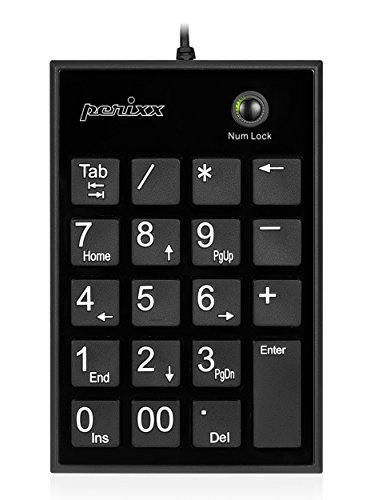
Perixx PPD-202 19-Key Slim Number Pad pairs big-print legends with X-type scissor keys in a slim, low-profile 19-key layout. The maker describes the keys as silent, and the non-synchronized key function is intended to support workflow. A USB 2.0 cable provides a wired connection, while the Tab key and Num Lock add practical controls. Its dimensions are about 5.74 by 3.42 by 0.87 inches. This is a wired pad rather than a wireless choice, and its Windows compatibility makes it a poor match for Mac users.
Bottom line: Choose this for a slim wired pad with quiet scissor keys and Tab.
22-Key Mechanical USB Numpad

22-Key Mechanical USB Numpad differs from the large-print 19-key models with a 22-key mechanical layout, blue backlighting, and audible blue-switch feedback. It adds Num, Esc, Tab, Delete, and a calculator shortcut, which can help when spreadsheet work involves frequent navigation. The maker says the backlight has three modes, including off, and that the switches are not hot-swappable. At 6 by 3 by 1.5 inches per the size and dimensions, it is a bulkier option than a slim pad; its blue switches are also intentionally clicky, not quiet.
Bottom line: Pick this if tactile, audible switches and backlighting matter more than quiet typing.
havit 26-Key Bluetooth Number Pad
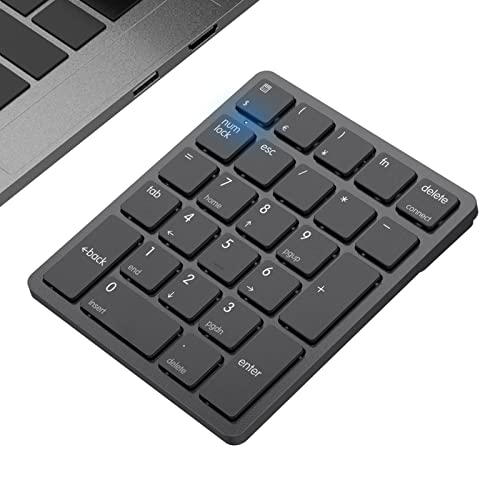
havit 26-Key Bluetooth Number Pad has the largest layout among these options at 26 keys and uses Bluetooth instead of a USB cable. It includes Num Lock, Esc, Delete, a calculator shortcut, and currency-symbol combinations accessed with Fn. The rechargeable battery avoids routine battery replacement, according to the maker, and the pad is intended for Windows computers. The compatibility excludes Mac OS, so Mac users should choose another option. Its compact 4.1-by-4.8-by-0.6-inch dimensions suit buyers prioritizing wireless placement over large-print legends.
Bottom line: Choose this for a compact Bluetooth pad with extra shortcuts on Windows.
Foloda 22-Key Wireless Number Pad
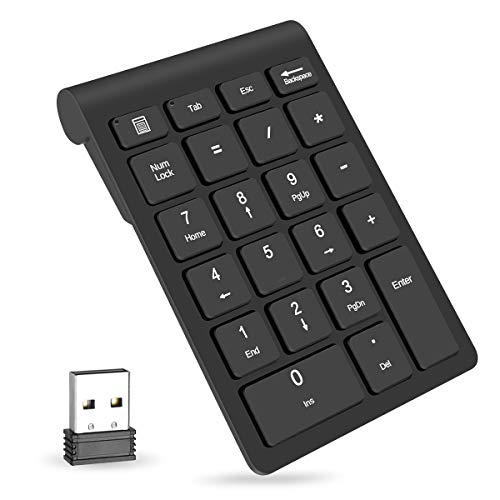
Foloda 22-Key Wireless Number Pad uses a 2.4 GHz wireless receiver rather than Bluetooth, making it the receiver-based option for a laptop with a free USB port. Its 22-key layout includes Num Lock, Esc, Tab, Delete, and a calculator shortcut. The maker describes it as plug-and-play and gives its weight as 87 g. Buyers seeking visible legends or a specified quiet key feel should favor a different match.
Bottom line: Pick this for receiver-based wireless entry and added navigation keys.
How to Choose a Number Keypad With Letters
Start by deciding whether “letters” means large-print legends or alphabetic typing keys: these options are numeric pads with number-focused layouts, and TechGarden 19-Key Wired Number Pad and Perixx PPD-202 19-Key Slim Number Pad specifically mention big-print lettering. A standard numeric keypad typically has 17 keys, while these 19-, 22-, and 26-key layouts add controls such as Tab, Esc, or calculator shortcuts. For a wired setup, a USB pad avoids pairing; Bluetooth and 2.4 GHz receiver models trade the cable for a wireless connection. Choose big-print legends when visibility is the priority, and choose by switch type when sound and tactile feel matter more.
Wired USB, Bluetooth, and Receiver Connections
Wired USB keypads draw their connection directly through a cable and avoid wireless pairing; the Perixx model specifies USB 2.0 and an 80 cm cable. Bluetooth pads pair without occupying a receiver port, while 2.4 GHz pads generally use a dedicated USB receiver, so the computer needs an available compatible port. A receiver-based device and a Bluetooth device are not interchangeable connection methods. Before selecting wireless, verify the operating system: havit 26-Key Bluetooth Number Pad specifies Windows compatibility and explicitly excludes Mac OS. If a computer is used in a locked-down work environment, confirm that peripheral pairing or receiver installation is allowed.
Key Layout and Typing Feel
Key count alone does not show which controls a keypad adds, so compare named keys as well as the total. Tab helps move between spreadsheet fields, while Esc and Delete serve navigation and editing tasks; calculator shortcuts can reduce switching to an on-screen app. Scissor switches are typically used in low-profile laptop-style keys, while mechanical blue switches are commonly tactile and clicky. That sound can disturb nearby people, so choose a silent or quiet model for shared workspaces rather than assuming every compact pad is quiet. For frequent number entry, keep the keypad close to the keyboard and at the same height to reduce reaching.
Using a Numeric Keypad Safely and Comfortably
A separate number pad can be placed on either side of a keyboard, letting users adapt placement to their mousing hand and desk layout. Keep wrists straight and avoid resting pressure on the wrist while typing; short breaks help limit sustained repetitive motion. Numpad operation can depend on Num Lock, which many external pads include, so check the indicator or test a number key if the keypad enters navigation commands instead. For spreadsheet work, Tab can advance through cells, but behavior depends on the app and active selection. Use a stable, flat surface so the pad does not shift during repeated entry.
Frequently Asked Questions
Do these number keypads type alphabetic letters?
No, these are numeric keypads rather than full keyboards with alphabetic key rows. “Big print letters” refers to larger legends, not a set of alphabetic typing keys.
What does Num Lock do on a number pad?
Num Lock switches a keypad’s number keys between numeric entry and alternate navigation functions on many layouts. If number entry behaves unexpectedly, toggle Num Lock and try the keys again.
Is a Bluetooth number pad the same as a wireless USB pad?
No, Bluetooth pairs directly, while a 2.4 GHz receiver-based pad uses a USB dongle. Check that your computer supports the connection method and has an available port for a receiver.
Are mechanical blue switches quiet for office use?
Usually not: blue mechanical switches are commonly tactile and clicky, and this mechanical keypad specifically describes audible clicks. For a shared quiet workspace, choose a model described as silent or quiet instead.
Where should I place a separate number keypad?
Place the pad beside the keyboard at a height that lets your wrist stay straight, and keep it near the hand doing the number entry. Moving it to the opposite side of a mouse can reduce reaching during long data-entry sessions.