
Office Cubicle Do Not Disturb Signs Compared by Style

SmoothNovelty Double-Sided Desk Flags suits most cubicles because its 4-by-6-inch double-sided flag clips to a desk or cubicle edge and can be seen from either side. Choose a slider or flip stand instead if you want status changes without repositioning a flag; a door-hanging sign fits better where a door is available.
We earn a commission if you buy through links on this page. As an Amazon Associate I earn from qualifying purchases. Products are compared on manufacturer specifications, not hands-on testing.
- Best overall: SmoothNovelty Double-Sided Desk Flags – Six double-sided 4-by-6-inch flags use adhesive-backed clips for cubicle or computer-side placement.
- Best for a desk slider: Acrylic Sliding Desk Sign – The 9.75-by-3-inch acrylic sign switches status with a sliding element.
- Best for a door: At-Home Double-Sided Door Sign – A 5-by-7.5-inch double-sided sign hangs from a small chain and flips between two messages.
- Best for multiple statuses: SOURBEAR 30-Card Flip Stand – The desktop stand includes 30 status cards across five color-coded modes.
| Product | Best for | Format | Size | Status choices | Shop |
|---|---|---|---|---|---|
| SmoothNovelty Double-Sided Desk Flags | Cubicle edges | Clip-on flag | 4 × 6 in | Do Not Disturb | Check Price on Amazon |
| Acrylic Sliding Desk Sign | Quick desk updates | Desktop slider | 9.75 × 3 in | Red and green | Check Price on Amazon |
| At-Home Double-Sided Door Sign | Door hanging | Hanging flip sign | 5 × 7.5 in | Do Not Disturb / Available | Check Price on Amazon |
| SOURBEAR 30-Card Flip Stand | Many status options | Flip-card stand | 4.1 × 5.2 in | 30 messages | Check Price on Amazon |
Office Cubicle Do Not Disturb Signs
Compare how each sign mounts, changes status, and communicates availability in a shared workspace.
SmoothNovelty Double-Sided Desk Flags
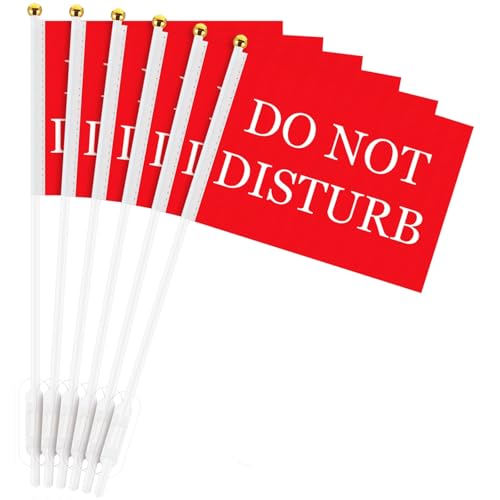
SmoothNovelty Double-Sided Desk Flags stands out for its six-flag set and two-sided display, making it useful when more than one workstation needs a clear signal. Each polyester flag measures about 4 by 6 inches and has an approximately 12-inch pole; the adhesive-backed clip attaches at the side of a computer or cubicle. The maker describes the polyester as suitable for daily office wear. This format works when coworkers approach from different directions, but it needs an edge or side surface where the clip can attach; it is less suitable for a bare desktop without a mounting point.
Bottom line: Choose this set when you need several visible signals that attach to cubicle or computer edges.
Acrylic Sliding Desk Sign

Acrylic Sliding Desk Sign differs from the flags by using a low-profile acrylic panel with a sliding status indicator rather than a hanging or pole-mounted sign. The sign measures 9.75 by 3 inches, has a black background with red and green status colors, and sits on a desk without assembly. Its single-piece design suits a workspace where a sign should stay on the desktop and status needs to change in place. The format is limited to desk placement, so choose another style if coworkers need to see a signal above monitors or from a distance.
Bottom line: Pick this sign for a compact desktop status display that switches with a slider.
At-Home Double-Sided Door Sign
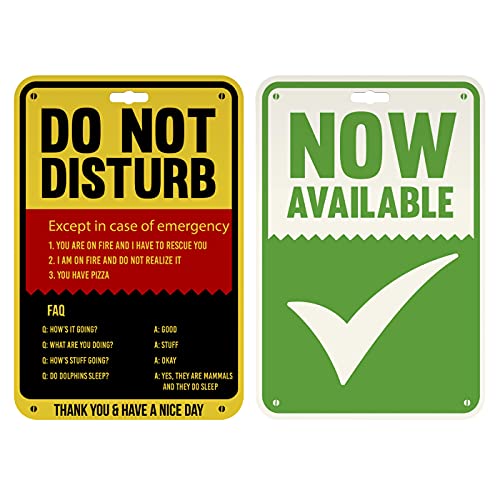
At-Home Double-Sided Door Sign is the door-oriented option, with a small chain for hanging and a suction cup for placement on a suitable smooth surface. Its 5-by-7.5-inch sign is double-sided, with Do Not Disturb and Now Available messages that can be flipped as needed. The maker presents it as suitable for office, cubicle, or home-room use. It fits best where a door or smooth mounting surface is available; unlike the desk flag and slider, it is not designed as a free-standing desktop display.
Bottom line: Choose this sign when you can hang or suction-mount it and want two clear availability states.
SOURBEAR 30-Card Flip Stand

SOURBEAR 30-Card Flip Stand offers more status variety than a two-state sign: its desktop stand holds 30 cards divided among five color-coded modes. The maker says the set includes Focus, Open, Away, Mood, and Fun categories, including Do Not Disturb, Free to Chat, Out to Lunch, and In a Meeting messages. At 4.1 by 5.2 inches, it is intended to sit on a desk and present a selected card toward coworkers. The extra choices are useful when a simple busy/available signal is too limited, but changing status requires flipping to another card rather than moving a slider.
Bottom line: Pick the flip stand if coworkers benefit from more than a busy-or-available message.
How to choose a cubicle do not disturb sign
Choose the sign by where coworkers need to see it and how many statuses you need to communicate. A clip-on flag suits an exposed cubicle edge, a desktop slider suits a desk-level view, and a hanging sign suits a door or smooth surface. A simple two-state message is easier to interpret at a glance; a multi-card stand can distinguish focus time, meetings, and time away. Before choosing a mount, check whether your cubicle has a suitable edge, whether the sign will face the main aisle, and whether a monitor or partition could block it. For shared spaces, keep the wording direct and use the same signal consistently so coworkers do not have to guess what a status means.
Where to place a cubicle privacy sign
Place the sign on the approach side where coworkers usually arrive, not behind a monitor or facing an empty aisle. A sign near eye level is easier to notice while walking, while a desk-level sign can be missed by someone standing at the partition. For an edge-mounted flag, choose a stable edge that does not interfere with normal computer use; for a door sign, use a surface that supports its mounting method. If colleagues approach from opposite sides, a double-sided message can be more legible than a one-sided card. Keep the message visible without blocking work equipment, neighboring work areas, or required office notices.
Desk flags, sliders, and flip stands compared
These sign types differ mainly in mounting position and the number of messages they can show. Use this guide to narrow the format before comparing the individual dimensions and status choices.
| Format | Best placement | Useful when |
|---|---|---|
| Clip-on flag | Cubicle or computer edge | Signal should face more than one direction |
| Sliding panel | Desktop | You want to change status in place |
| Hanging sign | Door or suitable smooth surface | A door-side signal is more visible |
| Flip-card stand | Desktop | You need several distinct messages |
A format cannot compensate for a blocked sightline: position matters as much as the message. Choose a flag for an edge, a panel or stand for desk space, and a hanging sign only where the mounting surface works.
Using workplace status signs clearly
A do-not-disturb sign communicates a request, not guaranteed privacy or emergency coverage. Set a clear local expectation for what the signal means, especially if a team uses several states such as focus, meeting, and away. Keep the sign current when stepping away or becoming available; an outdated message can cause unnecessary interruptions or missed coordination. In open offices, pair the visual cue with the team’s usual calendar or messaging status when appropriate, rather than assuming every coworker sees the sign. Avoid putting sensitive personal or project information on a public-facing sign; a short status such as busy or available is enough for most shared work areas.
Frequently Asked Questions
Do cubicle do not disturb signs work without a door?
Yes, desk signs and clip-on flags are made for workstations without doors. Choose a clip if the cubicle has an accessible edge, or a stand or panel if you have clear desktop space.
What sign is easiest to see from both sides?
A double-sided flag or sign can show its message from either face. Place it where the two likely approach directions have an unobstructed view.
Can a desk status sign replace a meeting calendar?
No; a physical sign only helps people who can see it at the workstation. For scheduled meetings or remote coworkers, use the team’s usual calendar or status system as well.
How many statuses should an office sign show?
Two states are enough when coworkers only need to distinguish busy from available. Choose multiple cards when the difference between focus time, a meeting, and being away changes how colleagues should respond.
Where should I mount a cubicle sign?
Mount it on the approach side at a visible height, with no monitor or partition blocking the message. Check that the surface matches the mount, such as an exposed edge for a clip or a suitable smooth area for suction.