
Old Samsung Tablet Charger: 30-Pin Models Compared

Samsung 30-Pin Tablet Cable, 6.6 ft suits the named older Samsung tablets because it lists a 30-pin connector and a broad set of compatible Galaxy Tab model numbers.
Older Samsung tablets may use a proprietary 30-pin port, while many later models use micro USB, so identify the exact model and connector before choosing.
We earn a commission if you buy through links on this page. As an Amazon Associate I earn from qualifying purchases. Products are compared on manufacturer specifications, not hands-on testing.
- Best overall: Samsung 30-Pin Tablet Cable, 6.6 ft – A 6.6-foot 30-pin cable lists compatibility with a wide range of older Galaxy Tab models.
- Best for a spare: Samsung 30-Pin Cable, 2-Pack, 6.6 ft – A two-pack provides two 6.6-foot 30-pin cables.
| Product | Best for | Cable length | Pack count | Shop |
|---|---|---|---|---|
| Samsung 30-Pin Tablet Cable, 6.6 ft | Wide model coverage | 6.6 ft | 1 cable | Check Price on Amazon |
| Samsung 30-Pin Cable, 2-Pack, 6.6 ft | Two-cable set | 6.6 ft | 2 cables | Check Price on Amazon |
| Samsung 30-Pin Tablet Charger Cable | Short cable needs | — | 1 cable | Check Price on Amazon |
Old Samsung Tablet Chargers
Match the connector and exact tablet model before selecting a replacement charging cable.
Samsung 30-Pin Tablet Cable, 6.6 ft
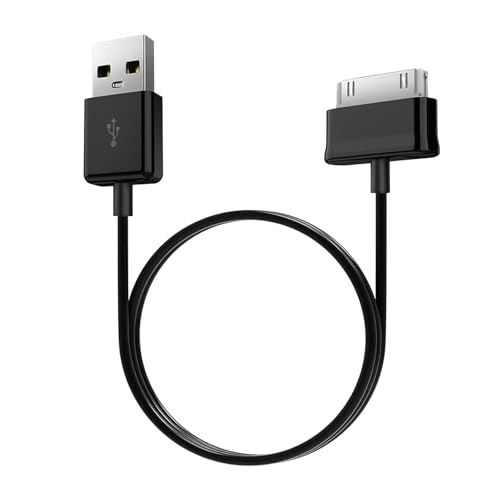
Samsung 30-Pin Tablet Cable, 6.6 ft is the single-cable choice with the broadest model coverage among these 30-pin options, including Galaxy Tab 2, Tab 7.7, Tab 8.9, Tab 10.1 and Note 10.1 models. The 6.6-foot USB-to-30-pin cable supports charging and data transfer, and its USB plug works with a 10W-or-higher power adapter. The maker says the PVC cord passed more than 10,000 bending tests. Choose it when your tablet’s model number appears in its compatibility list; the cable is not a micro-USB replacement.
Bottom line: Choose this if you want one long 30-pin cable and your exact model is listed.
Samsung 30-Pin Cable, 2-Pack, 6.6 ft

Samsung 30-Pin Cable, 2-Pack, 6.6 ft stands out by including two 6.6-foot 30-pin USB cables, making it useful when you need a spare cable or want one in two locations. Its compatibility list covers several Galaxy Tab generations and Note 10.1 models, but the included warning says a computer USB port may not provide enough output to charge a tablet. Use a suitable charger rather than relying on a PC port for charging. Because the connector is 30-pin, it will not fit a Samsung tablet with a micro-USB port.
Bottom line: Pick this if two long 30-pin cables fit your setup.
Samsung 30-Pin Tablet Charger Cable

Samsung 30-Pin Tablet Charger Cable is another single 30-pin replacement cable, with compatibility named for Galaxy Tab 2 sizes and selected Tab 7.7, 8.9, 10.1 and Note 10.1 models. The product name also identifies charging and sync/data use. Verify the model number against the models, since a similar-looking Galaxy Tab name does not guarantee a matching connector.
Bottom line: Choose this for a 30-pin model when cable reach is not the deciding factor.
How to choose an old Samsung tablet charger
Start with the tablet’s exact model number and charging port, not just its screen size or Galaxy Tab name. These choices split into 30-pin-to-USB cables and a USB-A-to-micro-USB cable; the plugs are not interchangeable. Check the model number in the tablet’s settings or on its rear label, then compare it with the cable’s compatibility list. For a replacement meant to charge, also consider the power source: one cable specifies use with a 10W-or-higher adapter, and another cautions that a computer USB port may not supply enough power for a tablet. The decision rule is simple: if the tablet has a 30-pin port, select a 30-pin cable; if it has micro USB, use a micro-USB cable.
30-pin versus micro-USB tablet ports
A 30-pin connector is a wide proprietary plug used by many older Galaxy Tab models, while micro USB is a much smaller, roughly trapezoidal connector used on other Samsung tablets and phones. A 30-pin cable can look like the right choice based on an older model family, but exact model numbers still matter because Galaxy Tab product lines span multiple connector types. Use this quick match guide before choosing a cord.
| Tablet port | Matching cable | Example fit |
|---|---|---|
| 30-pin | 30-pin to USB cable | Selected Tab 2, Tab 7.7, Tab 8.9 or Tab 10.1 |
| Micro USB | USB-A to micro-USB cable | Selected Tab A, Tab E, Tab S2 or Tab 4 |
Do not force a plug that does not seat naturally; forcing a connector can damage the port. A connector match alone is not enough if the exact model is absent from the compatibility list.
Choose cable length and number of cords
A 6.6-foot cable gives more reach between a wall adapter and a tablet than a 3-foot cable, but a longer cord can tangle more easily in a bag or across a desk. Choose a 3-foot cord when the charger sits close to the tablet; choose 6.6 feet when the outlet is farther away. A two-pack is useful when you need a spare, while a single cable avoids keeping an extra cord. One 30-pin option does not provide a length in the specifications, so confirm the reach before ordering if distance from outlet to tablet matters. Do not rely on the cable’s shape to infer a length.
Charging older Samsung tablets safely
Use a wall adapter suited to the tablet rather than assuming a laptop or desktop USB port will charge it: one cable’s instructions specifically warn that computer USB output may be insufficient for tablet charging. A 30-pin cable here calls for a 10W-or-higher power adapter, but that is not a universal rating for every tablet or cable. Keep connectors dry and stop using a cord with exposed wires, a cracked plug, or unusual heat. For charging problems, first confirm the connector is fully seated and test with a compatible power source; a correct-looking cable cannot compensate for a damaged tablet port or an unsuitable adapter.
Frequently Asked Questions
How can I tell which charger port my Samsung tablet has?
Look at the tablet’s charging socket: 30-pin is a wide connector, while micro USB is a much smaller trapezoidal opening. Match that shape and the exact tablet model number to the cable compatibility list.
Can a 30-pin Samsung cable charge every old Galaxy Tab?
No; older Galaxy Tab models do not all use the same connector. Confirm both a 30-pin port and an exact model-number match before choosing a 30-pin cable.
Will a computer USB port charge an older Samsung tablet?
A computer USB port may not provide enough output to charge a tablet, as one 30-pin cable’s guidance cautions. Use a suitable wall adapter for charging instead.
How long should a replacement Samsung tablet cable be?
A 3-foot cable suits a nearby charger, while 6.6 feet provides more reach to a distant outlet. Measure the route from adapter to tablet and leave slack so the connector is not pulled taut.
Can I use a micro-USB cable with a 30-pin Galaxy Tab?
No; micro USB and 30-pin are different connector shapes and cannot be substituted. Use the cable type that matches the tablet’s physical charging port.