
Onboard Diagnostic Port Lock: 5 Options Compared

For a standard OBD-II port, OBD2 Port Lock with 2 Security Keys suits most buyers who want a keyed lock with two keys and tool-free installation. Choose a different option if you need security screws, a matching installation tool, or a product explicitly limited to non-GM vehicles.
An onboard diagnostic port lock is a physical cover that restricts access to the vehicle’s diagnostic connector; it can also block a scan tool until removed.
We earn a commission if you buy through links on this page. As an Amazon Associate I earn from qualifying purchases. Products are compared on manufacturer specifications, not hands-on testing.
- Best overall: OBD2 Port Lock with 2 Security Keys – It fits most standard OBD-II ports and includes two keys for tool-free locking and unlocking.
- Best for non-GM fit checks: LIXOOMER Aluminum OBD2 Port Lock – It is designed for select non-GM vehicles and includes a matching security-screw tool.
- Best for keyed access: OBD2 Lock with Key – Its internal lock cylinder uses a key rather than security screws.
| Product | Best for | Locking method | Body material | Included access tool or keys | Shop |
|---|---|---|---|---|---|
| OBD2 Port Lock with 2 Security Keys | Keyed tool-free use | Key cylinder | Aluminum alloy and POM | 2 keys | Check Price on Amazon |
| LIXOOMER Aluminum OBD2 Port Lock | Select non-GM vehicles | Security screws | Solid alloy | Matching tool included | Check Price on Amazon |
| VTT OBD Lock | Billet aluminum body | Lock-and-key hardware | 6061-T6 billet aluminum | Matching key | Check Price on Amazon |
| NiwNiw OBD Port Lock | Screw-secured cover | Security screws | 6061 aluminum | Matching tool included | Check Price on Amazon |
| OBD2 Lock with Key | Internal key cylinder | Key cylinder | — | Key included | Check Price on Amazon |
Onboard diagnostic port locks
Compare the connector-fit claims and locking hardware before choosing a cover for your vehicle’s OBD-II port.
OBD2 Port Lock with 2 Security Keys

Two double-groove keys and tool-free installation distinguish this lock from the security-screw options. Its aluminum alloy and POM construction is intended for most standard OBD-II ports, while the ON and OFF key positions support locking and unlocking for diagnostic access. The maker says it physically blocks access to the port. This is a fit choice for buyers who prefer carrying a key over keeping a separate installation tool. The fit claim excludes OBD ports and advises checking compatibility with embedded ports, so inspect the connector area before choosing it.
Bottom line: Pick this if you want a keyed cover for a standard OBD-II port and prefer not to use an installation tool.
LIXOOMER Aluminum OBD2 Port Lock

Vehicle-specific caution is the defining point here: this lock is intended for select Ford, Toyota, Honda and other non-GM vehicles, not every port shape. The solid alloy body uses non-standard security screws, and a matching tool is included for installation and removal. The maker says the barrier helps make unauthorized OBD access for key programming more difficult. Buyers with a recessed port or tight surrounding clearance should measure that space before ordering; this option is less suitable when a universal fit claim is the priority.
Bottom line: Choose this when your vehicle is a supported non-GM model and its port has room for the lock.
VTT OBD Lock

A 6061-T6 billet aluminum body sets this option apart from the alloy-and-POM keyed cover and the security-screw locks. VTT says it is designed for standard 16-pin OBD2 ports across cars, SUVs and trucks, with a separate GM version required for GM vehicles. Its proprietary hardware uses multiple lock-and-key configurations within each production batch; the maker presents the cover as a deterrent to OBD-based key programming. The GM limitation matters: buyers of GM vehicles should select the correct version rather than assume this model fits.
Bottom line: Pick this if you want a billet aluminum lock and have a standard port in a non-GM vehicle.
NiwNiw OBD Port Lock

An illustrated instruction set accompanies this 6061 aluminum cover, making it distinct among the screw-secured options. Security screws fasten it over the connector, and the included matching tool is intended for installation and authorized removal. The maker says the cover helps restrict unauthorized tool connections, including attempts involving OBD-based key programming or ECU access. Screw styles may vary by production batch, so keep the tool with the vehicle; without it, routine removal for diagnostics may be inconvenient.
Bottom line: Choose this if you want a 6061 aluminum screw-secured cover with instructions and its matching tool.
OBD2 Lock with Key
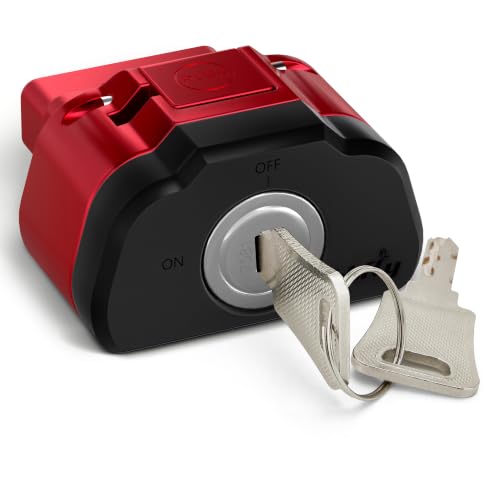
An internal lock cylinder distinguishes this keyed protector from covers fastened with security screws. Its maker claims 10,000 blade configurations and says each lock’s keys are non-interchangeable; those are maker performance claims rather than connector-fit measurements. The product is suited to buyers who want key-operated access instead of a separate security-screw tool.
Bottom line: Pick this if you prefer a key cylinder over security screws and have confirmed the connector fit.
How to choose an onboard diagnostic port lock
Start with the connector and the space around it: OBD-II uses a 16-pin trapezoidal connector, but a vehicle’s trim or a recessed installation can interfere with a cover. Measure the available clearance; if the port sits in a tight recess, favor a design whose fit guidance specifically addresses clearance rather than relying on a broad universal claim. Next, decide how you want to remove the lock. Key cylinders require the matching key, while security screws require the matching tool. A lock must come off before a scan tool can connect, so consider who may need diagnostic access and where the key or tool will be kept.
Also distinguish the physical barrier from an electronic immobilizer: a port cover obstructs connector access, not other possible routes into a vehicle. For a GM vehicle, do not choose a model expressly limited to non-GM vehicles unless its maker offers the correct variant.
Keyed locks and security-screw covers
Keyed covers and screw-secured covers trade convenience for different removal routines. A keyed design can be opened with its matching key; a security-screw design requires its matching driver or tool. Neither locking style establishes a universal vehicle fit, and fit depends on connector shape and the nearby trim. A keyed design makes sense when the key can stay with the vehicle’s normal access items; screw hardware can suit an owner who will retain the dedicated tool.
The table compares the practical choice points, not security strength: specifications do not provide a shared test or rating that would support ranking resistance to tampering.
| Need | Choice to consider | Before deciding |
|---|---|---|
| Tool-free operation | Keyed cover | Keep the matching key accessible |
| Separate removal tool | Security-screw cover | Retain its matching tool |
| GM vehicle | GM-compatible model or version | Check model-specific fit |
OBD-II port fit and diagnostic access
OBD-II ports use a standard 16-pin connector, but the surrounding space is not standardized for every cover. The connector is commonly located beneath the dashboard near the driver, though vehicle placement and trim vary. Check whether a proposed lock fits a recessed port and whether nearby panels leave room to seat and remove the cover. A fit label such as “universal” should not replace a clearance check when trim surrounds the connector closely.
Diagnostic access is a real tradeoff: a scan tool plugs into the same port that the lock covers. Remove the lock before routine scanning, emissions-related checks, or service work that needs a diagnostic connection, then reinstall it only after the connector is free. Keep the required key or tool where an authorized driver or technician can retrieve it.
Using a port lock without blocking service
An OBD-II port lock is a physical access barrier, not a complete vehicle security system. It can make a direct plug-in attempt harder, but it does not secure the doors, windows, keys or other vehicle entry points. Treat it as one layer alongside ordinary vehicle security rather than a guarantee against theft.
Before installation, confirm that the lock seats without forcing the connector or surrounding trim. Keep its key or removal tool separate from the covered port, and tell anyone arranging diagnostics where that access item is. If a service visit or scan is due, remove the cover beforehand when practical; a locked connector cannot accept a scan tool. Recheck that the cover is secure after diagnostic work, and avoid leaving loose keys or tools where they can be mistaken for vehicle keys.
Frequently Asked Questions
What connector does an OBD2 port lock cover?
An OBD-II lock covers the vehicle’s 16-pin diagnostic connector. Connector surroundings vary, so check port recess and trim clearance as well as the pin shape.
Can a scan tool work through an OBD2 lock?
No; a cover blocks access to the connector, so remove it before plugging in a scan tool. Keep the matching key or removal tool available for diagnostic or emissions-related service.
Where is the diagnostic port usually located?
The OBD-II port is commonly beneath the dashboard near the driver, but its position varies by vehicle. Check for a recessed opening or nearby trim that could obstruct a port cover.
Does a port lock stop every kind of car theft?
No; an OBD port lock is a physical barrier at one connector, not a complete vehicle security system. Use it as one layer rather than relying on it to protect other entry points.
Should I choose a keyed lock or security screws?
Choose based on how you want to remove the cover: keyed models need the matching key, while screw-secured models need their matching tool. In either case, retain that access item so a technician can reach the 16-pin port when needed.