
Poly Voyager 5200 UC: Models Compared for Calls

The Poly Voyager 5200 UC with a BT700 USB-A adapter is the closest fit for most people who want a headset for computer and mobile calls, because its package includes the adapter. Choose a bundle instead if you want extra ear tips or a charging case.
The Voyager 5200 UC is a single-ear Bluetooth headset for hands-free calls; check that your computer has a compatible USB-A port if you plan to use the included adapter.
We earn a commission if you buy through links on this page. As an Amazon Associate I earn from qualifying purchases. Products are compared on manufacturer specifications, not hands-on testing.
- Best overall: Poly Voyager 5200 UC with BT700 – Includes a BT700 USB-A adapter alongside the Bluetooth headset.
- Best for PC and phone calls: Plantronics Voyager 5200 UC – Connects to PC or Mac with USB-A and to a mobile phone.
- Best for extra ear tips: Voyager 5200 UC 7K2F3AA Bundle – Bundle includes small, medium and large ear tips plus a charging case and cable.
| Product | Best for | Connection | Talk time | Included accessories | Shop |
|---|---|---|---|---|---|
| Poly Voyager 5200 UC with BT700 | USB-A adapter setup | Bluetooth; BT700 USB-A adapter | — | BT700 adapter | Check Price on Amazon |
| Plantronics Voyager 5200 UC | PC and mobile calls | USB-A; Bluetooth | Up to 7 hours | — | Check Price on Amazon |
| Voyager 5200 UC 7K2F3AA Bundle | Multiple ear-tip sizes | Bluetooth 5.0 | — | Case, cable, 3 ear-tip sizes, cleaner, cloth | Check Price on Amazon |
| Voyager 5200 UC 7K2F3AA Accessory Bundle | Cable and light extras | Bluetooth 5.0 | Up to 7 hours | Case, charging cables, 3 ear-tip sizes | Check Price on Amazon |
Poly Voyager 5200 UC headsets
Compare the connection setup, talk time and included extras to find the configuration that suits your calls.
Poly Voyager 5200 UC with BT700

The included BT700 USB-A adapter sets this configuration apart for people who want a USB adapter with their Voyager 5200 UC headset. The headset has a boom microphone and an over-the-ear design, and its Bluetooth connection is described with a 98.4-foot range. It suits a work setup that uses a USB-A port and mobile Bluetooth pairing. The package information does not identify a charging case or talk-time figure, so buyers who need either should compare those features before choosing.
Bottom line: Choose this configuration if a BT700 USB-A adapter is central to your setup.
Plantronics Voyager 5200 UC
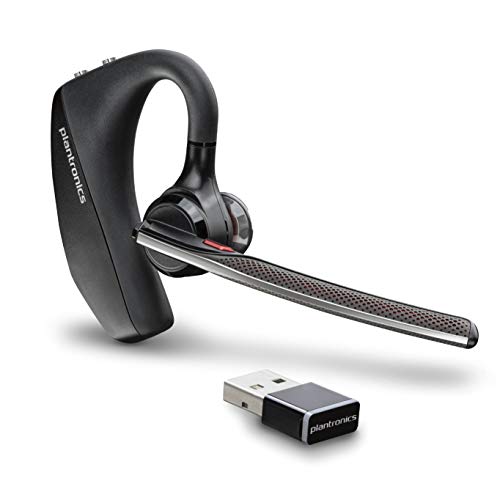
PC/Mac and mobile-phone compatibility is the defining point of this Voyager 5200 UC configuration. It uses USB-A for a computer connection and Bluetooth for mobile calls, and the maker claims up to 7 hours of talk time and a roaming range of 98 feet. The single-ear, over-the-ear design suits professionals who need to stay aware of nearby conversation while taking calls.
Bottom line: Pick this one if you need the USB-A computer connection and up to 7 hours of talk time.
Voyager 5200 UC 7K2F3AA Bundle

Three ear-tip sizes and a charging case make this bundle distinct from the adapter-focused configuration. It includes small, medium and large tips, a charging cable, headphone cleaner and a fiber cloth with the Voyager 5200. The maker says its six-layer WindSmart technology and dynamic noise reduction support call clarity, while SoundGuard limits audio levels to 118 dBA.
Bottom line: Choose this bundle if interchangeable ear tips and a case matter most.
Voyager 5200 UC 7K2F3AA Accessory Bundle

An LED light and a Type-C-to-Type-A cable distinguish this 7K2F3AA bundle. It also includes small, medium and large ear tips, a charging case and a charging cable; the maker claims up to 7 hours of talk time and compatibility with Windows or Mac systems, smartphones, tablets and Bluetooth-enabled desk phones. WindSmart, dynamic noise reduction and SoundGuard are also named among its audio features. This option suits buyers who want the additional cable and light, but those extras add little value if you only need the headset.
Bottom line: Pick this bundle if the LED light and Type-C-to-Type-A cable are useful to you.
Choosing a Voyager 5200 UC setup
Choose by connection first: the USB-A adapter configuration bundles a BT700, while another configuration describes USB-A computer and Bluetooth phone connections. A USB-A plug requires a matching port; a computer with only USB-C ports needs a compatible adapter or a different connection path. Bluetooth is useful for mobile pairing, while a USB adapter can make the computer connection part of the headset package. If you move between a desk and a phone, prioritize the connection routes you will actually use rather than accessories that may stay in the box.
Also weigh runtime and accessories separately. One configuration claims up to 7 hours of talk time, and one bundle includes three ear-tip sizes and a charging case. A mono headset leaves one ear open to surrounding sound, unlike stereo headphones that cover both ears; that can suit office calls but is not the choice for immersive music listening.
Fit and comfort for a single-ear headset
Ear-tip fit affects stability and comfort: a tip that seals poorly can feel loose, while one that is too large can create pressure. The multi-size bundle includes small, medium and large tips, allowing the wearer to try more than one size. Start with the smallest tip that stays secure without pressure, then check that jaw movement does not loosen the headset.
Over-the-ear fit is another comfort variable, especially for glasses wearers. Put on glasses first, position the headset without pinching the temple, and make a short call before relying on it for a long work session. For all-day wear, switch ears periodically if the headset permits and take breaks; a lightweight figure alone does not predict fit comfort. Check how the boom sits near the mouth so it does not brush clothing during movement.
Understanding Bluetooth range and call audio
Bluetooth range is a best-case specification, not a guarantee through walls or around interference. One Voyager 5200 UC configuration gives 98.4 feet, while another states 98 feet; walls, nearby wireless devices and the computer or phone placement can shorten usable roaming distance. Keep the paired device nearby and test movement along the route you use during calls.
Microphone processing and wind reduction can help manage background sound, but they do not make a noisy room silent. This category uses a boom microphone positioned near the mouth, so placement matters: keep it close without touching the face, and avoid pointing it away from your voice. For calls in shared spaces, reduce competing noise at the source where possible rather than relying only on headset processing.
Keeping a work headset ready for calls
Store the headset in a case when it is not being worn; a case also helps keep ear tips and cables together. Before an important call, confirm the headset is charged and selected as the audio input and output on the computer or phone. Bluetooth devices can remain paired but connect to the wrong active device, so disconnect unused devices if call audio routes unexpectedly.
Clean ear tips and the area around the microphone with a soft, dry cloth; avoid soaking electronics or forcing liquid into openings. Replace an ear tip if it becomes torn or no longer stays secure. A charging cable only helps if its connector matches the charging port, so check connector compatibility before relying on a spare cable.
Frequently Asked Questions
How far can a Voyager 5200 UC roam?
The product claims give ranges of about 98 feet: one says 98 feet and another says 98.4 feet. Walls and wireless interference can reduce the distance, so keep the connected device close enough for a stable call.
How long does the Voyager 5200 UC battery last?
One configuration claims up to 7 hours of talk time. Treat that as a maximum claim rather than a guarantee for every call pattern or connection setup.
Can a Voyager 5200 UC connect to a computer and phone?
Yes, one configuration describes USB-A for a PC or Mac and Bluetooth for a mobile phone. Confirm your computer has a USB-A port before choosing that connection setup.
What ear-tip size should I use for calls?
Use the smallest tip that stays secure without pressure; a loose fit can shift as you talk, while an oversized tip can become uncomfortable. A bundle includes small, medium and large tips to try.
Is a single-ear headset suitable for music?
A single-ear headset is designed to leave one ear open, which can be useful for work calls when you want awareness of nearby sound. Choose stereo headphones instead if listening to music across both ears is your priority.