
REDTIGER Dash Cams: 4 Models Compared by Coverage

The REDTIGER F7NP suits most drivers who want front-and-rear coverage and an included 128GB card, while the F17 adds an inside camera for cabin recording. A dash cam records video while you drive, but drivers who need cabin footage should choose the three-channel model instead.
Confirm the hardwire kit and memory-card compatibility before ordering if you plan to use parking mode or replace an included card.
We earn a commission if you buy through links on this page. As an Amazon Associate I earn from qualifying purchases. Products are compared on manufacturer specifications, not hands-on testing.
- Best overall: REDTIGER F7NP – It pairs 4K front and 1080p rear recording with a 128GB card included.
- Best for cabin coverage: REDTIGER F17 – Its three cameras record front, inside, and rear views.
- Best for touchscreen controls: REDTIGER F7N Touch – It combines a touchscreen with voice control and a 128GB card.
| Product | Best for | Recording | Camera views | Card included | Shop |
|---|---|---|---|---|---|
| REDTIGER F7NP | Two-camera coverage | 4K front, 1080p rear | 170° front, 140° rear | 128GB | Check Price on Amazon |
| REDTIGER F7N | GPS app access | 4K front, 1080p rear | 170° front, 140° rear | — | Check Price on Amazon |
| REDTIGER F7N Touch | Hands-free controls | 4K front, 1080p rear | 170° front, 140° rear | 128GB | Check Price on Amazon |
| REDTIGER F17 | Cabin recording | 4K front, 1080p inside and rear | 150° front, 160° inside, 155° rear | 64GB | Check Price on Amazon |
REDTIGER Dash Cams Compared
Compare the camera channels, fields of view, and included storage to match a model to your recording needs.
REDTIGER F7NP

The F7NP stands out for including a 128GB card with its two-camera setup. It records 4K in front and 1080p in the rear, with 170° and 140° fields of view, respectively. The maker also names a STARVIS 2 sensor and WDR night vision, features aimed at handling changing light. This model suits drivers who want front-and-rear coverage without a cabin camera. Its limitation is that it does not provide the third, interior view offered by a three-channel dash cam, so rideshare drivers seeking cabin recording should consider another option.
Bottom line: Choose this for front-and-rear recording with a 128GB card included.
REDTIGER F7N

The F7N is the two-camera option here that specifically pairs GPS route tracking with app access and a 3.18-inch screen. Its front camera records 4K and its rear camera records 1080p, with 170° and 140° views. The maker says 5.8GHz Wi-Fi transfers footage at up to 20MB/s. That combination suits drivers who want to view routes and clips through a phone app. The package has no memory card included, so buyers need a compatible card before recording; check card compatibility before ordering.
Bottom line: Pick this if GPS route tracking and app access matter more than an included card.
REDTIGER F7N Touch
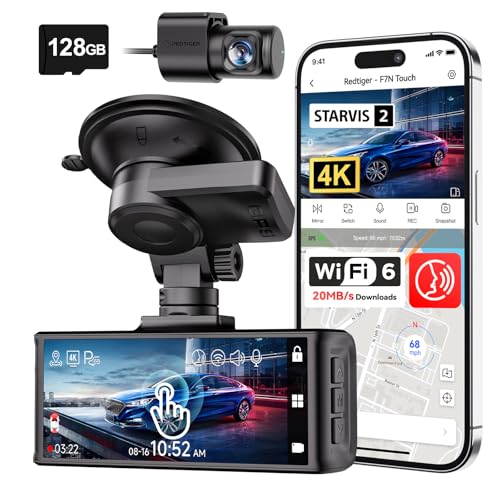
The F7N Touch separates itself with voice control and a touchscreen, alongside a 128GB card. The two-camera system records 4K front and 1080p rear video, with 170° and 140° fields of view. The maker also names GPS, loop recording, audio recording, and a supercapacitor. Drivers who want to lock an emergency clip using voice commands or screen controls may prefer this setup. Its two channels do not capture the cabin, so it is a less suitable fit for anyone who needs an interior view.
Bottom line: Choose this for touchscreen and voice controls in a two-camera setup.
REDTIGER F17

The F17 is the only three-channel model here, adding a 1080p cabin camera to 4K front and 1080p rear recording. Its views are 150° front, 160° inside, and 155° rear, and a 64GB card is included. The maker names four infrared lights for night vision and a STARVIS 2 IMX675 front sensor. This layout suits rideshare drivers or families who want footage from the cabin as well as both directions on the road. It uses a smaller included card than the 128GB options, so storage needs may favor another model.
Bottom line: Pick this when recording the cabin is as important as front and rear coverage.
How to Choose a REDTIGER Dash Cam
Choose by camera channels first: two-channel models record the road ahead and behind, while a three-channel model adds an interior view. A 4K UHD image is 3840 × 2160 pixels; 1080p is 1920 × 1080, so the front and rear streams do not have the same resolution on these models. Field of view matters too: wider angles capture more beside the vehicle, but distant objects occupy fewer pixels. If cabin recording is essential, choose a three-channel camera; if it is not, compare included storage, controls, and whether GPS or app access meets your needs. A wider stated angle alone does not guarantee legible license plates at a distance.
Dash Cam Storage and Loop Recording
Loop recording lets a dash cam overwrite older footage as a memory card fills, while an incident-lock feature is intended to preserve selected clips. A card’s usable recording time depends on resolution, number of cameras, compression, and how much footage is locked; three channels generally consume storage faster than two. These models include cards ranging from 64GB to 128GB, and one option comes without a card. Before a long trip, verify the camera is recording and confirm that important clips are saved before they can be overwritten. Use a card the camera supports, and periodically check that recorded files can be played back rather than assuming an indicator light means every camera channel is capturing.
Parking Mode Power and Installation
Parking mode needs power while the vehicle is parked, which commonly means a hardwire connection or another supported constant-power source; a standard accessory socket may turn off with the ignition. A hardwire kit can also include a low-voltage cutoff to reduce the risk of draining the starter battery, but the cutoff behavior depends on the kit. Before relying on parking recording, confirm the required power setup and test whether the camera stays on after the vehicle is shut off. Mount the front camera where it does not obstruct the driver’s view or interfere with an airbag deployment path. Tuck cables away from pedals and controls, and keep the rear camera lens unobstructed.
Two-Channel and Three-Channel Dash Cams
Two-channel cameras cover the road ahead and behind, while three-channel systems add a cabin view; the extra channel is useful for rideshare work or monitoring passengers. The added view can also complicate placement because the interior lens needs an unobstructed angle into the cabin. Use this comparison to match the camera layout to the footage you actually need. A front camera alone cannot document what happened behind the vehicle or inside it, and a rear camera does not replace an interior view. For everyday commuting without a need for cabin footage, a two-channel layout keeps the choice focused on road coverage, included storage, and controls.
| Need | Choose |
|---|---|
| Front and rear road footage | Two-channel model |
| Front, cabin, and rear footage | Three-channel model |
| Touchscreen and voice control | F7N Touch |
Frequently Asked Questions
Does a dash cam record when the car is parked?
Parking recording requires power after the ignition is off, often through a compatible hardwire kit. Verify that the power setup supports parking mode and includes a battery-protection cutoff before relying on it.
How much storage does a dash cam need?
More storage provides room for more footage, but recording time depends on resolution and camera count. A three-channel 4K-and-1080p setup will generally fill a card faster than a single-camera setup.
What does a G-sensor do in a dash cam?
A G-sensor detects sudden motion such as a collision and can trigger a clip lock. Locked clips may be protected from loop-recording overwrite, so check saved footage and clear unneeded files periodically.
Where should I mount a front dash cam?
Mount the camera high on the windshield without blocking the driver’s view or an airbag deployment path. Keep its lens clear of tint bands, stickers, and other obstructions that can impair the recording.
Can a dash cam record inside the car?
Only a model with an interior-facing camera can provide cabin footage. A three-channel system adds that view to front and rear coverage, but proper placement is needed to keep the cabin lens unobstructed.