
Retirement Countdown Clock for Desktop: 4 Options Compared

For most desktop users, 9999 Day Photo Frame Countdown Clock is the closest match because it combines an automatic 9,999-day countdown with a 4-by-6-inch photo frame.
We earn a commission if you buy through links on this page. As an Amazon Associate I earn from qualifying purchases. Products are compared on manufacturer specifications, not hands-on testing.
- Best overall: 9999 Day Photo Frame Countdown Clock – Its automatic date countdown reaches 9,999 days, and the frame holds a 4-by-6-inch photo.
- Best for a long countdown: MOSTRUST 9999-Day Countdown Clock – It counts up to 9,999 days and includes a clock/calendar function and a back stand.
| Product | Best for | Maximum countdown | Dimensions | Display style | Shop |
|---|---|---|---|---|---|
| 9999 Day Photo Frame Countdown Clock | Photo-frame display | 9,999 days | 7.5 × 7.25 in | Digital with 4 × 6 in frame | Check Price on Amazon |
| MOSTRUST 9999-Day Countdown Clock | Long-range countdown | 9,999 days | 4.0 × 2.9 in | Digital LCD | Check Price on Amazon |
| A AIMILAR 999-Day Clock Timer | Clock and timer | 999 days | 6.1 × 2.2 in | Digital LCD | Check Price on Amazon |
| A AIMILAR 999-Day Digital Timer | Compact timer | 999 days | 4.41 × 1.85 in | Digital digits | Check Price on Amazon |
Retirement Countdown Clocks for Desktop
Compare automatic timers and a manual desk sign by their countdown range, size and display format.
9999 Day Photo Frame Countdown Clock
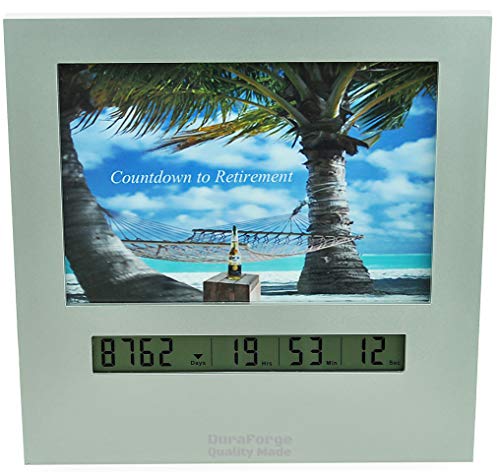
For a retirement countdown that doubles as a keepsake display, this model pairs an automatic date countdown with a replaceable 4-by-6-inch photo. Its 7.5-by-7.25-inch footprint makes it a larger desk presence than the compact timers, so measure the space before choosing it. Setup is described as entering the date rather than calculating days, hours and minutes yourself. The frame and broad display make it a fit for someone who wants the retirement date visible alongside a personal photo; the tradeoff is its larger footprint and lack of a clock mode.
Bottom line: Pick this if you want the retirement date beside a 4-by-6-inch personal photo.
MOSTRUST 9999-Day Countdown Clock

For a long lead time plus everyday clock use, this timer reaches 9,999 days and switches between countdown and 12- or 24-hour clock modes. Its 4-by-2.9-inch body is smaller than the framed model, with a 3.2-by-2.1-inch LCD and a built-in back stand; magnets offer another placement option. A key lock is included to prevent accidental button changes. The maker says two CR2032 batteries are included. Choose it when a straightforward digital display matters more than a framed photo; the screen is still substantially wider than the smallest options.
Bottom line: Choose this for a 9,999-day digital timer with a clock mode and stand.
A AIMILAR 999-Day Clock Timer
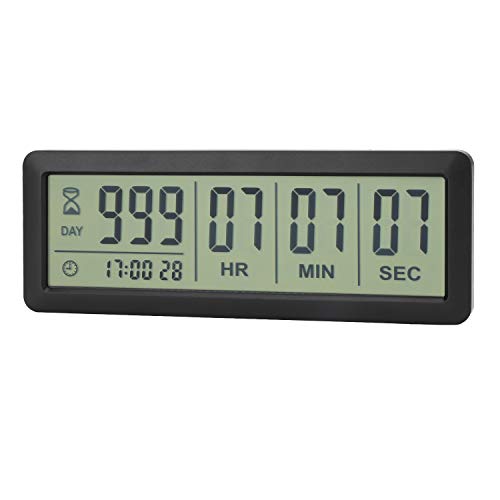
Unlike the longer-range options, this timer tops out at 999 days, but it adds a count-up function and a daily clock with a 12/24-hour switch. The 6.1-by-2.2-inch face is thin at 0.4 inch, and its magnetic back gives it a placement option beyond simply standing on a desk. The timer sounds a 60-second alert when it reaches zero, and the controls use SET and START/STOP. It suits users who value clock functionality and flexible countdown or count-up use; a retirement date more than 999 days away exceeds its range.
Bottom line: Pick this if the retirement date is within 999 days and clock mode matters.
A AIMILAR 999-Day Digital Timer

For the smallest, simplest digital footprint among these choices, this timer measures 4.41 by 1.85 inches and counts up to 999 days, 23 hours, 59 minutes and 59 seconds. Its separated digits are intended for quick reading, and the four-button setup adjusts the target with SET, UP and DOWN controls. A 60-second alarm sounds at the set point. The compact size suits a crowded desk or shelf, but it is a countdown timer rather than the richer clock-and-calendar option; buyers who need more than 999 days should choose a longer-range model.
Bottom line: Choose this for a compact countdown display when 999 days is enough.
How to choose a retirement countdown clock
Choose first by whether you want an automatic date countdown, a clock, or a manually changed number. A digital countdown timer measures time to a target; a calendar-based model lets you enter a date, while a manual board requires you to update the number yourself. Next, match the maximum range: models capped at 999 days are for dates within roughly 2 years and 9 months, while 9,999-day models cover much longer horizons. For a desk setup, compare the actual footprint, not just the screen: these options range from 4 inches wide to 7.5 inches wide. Select the larger framed model if you value a photo; favor a 4-inch format when desk space is tight.
Use this quick match between countdown needs and display type.
| Need | Choose |
|---|---|
| Automatic date entry and photo | Framed digital countdown |
| Clock mode and extended range | 9,999-day digital timer with clock |
| Small footprint and short range | 999-day digital timer |
| Manual, decorative reminder | Write-on acrylic sign |
Countdown range and date setup
Pick a maximum countdown that exceeds the time remaining until retirement, with a margin for setting the date early. A 999-day limit is just under 2.74 years, so it will not work for a retirement date more than that far away; a 9,999-day limit is about 27.4 years. Timer-style models ask you to set a duration or target, while the framed model says you can set a date without calculating the hours and minutes. Confirm the exact date-entry method before ordering if you need a specific calendar-date countdown, and check whether the display starts at days or also shows hours, minutes and seconds. A manually written sign has no automatic range and relies on regular updates.
Desktop size and display readability
Measure the free desk area before choosing a retirement clock: these options span about 4.0 to 7.5 inches in their largest dimension. A wider framed device may be easier to notice across a desk but consumes more surface; compact digital units suit crowded workspaces. For screens, compare the screen’s measured area when supplied, rather than relying only on the outside dimensions. A stand supports desk viewing, while a magnetic back is useful only on a suitable steel surface. Allow space to reach the controls when setting a timer. For a manual acrylic sign, leave room to erase and rewrite its number without moving nearby items.
Digital timer versus manual countdown sign
Digital timers update automatically and can show a precise countdown, but they need initial setup and some are limited to 999 days. One 999-day model also counts upward and switches to a 12/24-hour clock; a 9,999-day choice adds clock/calendar functions. A manual acrylic sign avoids electronic setup and adds decorative material, but its countdown changes only when someone rewrites it. Choose automatic counting when the number needs to stay current without daily attention. Choose a manual sign when a visual, collaborative countdown is the point. Do not treat a manual sign as a timekeeping device: it cannot alert at zero or show the time of day.
Frequently Asked Questions
How far ahead can a 999-day retirement timer be set?
A 999-day timer covers just under 2.74 years. If retirement is farther away, select a model with a 9,999-day range instead.
Should I choose a date-based or duration-based countdown?
Choose date entry when you want the device to calculate the remaining time to a calendar date; choose a duration timer if setting days, hours and minutes yourself is acceptable. Some models specify one approach more clearly than others, so confirm the setup method if date accuracy is essential.
What size retirement clock fits a small desk?
A unit around 4 inches wide is the most compact class among these options. Leave additional room to press buttons or use a stand, and measure your available surface before selecting a larger framed model.
Can a retirement countdown clock also show the time?
Some digital models include a clock mode with 12- or 24-hour display, while others focus on countdown timing. Check for a clock/calendar function if you want one device for both purposes.
How does a manual retirement countdown sign stay current?
A write-on sign stays current only when someone erases and rewrites the remaining number. Update it on a regular schedule, such as once each week, and make sure the marker and eraser are kept nearby.