
RJ45 to HDMI Adapter: Extenders Compared by Range

For sending HDMI video over Cat cable, choose BERLAT HDMI Extender 30m if you need a plug-and-play pair rated for 1080p at 60 Hz over up to 30 meters. These devices use matched transmitters and receivers; they do not turn an Ethernet network connection into HDMI.
Choose another option if your run is longer or you need a different power setup: Wiistar HDMI Extender 60m claims up to 60 meters over Cat6 but requires DC power at both ends.
We earn a commission if you buy through links on this page. As an Amazon Associate I earn from qualifying purchases. Products are compared on manufacturer specifications, not hands-on testing.
- Best overall: BERLAT HDMI Extender 30m – It specifies 1080p at 60 Hz over up to 30 meters and says no external power is needed.
- Best for longer runs: Wiistar HDMI Extender 60m – It claims a 60-meter range over Cat6 and 50 meters over Cat5e, with DC power required.
- Best for HDCP-free setups: Znoogrn HDMI Extender 30m – Its maker explicitly says the extender does not support HDCP.
| Product | Best for | Maximum Cat cable range | Resolution | External power | Shop |
|---|---|---|---|---|---|
| BERLAT HDMI Extender 30m | 1080p at 60 Hz | 30 m / 98 ft | 1080p at 60 Hz | No | Check Price on Amazon |
| MVBOONE HDMI Extender 30m | HDMI 1.4 sources | 30 m / 98 ft | 3D 1080p | No | Check Price on Amazon |
| Znoogrn HDMI Extender 30m | HDCP-free sources | 30 m / 98 ft | 3D 1080p | — | Check Price on Amazon |
| Wiistar HDMI Extender 60m | Long Cat6 runs | 60 m / 197 ft Cat6; 50 m / 164 ft Cat5e | 1080p | Yes | Check Price on Amazon |
RJ45 to HDMI adapter extenders
These are transmitter-and-receiver pairs for carrying an HDMI signal over Cat5e or Cat6 cable, not Ethernet network adapters.
BERLAT HDMI Extender 30m

For a straightforward 1080p link, this pair combines a 30-meter range with a 60 Hz refresh rate and no external power requirement. It includes a transmitter and receiver for a point-to-point connection over Cat5e or Cat6 cable. The maker says video and audio travel together and that cable quality affects extension performance. The key limit is explicit: this unit does not support 4K, so choose another model if your source and display require 4K output.
Bottom line: Pick this for a 1080p setup with a run no longer than 30 meters and no need for 4K.
MVBOONE HDMI Extender 30m
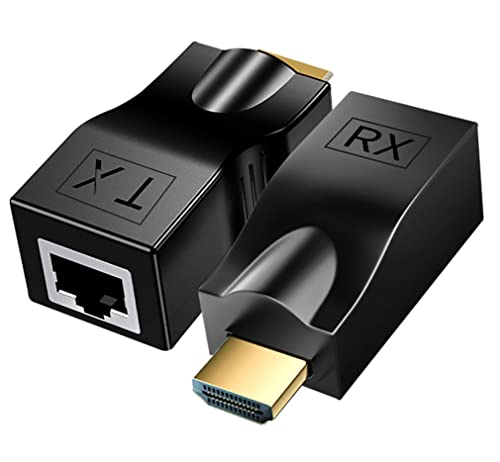
This pair emphasizes HDMI 1.4 formats, including 3D 1080p, for a Cat5e/6 run up to 30 meters. The maker says it needs no setup, drivers, or external power, and the included transmitter and receiver must be used together. Its resolution list reaches 1080i/p and includes lower formats. The capability is not a general 4K guarantee, despite 4K wording in the product name; buyers needing a confirmed 4K signal should choose a model with that capability clearly specified.
Bottom line: Choose this when HDMI 1.4 and 3D 1080p support matter more than a longer run.
Znoogrn HDMI Extender 30m

This extender is the one to consider only when the source and display chain does not require HDCP, because the maker explicitly says HDCP is not supported. The TX/RX pair sends HDMI video and audio over Cat5e/6 cable for up to 30 meters, and its formats include 3D 1080p and 1920 × 1200. The product name mentions 4K, but the detailed supported-format statement does not establish reliable 4K operation; choose another model when 4K is a requirement.
Bottom line: Pick this only for a compatible, HDCP-free source and display chain.
Wiistar HDMI Extender 60m

This pair stands apart with the longest reach: the maker claims up to 60 meters over Cat6 or 50 meters over Cat5e for simultaneous HDMI video and audio. It uses a transmitter and receiver, with 5 V DC power connected at both ends. The maker describes the output as point-to-point and matching the input. Its resolution support is 1080p rather than a confirmed 4K format, and the external power requirement makes it less convenient where outlets are unavailable near both devices.
Bottom line: Choose this for a longer Cat6 run when power is available at both ends.
How an RJ45 to HDMI adapter works
An HDMI-over-Cat extender sends a source’s HDMI signal from a transmitter to a receiver through a Cat5e or Cat6 cable. RJ45 names the familiar modular connector; the cable in this setup is a direct point-to-point link between the two extender units, not a connection to a router or Ethernet switch. Keep the TX at the source and RX at the display, and use the matched pair. A conventional Ethernet network carries packet data, so plugging an extender into a home network does not make it a network-to-HDMI converter. Check the product’s cable category and maximum run claim before installation, because those limits are specific to each extender.
Choose the right range and cable
Match the extender’s claimed reach to the measured route, not just the straight-line distance between rooms. The models here claim 30 meters for several Cat5e/6 pairs, while the longer-range model specifies 50 meters on Cat5e and 60 meters on Cat6. Cat6 does not automatically make every extender reach farther; the transmitter, receiver, cable construction, and installation all matter. For a run longer than 30 meters, pick a model that explicitly rates the cable type and distance you need. Leave a little slack for routing and service loops, and avoid sharp bends or crushing the cable, which can impair signal transmission.
Check resolution, refresh rate, and HDCP
Choose an extender by the entire video format you need, not just a headline resolution. Resolution and refresh rate are separate requirements: a 1080p signal at 60 Hz is a more specific target than a generic 1080p claim. This group includes products whose specifications mention 3D 1080p, 1080p at 60 Hz, or simply 1080p; none should be treated as interchangeable with confirmed 4K support. HDCP is copy protection used with protected video sources, and an extender that does not support it can interrupt protected playback. Confirm compatibility across the source, extender, and display before committing to a protected-content setup.
Plan power and installation
Power requirements determine where the receiver and transmitter can be placed. Some extenders in this comparison say no external power is needed, while the longer-range Wiistar pair calls for a 5 V DC supply at both TX and RX. Measure outlet access at each endpoint before routing cable; a power-dependent receiver may not suit a display mounted far from an outlet. Keep the HDMI leads short at each device and connect the Cat cable directly between TX and RX. Do not substitute an Ethernet switch or assume a passive Cat cable makes the extender compatible with a LAN.
Frequently Asked Questions
Can an RJ45 to HDMI adapter use my router?
No, these extenders are designed for a direct Cat-cable link between the transmitter and receiver, not router networking. A router carries Ethernet data packets, while the extender sends an HDMI signal across the cable.
How far can HDMI travel over Cat6 cable?
The products here claim ranges from 30 meters to 60 meters over Cat6, depending on the extender. Choose a unit whose range covers your measured route; the cable category alone does not set the extender’s maximum distance.
Do HDMI extenders over Cat cable support 4K?
Do not assume so from the product name alone: the specifications here chiefly describe 1080p formats, and one explicitly says no 4K. If your setup requires 4K, confirm that the exact extender specifies the resolution and refresh rate you use.
Does an HDMI extender need power at both ends?
Some pairs say no external power is required, while the Wiistar model calls for 5 V DC at both the transmitter and receiver. Check outlet access at each endpoint before selecting a powered extender.
Will an HDMI extender pass HDCP video?
Not every model supports HDCP; the Znoogrn specifications explicitly say this one does not. For protected streaming or disc playback, verify HDCP compatibility across the source, extender, and display before installation.