
Sim Racing USB Handbrakes: 5 PC Models Compared

PXN HB S USB Handbrake suits most PC sim racers because it combines a 16-bit linear sensor with adjustable resistance and a clamp for surfaces up to 70 mm thick. Choose another model if its material, stated sensor type or mounting style better matches your rig.
A USB sim racing handbrake is a separate control that connects to a PC and can be assigned to a handbrake function in a supported game.
We earn a commission if you buy through links on this page. As an Amazon Associate I earn from qualifying purchases. Products are compared on manufacturer specifications, not hands-on testing.
- Best overall: PXN HB S USB Handbrake – Combines a 16-bit sensor, adjustable resistance and a clamp that fits surfaces up to 70 mm thick.
- Best for aluminum build: CNC Aluminum USB Handbrake with Clamp – Uses CNC-machined aluminum and mild steel with a clamp.
- Best for steel construction: CNRAQR 16-Bit USB Handbrake – Uses low-carbon steel and a 16-bit non-contact sensor, but excludes an installation bracket.
| Product | Best for | Sensor | Mount | Shop |
|---|---|---|---|---|
| PXN HB S USB Handbrake | Adjustable setup | 16-bit linear | Clamp, 0–70 mm | Check Price on Amazon |
| CNC Aluminum USB Handbrake with Clamp | Aluminum construction | 64-bit Hall-effect | Clamp | Check Price on Amazon |
| Aikeec USB Handbrake with Clamp | Reinforced spring | Hall sensor | Clamp | Check Price on Amazon |
| 64-Bit Hall Sensor USB Handbrake | Listed game range | 64-bit Hall sensor | — | Check Price on Amazon |
| CNRAQR 16-Bit USB Handbrake | Steel construction | 16-bit non-contact | No bracket | Check Price on Amazon |
Sim Racing USB Handbrakes
Compare platform compatibility, sensor claims and mounting before matching a handbrake to your PC rig.
PXN HB S USB Handbrake
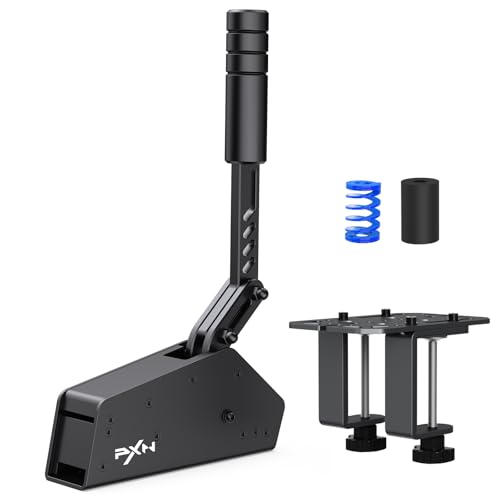
Adjustable resistance and stroke distinguish this model, which also offers a dual-direction lever. PXN says its 16-bit linear sensor and plug-and-play USB connection provide precise control with compatible PC steering wheels. The aluminum-alloy body can attach with M5 screws or the included metal clamp, which fits surfaces 0–70 mm thick. It suits a rig where the user wants to tune lever feel or move between clamp and screw mounting. Its Windows-PC focus makes it a poor match for anyone needing console or Mac support.
Bottom line: Pick this if you want adjustable resistance and two mounting options.
CNC Aluminum USB Handbrake with Clamp

The CNC-machined aluminum and mild-steel construction set this handbrake apart from the steel-only option and the aluminum-alloy adjustable model. Its maker describes the sensor as 64-bit Hall-effect precision technology and says the USB connection is plug-and-play on Windows PCs. A clamp is included, and the curved handle is intended for a sim-racing grip. This suits a PC player who wants a mixed-metal build and clamp mounting.
Bottom line: Choose this for its CNC aluminum and mild-steel construction.
Aikeec USB Handbrake with Clamp
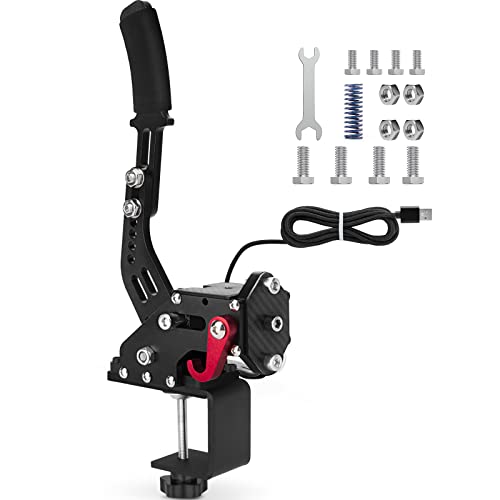
A reinforced spring and nylon cable distinguish this clamp-mounted handbrake. The product name also specifies a Hall sensor, while the compatibility information limits use to Windows PC and names Logitech and Thrustmaster wheel models. It suits a buyer looking for a straightforward clamp-equipped control with a spring-based lever feel. The dimensions are 8 inches long, 7 inches wide and 5 inches high.
Bottom line: Pick this if the reinforced spring and clamp match your setup.
64-Bit Hall Sensor USB Handbrake

This model distinguishes itself by naming a broad set of compatible games, including Assetto Corsa, iRacing, ETS2/ATS and Forza Horizon 5; its maker explicitly excludes Forza Horizon 4. The maker says it uses a non-contact 64-bit Hall sensor and operates as an independent USB device on Windows PC. It suits players checking game-specific support before choosing a handbrake. The specifications give no mounting hardware, so verify that you have a compatible way to secure it before ordering. Xbox, PlayStation and Mac are not supported.
Bottom line: Choose this if its named game support fits your PC library.
CNRAQR 16-Bit USB Handbrake

Low-carbon steel construction and a curved handle distinguish this handbrake, while the included product name explicitly excludes an installation bracket. Its maker says the 16-bit non-contact sensor is more precise than a 14-bit USB handbrake, and the USB connection is plug-and-play for Windows PC. It suits a buyer who already has a mounting solution and prefers a steel control. The dimensions are about 16.14 inches long, 8.66 inches wide and 3.15 inches high. Since there is no bracket, plan how to mount it before choosing this model.
Bottom line: Choose this if you have a bracket or another mounting plan.
How to choose a sim racing USB handbrake
Start with platform compatibility, then compare mounting and sensor claims. These five models specify Windows PC use; some explicitly exclude Xbox, PlayStation or Mac. A USB connection alone does not guarantee console compatibility. Sensor claims range from 16-bit to 64-bit, but a higher bit count by itself does not establish that a game will recognize the control or that the lever will feel better. Check whether your game lets you assign a separate handbrake axis, then plan to calibrate its travel and dead zone in the game or controller software. For mounting, measure the thickness of the edge you plan to clamp: the PXN clamp covers 0–70 mm, while other clamp ranges are not given. Choose a screw-mounted option only if your rig has suitable mounting points.
USB handbrake fit and mounting
Measure the mounting surface before choosing a clamp, because a lever that cannot be secured is not usable in a racing session. The PXN clamp supports surfaces from 0 to 70 mm thick; do not assume that range applies to the other clamps. One model explicitly excludes an installation bracket, so it needs a separate mounting plan. Desk edges, wheel stands and racing rigs differ in thickness and access to screws, so check both the edge dimension and clearance for the lever’s movement. A useful rule is to choose the PXN clamp only when the target surface measures within its 0–70 mm range; otherwise plan a screw mount or another supported attachment. After mounting, make sure the lever moves freely without striking the desk or wheel base.
What handbrake sensor claims mean
Sensor bit depth describes the number of digital steps an input can represent: 16-bit corresponds to 65,536 possible levels, while a 64-bit claim describes a vastly larger number. That count is not the same as guaranteed real-world precision, since game input handling and calibration also affect response. Hall-effect sensing detects a magnetic position without relying on a contact slider, while the CNRAQR model calls its sensor non-contact. The sensor type and bit-depth claims differ across these models, so compare them as specifications rather than assuming the largest number guarantees a better drive. In a game’s control menu, check that the lever registers progressively across its travel; if the game offers axis calibration, set its resting and fully pulled positions.
PC game setup and compatibility checks
A standalone USB handbrake must be recognized by the PC and assigned inside each supported game; wheel compatibility does not automatically prove support in every title. The specifications name games such as Assetto Corsa, DiRT Rally, ETS2/ATS and Forza Horizon, but specific support differs between models, and one explicitly excludes Forza Horizon 4. Before buying, confirm the exact game and platform you use, especially if you expect console play. Bind the handbrake to a distinct control rather than replacing the brake pedal, then test for a smooth axis response and set any available dead zone so the lever rests at zero. If calibration or binding fails, confirm the game supports a separate USB handbrake input.
Frequently Asked Questions
Can a USB sim racing handbrake work on consoles?
These five products specify Windows PC use, and several explicitly exclude Xbox and PlayStation. Check platform support for the exact handbrake and game before choosing a console setup.
What does a 16-bit handbrake sensor provide?
A 16-bit digital input can represent 65,536 levels. That count alone does not guarantee better feel; game calibration and how the game reads the axis also matter.
How do I mount a handbrake to my desk?
Measure the desk edge thickness and compare it with the clamp’s supported range; the PXN model specifies 0–70 mm. A model without an included bracket needs another secure mounting method.
Why does my PC game not detect the handbrake?
The game must support a separate USB handbrake input and let you bind it in the controls menu. Confirm the exact game and platform, then check its input assignment and axis calibration settings.
Should I choose a Hall-effect handbrake sensor?
A Hall-effect sensor detects position magnetically rather than using a contact slider. Sensor type is one comparison point, but verify game recognition and axis calibration rather than relying on a bit-depth claim alone.