
Single DIN With Apple CarPlay: 5 Radios Compared

For most drivers, 6.5-Inch Single DIN Touchscreen Stereo is the most versatile choice because it supports both wired and wireless CarPlay and has a 6.5-inch screen. Choose PLZ 10.1-Inch Wireless Single DIN Radio if you want a larger 10.1-inch display, or Single DIN Stereo with Dual Subwoofer Outputs if multiple subwoofer outputs matter more than a specified screen size.
Single DIN refers to the radio’s dash-mounting format, not the size of its touchscreen. Measure your dash opening and check the screen’s clearance around vents and controls before choosing.
We earn a commission if you buy through links on this page. As an Amazon Associate I earn from qualifying purchases. Products are compared on manufacturer specifications, not hands-on testing.
- Best overall: 6.5-Inch Single DIN Touchscreen Stereo – Offers wired and wireless CarPlay with a 6.5-inch touchscreen.
- Best for a large display: PLZ 10.1-Inch Wireless Single DIN Radio – Its 10.1-inch screen is the largest specified here.
- Best for subwoofer systems: Single DIN Stereo with Dual Subwoofer Outputs – Provides two subwoofer outputs and 4.2-channel RCA output.
| Product | Best for | Display | CarPlay connection | Audio outputs | Shop |
|---|---|---|---|---|---|
| 6.5-Inch Single DIN Touchscreen Stereo | Wired or wireless | 6.5 in | Wired and wireless | — | Check Price on Amazon |
| PLZ 10.1-Inch Wireless Single DIN Radio | Large display | 10.1 in | Wired and wireless | 2 subwoofer outputs | Check Price on Amazon |
| 6.9-Inch Wireless Single DIN Stereo | Vent clearance check | 6.9 in | Wireless | — | Check Price on Amazon |
| 6.36-Inch Wireless Single DIN Stereo | Compact screen | 6.36 in | Wireless | — | Check Price on Amazon |
| Single DIN Stereo with Dual Subwoofer Outputs | Audio connections | — | Wired and wireless | 2 subwoofer outputs | Check Price on Amazon |
Single DIN Apple CarPlay Radios
Compare screen size, phone connection options, and audio outputs to narrow down a radio that fits your dash and setup.
6.5-Inch Single DIN Touchscreen Stereo

Wired and wireless CarPlay set this stereo apart for drivers who want a choice of connection method. The 6.5-inch InCell touchscreen pairs with Android Auto, Bluetooth 6.0, Type-C fast charging, and voice control through Siri or Google Assistant. An external microphone is included for calls and commands. It also lists a 1080P backup camera among its features. The screen is smaller than the 6.9-inch and 10.1-inch options in this group, so drivers prioritizing a larger display should compare those instead. Confirm the display clears nearby dash controls in your vehicle.
Bottom line: Choose this if you want both wired and wireless phone connection options.
PLZ 10.1-Inch Wireless Single DIN Radio
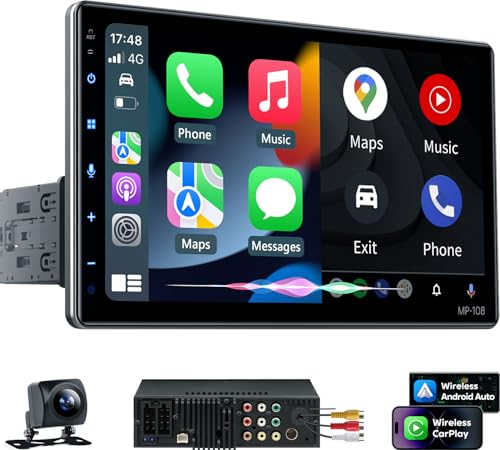
The 10.1-inch IPS touchscreen is the largest specified display here, making this model a fit for drivers who prioritize a broad viewing area. PLZ says it supports wired and wireless CarPlay and Android Auto, with voice control through Siri or Google Assistant; it also includes Bluetooth 5.3, a backup camera, and two subwoofer outputs. The screen’s size and multi-angle adjustment need room beyond the dash opening, so check clearance around vents, trim, and controls before choosing it. Wired MirrorLink is also included for compatible iOS and Android devices.
Bottom line: Pick this when screen size and two subwoofer outputs are priorities.
6.9-Inch Wireless Single DIN Stereo

The 6.9-inch display gives this radio a middle ground between the 6.36-inch and 10.1-inch screens in this group. It supports wireless Apple CarPlay and Android Auto, plus Bluetooth, a 1080P backup camera, USB Type-C fast charging, mirror link, and steering-wheel controls. The manufacturer says it is for 12-volt automotive DC systems, not 24-volt vehicles. Its 7-inch listed height may overlap vents or buttons in some dashboards, so verify the available space and vehicle fit before installation. A detailed wiring diagram and harness are included.
Bottom line: Choose this if a 6.9-inch screen suits your dash and your vehicle uses 12-volt DC.
6.36-Inch Wireless Single DIN Stereo

The 6.36-inch touchscreen is the smallest screen size specified among these radios, which may suit a dash where a larger display would crowd nearby controls. It pairs wireless Apple CarPlay and Android Auto with Siri or Google Assistant voice control, an external microphone, a backup camera, a 10-band EQ, and steering-wheel control. The camera includes 12 LED lights and is described as waterproof by the maker. Its compact display means less screen area than the 6.5-, 6.9-, and 10.1-inch alternatives, so choose another option if a larger viewing surface is your priority.
Bottom line: Pick this if you want the smallest specified screen in the group.
Single DIN Stereo with Dual Subwoofer Outputs
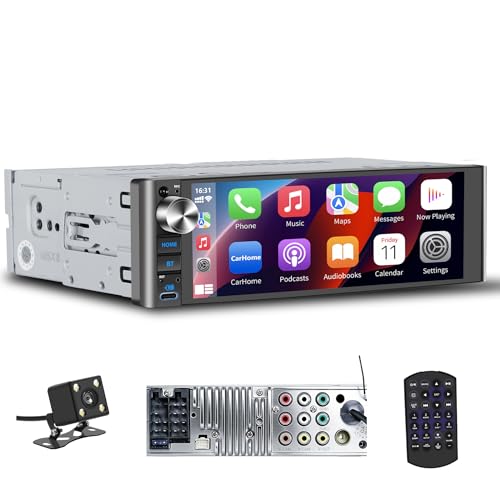
Two independent subwoofer outputs and 4.2-channel RCA output distinguish this stereo for audio setups that need those connections. It supports wired and wireless CarPlay and Android Auto, Bluetooth 5.3, 5G Wi-Fi, a 10-band EQ, and a touchscreen. The 240W figure is peak output, not a continuous-power rating. A front and backup camera are also part of its feature set. No screen size is given in the specifications, so buyers who need to match a display to a tight dash should confirm the dimensions before selecting it.
Bottom line: Choose this if dual subwoofer outputs and multiple RCA channels fit your audio system.
How to Choose a Single DIN Apple CarPlay Radio
Start with dash fit, then decide whether wired or wireless CarPlay matters more. Single DIN describes the radio’s mounting format; a touchscreen can extend beyond the opening, so its screen and chassis dimensions both affect clearance. Wireless CarPlay avoids a cable for phone connection, while wired connection uses a cable and can keep a phone charging during use. Check whether the radio supports the exact connection style you want, rather than assuming every CarPlay unit offers both.
Match outputs to the rest of your system: RCA channels and subwoofer outputs matter if you are connecting external amplifiers or subwoofers. A 10-band EQ gives more adjustment points than a basic tone control, but it does not establish amplifier power. Treat peak wattage as a peak figure, not an everyday continuous rating.
Screen Size and Dash Fit
Measure the dash opening and the space in front of it before choosing a touchscreen. The screen sizes here run from 6.36 to 10.1 inches, but screen diagonal alone does not show how much the display projects or whether it blocks nearby vents, hazard switches, or climate controls. Leave enough room for the screen’s full movement if it tilts or adjusts.
A practical rule is to reject any model whose screen overlaps a control you need while driving; recheck the fit with the display in its operating position. Also compare the radio chassis dimensions with the cavity behind the dash, where wiring and brackets consume space. Vehicle dashboards differ, so confirm fit for the specific vehicle before ordering rather than relying only on the single DIN label.
Wired and Wireless CarPlay Compared
Wired CarPlay connects a phone by cable, while wireless CarPlay pairs the phone without a plug-in connection. Wireless pairing can be convenient for short trips, but a cable is useful when you want charging while navigating or playing audio. Some radios in this group support both connection methods, while others specify wireless connection only.
Choose based on daily use: prioritize wired support if you regularly need to charge through the stereo, and select a radio with both methods if you want flexibility. Siri and Google Assistant voice control can reduce the need to handle a phone, but drivers should set up navigation and audio before moving. A backup camera is a separate feature from CarPlay; check its compatibility and install it according to the vehicle and camera instructions.
Audio Outputs and Camera Features
Count the connections your audio system needs before choosing a head unit. RCA outputs carry audio to external amplifiers, and dedicated subwoofer outputs make it easier to connect a sub without relying on speaker-level wiring. A 10-band equalizer offers adjustment across more frequency bands, but it does not substitute for matching amplifier and speaker ratings.
Backup-camera support is useful only when the camera is installed and wired correctly; keep mirrors and direct visibility in use when reversing. Camera images can be affected by mounting angle, dirt, and lighting, so do not treat the display as a replacement for looking around the vehicle. If you plan to retain steering-wheel controls, verify the required vehicle interface and wiring before installation.
Frequently Asked Questions
Does single DIN describe the screen size?
No. Single DIN refers to the radio’s mounting format, not the touchscreen diagonal. Measure the dash opening and the clearance in front of it because an oversized display can cover vents or controls.
Can I use wireless CarPlay and charge my phone?
Yes, if the radio and phone support wireless CarPlay and you charge the phone separately. A wired CarPlay connection can carry the phone connection and charging through the cable, depending on the radio’s port and phone.
Will a single DIN radio fit every vehicle?
No. Dash openings, brackets, wiring, and space behind the dash vary by vehicle. Check the radio’s chassis and screen dimensions, and verify any needed wiring or steering-wheel-control interface before installation.
Does a backup camera replace checking mirrors?
No. Use mirrors and look around the vehicle while reversing, with the camera as an additional view. Camera visibility can be affected by lens dirt, installation angle, and lighting.
What does a stereo’s peak wattage mean?
Peak wattage describes brief maximum output, not continuous power during normal listening. Compare continuous power ratings when matching a receiver to speakers or an amplifier.