
Smallest USB-C Memory Stick: 5 Models Compared

The 64GB mini Type-C flash drive is the closest match for the smallest USB-C memory stick because its ultra-short profile is the key deciding feature. Choose a different design if you need more storage, a second connector, or physical dimensions you can compare before buying.
We earn a commission if you buy through links on this page. As an Amazon Associate I earn from qualifying purchases. Products are compared on manufacturer specifications, not hands-on testing.
- Best overall: Mini Type-C Flash Drive, 64GB – Its ultra-short, low-profile design is specifically made to stay small when connected.
- Best for high capacity: 512GB Low-Profile USB-C Flash Drive – It offers 512GB and a compact, low-profile design.
- Best for dual connectors: 32GB Dual USB 3.0 and Type-C Drive – Its 1.41-inch body has USB 3.0 and Type-C interfaces.
| Product | Best for | Capacity | Length | Connector design | Shop |
|---|---|---|---|---|---|
| Mini Type-C Flash Drive, 64GB | Shortest profile | 64GB | Ultra-short; — | USB-C | Check Price on Amazon |
| 512GB Low-Profile USB-C Flash Drive | Large capacity | 512GB | Low profile; — | USB-C | Check Price on Amazon |
| 32GB Dual USB 3.0 and Type-C Drive | Two connector types | 32GB | 1.41 in | USB 3.0 + Type-C | Check Price on Amazon |
| Vansuny 128GB Dual USB 3.0 + Type-C | Phone transfers | 128GB | 2.24 in | USB 3.0 + Type-C | Check Price on Amazon |
| WesData 8GB USB 2.0 with USB-C Adapter | Adapter included | 8GB | — | USB 2.0 + USB-C adapter | Check Price on Amazon |
Smallest USB-C Memory Sticks
Compare the dimensions and connector layouts, then check how much of your device’s port area each design may occupy.
Mini Type-C Flash Drive, 64GB

The defining feature of this 64GB drive is its ultra-short profile, making it the most direct match for buyers prioritizing minimal protrusion. It uses a USB-C connector and has a metal casing; the maker also claims waterproof protection. Its silver finish and stated weight of about 0.10 ounces make it a compact option for carrying with a compatible device. Choose it when a low-profile USB-C design matters more than extra capacity or dual-ended connectivity.
Bottom line: Pick this if minimizing the connected drive’s profile matters more than having precise dimensions or extra capacity.
512GB Low-Profile USB-C Flash Drive

The 512GB capacity separates this low-profile USB-C drive from the smaller-capacity options, while its compact metal design is intended not to block nearby ports. The maker describes compatibility with USB-C iPhone and iPad models, Android devices, laptops, and USB-C computers; device support still depends on the particular model and its file-handling requirements. A protective case is included according to the product name. Verify that your device supports external storage before relying on it for transfers.
Bottom line: Choose this when 512GB matters more than comparing an exact physical length.
32GB Dual USB 3.0 and Type-C Drive
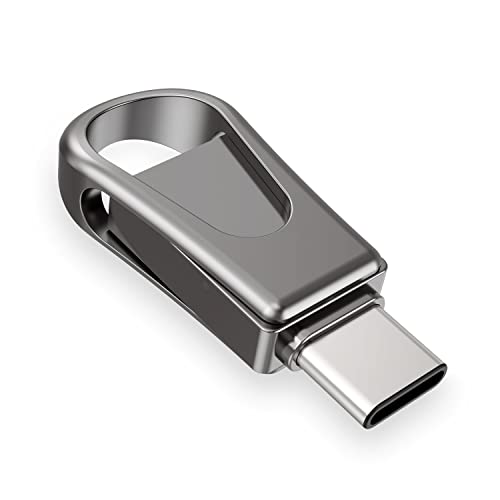
The 1.41-inch length is the clearest measured size among these options, but the dual-interface body is longer than an ultra-short single-connector design. This 32GB drive combines USB 3.0 and Type-C, which can simplify transfers between devices with different ports. The maker gives read speed up to 100 MB/s and write speed up to 26 MB/s; actual transfer speed depends on the host device, file size, and connection. Its width is 0.58 inches and height 0.29 inches. Pick it for connector flexibility and a known body length, not if the smallest connected profile is your only priority.
Bottom line: Pick this for a measured 1.41-inch body and two connector types rather than minimum protrusion.
Vansuny 128GB Dual USB 3.0 + Type-C

The Vansuny offers 128GB and two interfaces, but its 2.24-inch length makes it a larger format than a mini, low-profile stick. The product specifies exFAT as its default format and says it is for C-port phones and computers; support for external drives can vary by device, so confirm compatibility before purchase. It also includes a keychain attachment and is described as plug-and-play. USB 3.0 is useful when both the drive and host support it, but the product does not provide a numeric transfer rate here. Choose it for carrying more files and moving them between USB-C and USB-A devices, not for the smallest footprint.
Bottom line: Choose this if dual interfaces and 128GB are more useful than a very short body.
WesData 8GB USB 2.0 with USB-C Adapter

The WesData pairs an 8GB USB 2.0 flash drive with a separate USB-C adapter, rather than using a built-in dual-ended connector. That adapter-based layout may suit someone who already has a USB-A drive and wants to connect it to a USB-C device, but it adds a piece to keep track of and is not the most compact all-in-one choice. The maker gives potential read speeds of 15–20 MB/s and write speeds of 8–12 MB/s, with actual speeds able to vary. Phone and tablet transfers require a Type-C port and OTG support. Choose it for the included adapter and modest storage, not for a tiny connected profile.
Bottom line: Pick this if an included USB-C adapter matters more than an integrated, low-profile design.
How to Choose a Small USB-C Memory Stick
For the smallest connected setup, prioritize the drive’s body length and how much remains outside the port, not the storage capacity printed on its label. USB-C describes the connector shape; it does not by itself guarantee USB 3.0 transfer rates or support for external storage on a phone. USB 3.0 has a theoretical signaling rate of 5 Gbit/s, but the drive and host both need compatible interfaces, and real file transfers are slower. If you need to use neighboring ports, choose a single-connector low-profile body and leave room for any device case. If the manufacturer provides no dimensions, confirm the body measurements before ordering rather than assuming “mini” gives a precise fit.
USB-C Drive Size and Port Clearance
A short body can reduce leverage and snagging, but a drive that stays plugged in can still be bumped or put pressure on the host port. Compare the drive’s width and height as well as its length, especially when USB ports sit close together or a phone case surrounds the connector. The dual-interface drives measure 1.41 inches and 2.24 inches long, so their bodies are easier to assess against a device than a drive described only as ultra-short. For a port beside another connector, choose a single USB-C body under 1.5 inches long when the width and case clearance also fit; length alone cannot guarantee clearance. Avoid carrying a device by a plugged-in drive.
Single USB-C Versus Dual-Connector Drives
A single USB-C plug tends to support a shorter form than a stick that also carries a USB-A plug or adapter. Dual-interface designs can transfer files between newer USB-C devices and older USB-A computers without a separate adapter, but the extra connector adds length or parts. USB-A and USB-C are connector types, while USB 2.0 and USB 3.0 describe interface generations; a USB-C plug does not automatically mean faster USB 3.0 operation. Use this guide to choose by need:
| Need | Design to favor | Trade-off |
|---|---|---|
| Shortest connected profile | Single USB-C mini drive | May have no USB-A connector |
| Transfer across port types | Dual USB-A and USB-C drive | Often a longer body |
| Use an existing USB-A drive | USB-C adapter | Adapter is a separate piece |
USB-C Compatibility and File Transfers
USB-C drives work only when the host device supports external storage through its USB-C port; connector fit alone is not enough. Phones may require USB OTG support, and operating systems can differ in which file systems they read and write. exFAT is commonly used for cross-device storage because it supports files larger than 4GB, unlike FAT32’s 4GB single-file limit. Before moving important files, check that the phone or tablet supports external drives and can read the drive’s file system. Eject the drive through the device’s software before unplugging it, especially during a transfer, to reduce the risk of incomplete writes or file corruption.
Frequently Asked Questions
Does every USB-C phone support a flash drive?
No, the phone needs to support external USB storage, and some devices also require OTG support. Check the device’s specifications or file-management settings before relying on a drive for transfers.
Is a shorter USB-C drive always safer in a phone?
A shorter body usually gives less leverage if bumped, but any connected drive can strain a port when hit. Remove it before putting a phone in a crowded pocket or bag.
Can USB-C mean the drive uses USB 3.0?
No, USB-C specifies the connector shape, not the data interface generation. USB 3.0 supports a theoretical 5 Gbit/s signaling rate, but the host and drive must both support that interface.
Why should I check the drive’s file system?
The host device must be able to read and write the drive’s format. exFAT supports single files larger than FAT32’s 4GB limit, making it useful for large videos.
How much port clearance does a mini flash drive need?
The drive needs enough space for its full body and width without covering neighboring ports or hitting a case. Compare all three body dimensions with the usable clearance, since length alone does not establish fit.