
Stealth Cam Browtine: 4 Trail Cameras Compared

For most Browtine buyers, Stealth Cam Browtine 20MP 6-Pack is the fit when 20MP photos and 720P video matter most; the deciding tradeoff is its six-camera bundle. Choose Stealth Cam Browtine 16MP Single Camera instead if you need one camera, or Stealth Cam Browtine 16MP 2-Camera Bundle if you want two cameras and an 80-foot infrared detection range.
Trail cameras use motion-triggered sensors to capture wildlife activity, so resolution, detection range and how many cameras you need are the key choices.
We earn a commission if you buy through links on this page. As an Amazon Associate I earn from qualifying purchases. Products are compared on manufacturer specifications, not hands-on testing.
- Best overall: Stealth Cam Browtine 20MP 6-Pack – It pairs 20MP photos and 720P video with a six-camera bundle.
- Best for 80-foot detection: Stealth Cam Browtine 16MP 2-Camera Bundle – The bundle includes two cameras with an 80-foot infrared detection range.
- Best for three-camera coverage: Stealth Cam Browtine 18MP 3-Camera Bundle – The bundle has three cameras, each with 18MP photos and 480P video.
- Best for one camera: Stealth Cam Browtine 16MP Single Camera – It is a single 16MP camera with 480P video and 60-foot infrared detection.
| Product | Best for | Photo resolution | Trigger speed | Video resolution | Shop |
|---|---|---|---|---|---|
| Stealth Cam Browtine 20MP 6-Pack | High-resolution bundle | 20MP | 0.8 sec | 720P | Check Price on Amazon |
| Stealth Cam Browtine 16MP 2-Camera Bundle | 80-foot detection | 16MP | <0.8 sec | — | Check Price on Amazon |
| Stealth Cam Browtine 18MP 3-Camera Bundle | Three-location coverage | 18MP | 0.8 sec | 480P | Check Price on Amazon |
| Stealth Cam Browtine 16MP Single Camera | Single camera setup | 16MP | 0.8 sec | 480P | Check Price on Amazon |
Stealth Cam Browtine trail cameras compared
Compare the camera resolution, bundle size and capture features to match your coverage needs.
Stealth Cam Browtine 20MP 6-Pack

For the highest photo and video resolutions among these options, Stealth Cam Browtine 20MP 6-Pack combines 20MP photos with 720P HD video. The bundle has six cameras, six 32GB memory cards and a card reader, so it suits buyers covering several locations. Its 0.8-second trigger speed and 1–3 image burst mode are intended to capture quick movement, while night mode and a 60-foot flash range address after-dark use. The tradeoff is bundle scale: someone needing only one or two cameras may not need six.
Bottom line: Pick this if you need broad coverage and want the highest photo and video resolutions.
Stealth Cam Browtine 16MP 2-Camera Bundle

Stealth Cam Browtine 16MP 2-Camera Bundle stands apart with an 80-foot infrared detection range and two Browtine 16MP cameras. The bundle also includes two 32GB SDHC UHS-I memory cards and a high-speed card reader, which makes it a practical choice for monitoring two locations. Its burst mode captures 1–3 images per trigger, and the trigger speed is under 0.8 seconds. The product facts do not give a video resolution, so buyers who need video specifications should choose an option with a resolution instead.
Bottom line: Choose this when two cameras and an 80-foot infrared detection range matter more than video specs.
Stealth Cam Browtine 18MP 3-Camera Bundle

Stealth Cam Browtine 18MP 3-Camera Bundle provides three Browtine cameras at 18MP, placing it between the 16MP and 20MP options for still photos. It records 480P video at 30 frames per second and has an 80-foot detection range with 18 infrared LEDs. Burst mode takes up to three photos per trigger; recovery settings range from 5 to 120 seconds, which lets a buyer choose how soon the camera can respond again. The limitation is 480P video, below the 720P resolution offered by Stealth Cam Browtine 20MP 6-Pack.
Bottom line: Pick this if you want three camera positions and an 80-foot detection range.
Stealth Cam Browtine 16MP Single Camera
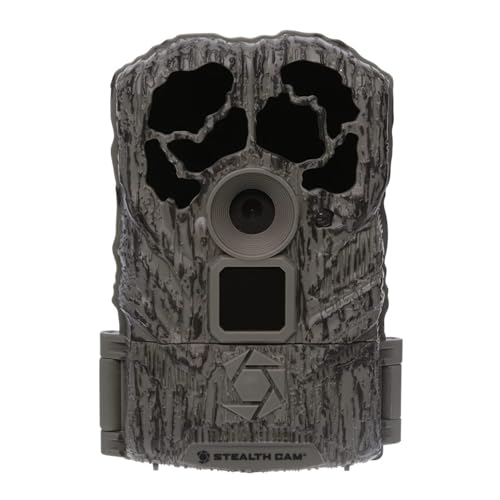
Stealth Cam Browtine 16MP Single Camera is the single camera option, with 16MP photos, 480P video at 30 frames per second and a 60-foot infrared detection range. Its burst mode captures 1–3 images per trigger, with recovery intervals of 5, 15, 30, 60 or 120 seconds. It runs on eight AA batteries, which are not included, and has an integrated Python lock latch for securing it to a tree. The shorter listed detection range makes it less suitable than the 80-foot options for monitoring a wider area.
Bottom line: Choose this for a one-camera setup with multiple recovery-time choices.
How to choose a Browtine trail camera
Choose by coverage first, then compare resolution and capture speed. A single camera suits one trail or feeding area, while multi-camera bundles let you watch separate approaches without moving one unit. Among these choices, photo resolution runs from 16MP to 20MP, and video ranges from 480P to 720P where specified. Trigger speeds are 0.8 seconds or just under 0.8 seconds; a faster trigger can help when animals cross the sensor quickly, but placement still matters. For an open area, compare the detection range with the distance to the trail: the options span 60 to 80 feet. If you need after-dark photos, distinguish an infrared detection range from a flash range, since they describe different camera functions.
Where to place a trail camera
Place a trail camera about 3 to 4 feet above the ground for many deer-trail setups, then angle it across—not straight down—the expected path. This height can capture the animal’s body while reducing the chance that a nearby branch fills the frame. Aim north or south when practical; facing east or west can put low-angle sun directly into the lens at dawn or dusk. Clear grass and twigs from the sensor’s view because moving vegetation can trigger captures. Keep the camera outside travel routes and avoid approaching or disturbing wildlife while setting it up. For a crossing trail, a position roughly 10 to 20 feet from the path can frame an animal for longer than a camera aimed from very close range.
What trail-camera range and trigger speed mean
Detection range is the distance at which a sensor can register movement under suitable conditions, not a guarantee that every animal will trigger the camera at that distance. Temperature contrast, animal size, approach angle, vegetation and terrain can all affect detection. Flash range describes how far the illumination reaches in low light; it should not be treated as the same figure as detection range. Trigger speed measures the delay between detection and capture, while recovery time is the pause before another trigger can be recorded. A camera with a 0.8-second trigger may still miss an animal that crosses a narrow field of view, so aim across the route and use burst mode where available.
Memory, power and camera security
Use the memory-card type and capacity that the camera supports, and format the card in the camera before setting it in the field; formatting erases existing files. A 32GB card holds a different number of images depending on resolution, video length and file format, so check free space after setup rather than assuming a fixed shot count. Batteries lose capacity faster in cold weather, and video or frequent triggers consume power more quickly than occasional still photos. Carry spare batteries for remote placements. Secure the camera to a stable tree and use a locking method compatible with its latch; a lock deters casual removal but does not make equipment theft-proof. Review the camera periodically to clear cards and check its aim.
Frequently Asked Questions
How high should I mount a trail camera?
For deer trails, about 3 to 4 feet above ground is a common starting height. Adjust for the target animal and terrain, and aim across the route so the camera has time to capture movement.
What does a 0.8-second trigger speed mean?
It is the delay between motion detection and the camera taking a picture. A fast-moving animal can still pass outside the frame, so camera angle and a clear sensor view matter too.
Is detection range the same as flash range?
No. Detection range refers to how far the sensor can register movement, while flash range describes how far its illumination reaches at night. Conditions such as temperature, vegetation and terrain affect real-world performance.
How often should I check a trail camera?
Check remote cameras every one to two weeks as a practical starting interval, shortening the gap when battery life or card capacity is limited. Cold weather, frequent triggers and video recording can use power and storage faster.
Can I use any SD card in a trail camera?
No; the camera must support the card type and capacity. Format a compatible card in the camera before deployment, and keep a spare because long videos and frequent triggers can fill storage sooner.