
STGAubron Gaming PCs: 3 Models Compared by Specs

STGAubron Core i7 / RX 590 suits buyers who want 32GB of memory and a 1TB SSD; its RX 590 graphics card is the deciding tradeoff against STGAubron Ryzen 5 2600 / RTX 2060 with an RTX 2060. Choose STGAubron Ryzen 5 2600 / RTX 2060 if that graphics option matters more, or STGAubron Core i5 / R9 370 if you want the Core i5 configuration.
A gaming PC is a desktop whose processor and graphics card handle game workloads, while memory and storage affect multitasking and load times.
We earn a commission if you buy through links on this page. As an Amazon Associate I earn from qualifying purchases. Products are compared on manufacturer specifications, not hands-on testing.
- Best overall: STGAubron Core i7 / RX 590 – It pairs the largest memory capacity, 32GB, with a 1TB SSD.
- Best for RTX graphics: STGAubron Ryzen 5 2600 / RTX 2060 – It is the only configuration here with an RTX 2060 6GB graphics card.
- Best for Core i5: STGAubron Core i5 / R9 370 – Its processor is a Core i5 up to 3.7GHz.
| Product | Best for | Graphics card | Memory | Storage | Shop |
|---|---|---|---|---|---|
| STGAubron Core i7 / RX 590 | More memory | RX 590 8GB | 32GB | 1TB SSD | Check Price on Amazon |
| STGAubron Ryzen 5 2600 / RTX 2060 | RTX graphics | RTX 2060 6GB | 16GB DDR4 | 512GB SSD | Check Price on Amazon |
| STGAubron Core i5 / R9 370 | Core i5 setup | R9 370 4GB | 16GB | 512GB SSD | Check Price on Amazon |
STGAubron gaming PCs
Compare the graphics card, processor, memory, and storage to see which configuration matches your priorities.
STGAubron Core i7 / RX 590
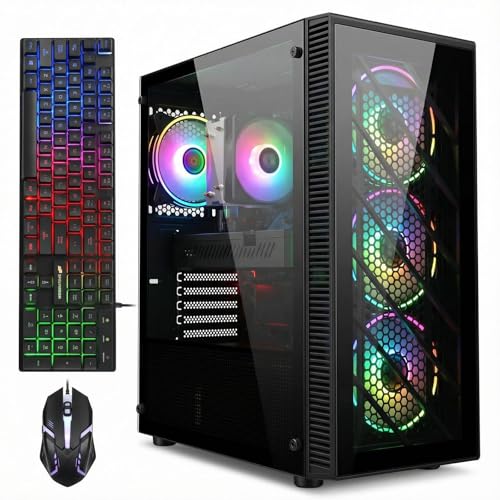
The 32GB of memory and 1TB SSD set this Core i7 model apart from the two 16GB, 512GB configurations. Its processor reaches up to 3.9GHz, and the graphics card is an RX 590 with 8GB. The maker claims 60+ FPS across a range of named games, but that figure is not a guarantee for every game or graphics setting. This configuration suits buyers who prioritize memory and storage capacity alongside gaming. Choose another model if an RTX 2060 graphics card is the deciding requirement.
Bottom line: Pick this configuration if you want 32GB of memory and a 1TB SSD.
STGAubron Ryzen 5 2600 / RTX 2060

The RTX 2060 6GB is the distinguishing feature of this Ryzen 5 configuration; neither of the other PCs has that graphics card. It pairs with a Ryzen 5 2600 processor up to 3.9GHz, 16GB DDR4 memory, and a 512GB SSD. The maker claims 60+ FPS for a range of named games, but actual frame rates vary with game, resolution, and graphics settings. This is the clearest fit for a buyer specifically seeking the RTX 2060 option. Its memory and SSD capacities are smaller than those in STGAubron Core i7 / RX 590.
Bottom line: Choose this one if the RTX 2060 is your priority.
STGAubron Core i5 / R9 370

The Core i5 processor distinguishes this configuration from the Core i7 and Ryzen 5 options. It reaches up to 3.7GHz and is paired with an R9 370 graphics card with 4GB, 16GB of memory, and a 512GB SSD. The maker claims 60+ FPS across a range of named games, but a single frame-rate claim cannot establish performance in every title or setting. This model may suit buyers who specifically prefer the Core i5 setup. Its graphics memory, system memory, and SSD capacities are lower than STGAubron Core i7 / RX 590’s.
Bottom line: Pick this configuration if you specifically want the Core i5 option.
How to choose an STGAubron gaming PC
Start with the graphics card if gaming is the main task, then compare processor, memory, and SSD capacity. The graphics card does much of the work of rendering game visuals; the processor also matters in games that rely heavily on simulation or many active characters. Memory supports the game and other open programs, while an SSD stores games and affects loading rather than frame rate. For a practical decision rule, if you regularly keep several large games installed, favor the 1TB SSD over a 512GB drive; if a named GPU is your priority, choose by the graphics card rather than the processor label. Frame rate depends on the game, resolution, graphics settings, and system configuration, so do not treat a single broad FPS claim as a guarantee.
Graphics cards and gaming expectations
Graphics-card names are not interchangeable: the three configurations use an RX 590 8GB, an R9 370 4GB, or an RTX 2060 6GB. The memory figure on a graphics card is separate from the PC’s system memory; for example, 16GB DDR4 describes system RAM, not graphics memory. A game’s resolution and visual settings change the work required from the GPU, and newer or more demanding games can behave differently from older or lighter titles. Use the exact card model as the comparison point, then look for performance data for the games and settings you actually use before making a high-FPS or high-resolution decision. The maker’s 60+ FPS claim does not specify one consistent game setting or resolution.
Memory and SSD capacity for games
System memory and storage solve different problems: RAM holds active game and application data, while an SSD keeps installed files. These PCs offer either 16GB or 32GB of system memory, and either a 512GB or 1TB SSD. As a general planning rule, 16GB can suit a gaming-focused setup with limited simultaneous applications, while 32GB gives more room for multitasking; actual needs depend on the game and other software running. Game installs vary substantially in size, and the operating system and applications also occupy drive space, so the advertised capacity is not all available for games. If you expect a large library installed at once, favor 1TB; if you rotate a smaller selection, 512GB may be enough.
Ports, wireless, and physical fit
Check monitor connections and desk space before choosing a desktop tower. The product names identify HDMI on all three, while STGAubron Core i7 / RX 590 and STGAubron Ryzen 5 2600 / RTX 2060 also name DisplayPort; select a connection that matches the monitor, and confirm the exact port arrangement before ordering. Wireless specifications also differ: the two Core models name Wi-Fi 6, while the Ryzen 5 model names Wi-Fi 6; Bluetooth versions are 5.0, 5.2, and 5.0 respectively. Measure the intended space in all three dimensions, including clearance for cables and airflow, rather than comparing only tower height. Keep vents unobstructed, since restricted airflow can raise component temperatures and reduce sustained performance.
Frequently Asked Questions
Does a gaming PC need a dedicated graphics card?
A dedicated graphics card is important for many modern 3D games because it handles graphics rendering separately from the processor. These three configurations each name a discrete graphics card, but the specific model and game settings still affect performance.
Is 16GB of RAM enough for PC gaming?
16GB can suit gaming with a limited number of other applications running, while 32GB leaves more room for multitasking. Requirements vary by game, so check the memory recommendation for titles you plan to play.
How much SSD space do PC games need?
Game installs vary widely, and the operating system and other applications also use drive space. A 1TB SSD provides more room for an installed library than a 512GB SSD; check the current storage requirement for each game before installing.
What monitor cable should I use with a gaming PC?
Match the monitor input to an output on the PC, such as HDMI or DisplayPort. The product names identify HDMI for all three and DisplayPort for two; verify the exact ports and supported display modes for your monitor before ordering.
Will these PCs run every game at 60 FPS?
No single frame rate is guaranteed across every game and setting. Resolution, graphics quality, game updates, and the specific GPU all affect FPS, so check performance for the exact title and settings you intend to use.