
Switch Joy-Con Covers: 5 Types Compared by Fit

For broad grip and scratch coverage, MatoSan Silicone Joy-Con Grip Covers is the closest match because it is a silicone skin for Joy-Con controllers and claims fit for Switch 1 and Switch 2. Choose a thumb-stick cap instead if only the analog stick needs grip or wear protection; choose a TPU case when you want a cover over the controller itself.
We earn a commission if you buy through links on this page. As an Amazon Associate I earn from qualifying purchases. Products are compared on manufacturer specifications, not hands-on testing.
- Best overall: MatoSan Silicone Joy-Con Grip Covers – The soft silicone skin is designed for a textured grip and claims compatibility with Switch 1 and Switch 2 Joy-Con.
- Best for clear coverage: Clear TPU Joy-Con Protective Case – The transparent TPU case is described as a protective case for the Joy-Con controller.
- Best for stick replacement: NEWDERY 10-Piece TPU Joystick Caps – The 10-piece set is designed to replace worn or damaged joystick caps and uses diamond-textured TPU.
| Product | Best for | Coverage | Material | Pack count | Shop |
|---|---|---|---|---|---|
| MatoSan Silicone Joy-Con Grip Covers | Textured grip | Controller body | Silicone | — | Check Price on Amazon |
| Clear TPU Joy-Con Protective Case | Clear protection | Controller body | TPU | — | Check Price on Amazon |
| NEWDERY 10-Piece TPU Joystick Caps | Worn stick caps | Thumb stick only | TPU | 10 pieces | Check Price on Amazon |
| 4-Piece Silicone Joystick Covers | Basic stick grip | Thumb stick only | Silicone | 4 pieces | Check Price on Amazon |
| SFIELCAPA 6-Piece Silicone Stick Covers | Six stick covers | Thumb stick only | Silicone | 6 pieces | Check Price on Amazon |
Switch Joy-Con Covers Compared
The key difference is whether a cover protects the controller body or only the thumb stick.
MatoSan Silicone Joy-Con Grip Covers
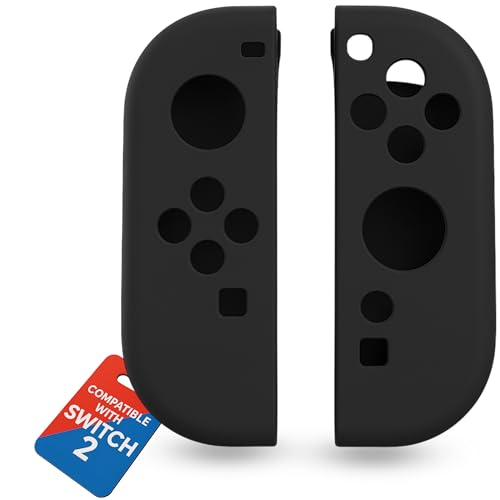
Unlike the stick-only caps, these covers are silicone skins for the Joy-Con body, with a textured surface intended to improve grip. The maker claims fit for Nintendo Switch 2 and Switch 1 Joy-Con, and the set is described as slim and ergonomic. Choose this style if your priority is a softer, less slippery hold during longer play sessions.
Bottom line: Pick this if you want a textured silicone skin and need the claimed Switch 1 and Switch 2 compatibility.
Clear TPU Joy-Con Protective Case

This option is a clear TPU case for the Joy-Con controller, rather than a thumb-stick grip cap or an opaque silicone skin. The maker says the soft material and precise cutouts are intended to protect against dust and scratches while leaving the keys usable. Its transparent finish suits buyers who want the controller’s appearance to remain visible.
Bottom line: Choose this if a clear TPU controller case is more important than extra thumb-stick grip.
NEWDERY 10-Piece TPU Joystick Caps

These caps focus on replacing worn or damaged joystick covers, unlike the full-body skins and case. The 10-piece set has a diamond texture, and the maker says its TPU caps are designed for Switch, Switch OLED and Switch Lite. This is the targeted choice when the stick surface, rather than the controller shell, needs a fresh grip. It does not cover the rest of the Joy-Con, so buyers looking for scratch coverage on the controller body should choose a case or skin instead.
Bottom line: Pick these when you need multiple textured caps for worn Switch joystick surfaces.
4-Piece Silicone Joystick Covers

Compared with the 10-piece TPU option, this set has four silicone joystick covers and a straightforward anti-slip design. The maker says they fit Switch, Joy-Con and Switch Lite sticks, and the silicone is described as soft, washable and comfortable. Choose these if you only need a few caps and want silicone rather than TPU. They protect the joystick surface, not the Joy-Con body, and the maker excludes Switch Pro and Xbox One controllers, so keep them to the Switch-compatible stick types.
Bottom line: Choose this compact set for silicone grip caps rather than a full controller cover.
SFIELCAPA 6-Piece Silicone Stick Covers

This six-piece set provides more stick covers than the four-piece silicone option, while keeping the same basic focus on thumb-stick grip and wear protection. Its silicone caps have a textured surface, and the maker claims compatibility with Switch, Switch OLED, Switch Lite and Joy-Con controllers. The cap dimensions are 0.39 inches long and wide, with a height of 0.2 inches. These cover only the analog sticks; buyers who want scratch protection for the controller shell need a full-body case or skin.
Bottom line: Pick this if you want six silicone stick covers and do not need controller-body coverage.
How to choose Switch Joy-Con covers
Start by deciding which surface needs coverage: the controller body or the thumb stick. A full-body skin or case covers more exterior area, while a stick cap sits over the analog stick and leaves the rest of the controller exposed. Match material to your preference: the options here use silicone or TPU, both flexible materials, but their texture and fit differ by product. If you want grip without changing the whole controller feel, a stick cap is the narrower choice; if scuffs across the shell are your concern, consider a body cover. Covers are not a substitute for careful handling: no impact or drop rating is provided for these options, so do not assume one will prevent damage from a fall.
Check Joy-Con cover fit and control access
Compatibility names matter because Switch, Switch OLED, Switch Lite and Switch 2 are not interchangeable labels for every accessory. Match the cover to the specific controller generation and configuration you own, especially when a product names only some models. Covers should leave the buttons, sticks, rails and any needed openings usable; a close fit around the shell does not guarantee access to every control. The body-cover and stick-cap designs also fit different surfaces, so do not choose by the word “cover” alone. If a Switch 2 fit is essential, select a product whose compatibility includes it and verify the coverage you need before ordering.
Full-body skins versus joystick caps
Full-body skins and joystick caps solve different problems: skins cover the controller shell, while caps cover the small stick surface. A cap cannot protect the controller body from ordinary scuffs, and a body skin does not replace a worn joystick top. Use this quick comparison to narrow the type by need.
| Need | Cover type | Trade-off |
|---|---|---|
| Grip or wear protection on the stick | Thumb-stick cap | Leaves controller body exposed |
| Scratch coverage on controller shell | Full-body skin or case | May add a layer around controls |
| Visible controller finish | Clear case | Still needs model-specific fit |
For a cap, use the measurable distinction of coverage: if you need protection beyond the joystick surface, choose a body-cover style rather than adding more caps.
Install and care for Joy-Con covers
Flexible silicone and TPU covers are generally fitted over an existing controller or stick rather than replacing the electronics. Align openings with controls and avoid stretching a cap sideways across the stick; a loose or misaligned cover can interfere with movement. Remove covers before cleaning the controller, and use a dry or slightly damp soft cloth rather than soaking electronics. Silicone and TPU do not make a controller waterproof. Check that the stick returns freely to center and every button moves normally after fitting; remove the cover if it obstructs a control or catches during movement.
Frequently Asked Questions
Do Joy-Con covers fit Switch Lite controllers?
Some stick-cap options here claim Switch Lite compatibility, but that does not establish that every full-body case fits a Lite. Match the accessory to the exact controller surface and model named for it before ordering.
Are joystick covers the same as Joy-Con cases?
No, joystick covers fit over the analog stick, while a Joy-Con case or skin covers the controller shell. Choose caps for stick grip or wear and a body cover for shell scuffs.
Can silicone covers make Joy-Con waterproof?
No, a silicone cover should not be treated as waterproofing. Keep liquids away from the controller and remove a cover before cleaning the device.
How can I tell if a Joy-Con cover fits correctly?
The cover should align with the buttons and openings without restricting stick movement. After fitting it, press each control and confirm the stick returns to center before playing.
Should I replace a worn joystick cap or cover the controller?
Replace or cover the stick surface when wear is limited to the joystick; choose a full-body cover when the shell also needs scratch coverage. A stick cap does not protect the rest of the controller.