
TEAC CD-P650 CD Player: Models Compared by Features

The TEAC CD-P650 suits buyers who want to record CDs to USB as MP3 files without a computer, with selectable 1x or 2x recording speed. Choose a different model if you need a cassette deck, FM radio or a multi-disc changer instead.
A standalone CD player reads audio discs and sends sound to a compatible audio system; the models here add different recording and playback functions.
We earn a commission if you buy through links on this page. As an Amazon Associate I earn from qualifying purchases. Products are compared on manufacturer specifications, not hands-on testing.
- Best overall: TEAC CD-P650 – Records CDs to USB as MP3 files, with 1x or 2x recording and selectable bit rates.
- Best for cassette recording: TEAC AD-850 CD and Cassette Deck – Combines a CD player and cassette deck, with USB recording and a microphone input.
- Best for multi-disc listening: Onkyo DX-C390 6-Disc CD Changer – Holds six discs and can change up to five discs without stopping playback.
| Product | Best for | USB recording | Extra function | Disc capacity | Shop |
|---|---|---|---|---|---|
| TEAC CD-P650 | USB CD recording | CD to MP3 | iPod digital input | 1 disc | Check Price on Amazon |
| TEAC PD-301-X CD Player and FM Radio | Radio and USB playback | — | FM tuner | — | Check Price on Amazon |
| TEAC AD-850 CD and Cassette Deck | CD and cassette transfer | CD, cassette, external input | Mic input, echo | — | Check Price on Amazon |
| TEAC PD-301-X CD Player, Silver | Silver radio player | — | FM tuner | — | Check Price on Amazon |
| Onkyo DX-C390 6-Disc CD Changer | Six-disc playback | — | Digital audio outputs | 6 discs | Check Price on Amazon |
TEAC CD-P650 CD Player and Alternatives
Compare the CD-P650 with related players by recording options, added functions and disc capacity.
TEAC CD-P650
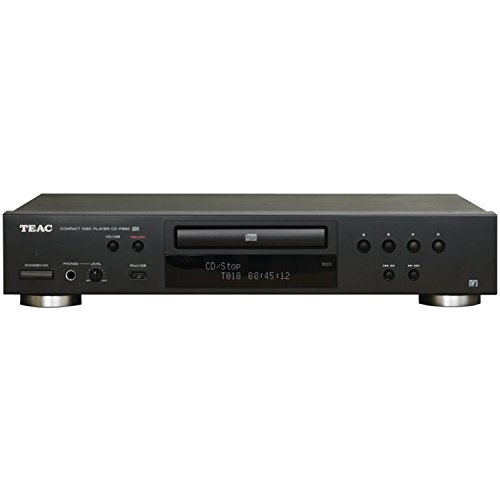
The TEAC CD-P650 stands apart for direct CD-to-USB recording: it creates MP3 files without a computer, with 1x or 2x speed and selectable 64, 96, 128 or 192 kbps bit rates. It also has an iPod digital interface that outputs PCM at 44.1 kHz/16 bit. A center-mounted CD mechanism is intended to reduce vibration and resonance during playback. This model suits a setup where digitizing CDs matters more than adding a radio or cassette deck. Its USB recording is MP3-only, so buyers who need another recording format should choose a different approach.
Bottom line: Pick this if direct MP3 recording from CDs is your main requirement.
TEAC PD-301-X CD Player and FM Radio

The PD-301-X adds an FM tuner, unlike the CD-P650’s focus on recording CDs to USB. It also supports USB memory playback, making it a fit for listeners who want radio and file playback in one component. The features do not identify a USB recording function, so do not choose it as a substitute for CD-to-USB recording. Its compact stated dimensions are 2.4 inches high, 9.1 inches long and 8.5 inches wide; allow extra space for cables and ventilation when positioning any audio component.
Bottom line: Choose this for FM radio and USB memory playback rather than CD recording.
TEAC AD-850 CD and Cassette Deck

The TEAC AD-850 is a CD player and cassette deck, so it handles tape playback and transfers as well as CD-related recording. It can record CDs, cassettes and external inputs to USB flash drives as MP3 files, and it can record CDs, USB MP3 files and external inputs to cassette. A built-in microphone input and echo effect add voice recording and mixing options. This combination suits households with tapes to digitize or a need for cassette recording. It is much larger than a single-component CD player, measuring 9.84 inches high, 16.14 inches long and 22.05 inches wide.
Bottom line: Pick this for cassette playback and cross-format recording, not a compact CD-only setup.
TEAC PD-301-X CD Player, Silver

The silver PD-301-X offers the same core functions as the black version: USB memory playback and an FM tuner. Its color is the meaningful distinction for buyers matching existing components, rather than a different recording feature. The unit measures 2.4 inches high, 9.1 inches long and 8.5 inches wide, so check shelf width as well as front-panel clearance. Since its described functions center on playback and radio, it is a poor fit for someone specifically seeking the CD-P650’s direct CD-to-USB MP3 recording.
Bottom line: Choose this if the silver finish suits your system and radio is useful.
Onkyo DX-C390 6-Disc CD Changer
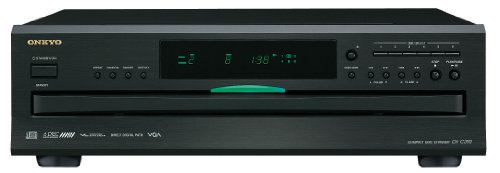
The Onkyo DX-C390 is the option here for keeping several discs in a carousel: it holds six and can change up to five without stopping playback. It plays audio CDs, MP3 CDs and CD-R/RW discs, and provides optical and coaxial digital audio outputs. This model is useful for listeners who prefer a disc rotation over USB recording. It is a larger component, measuring about 5.2 inches high, 17 inches long and 17.1 inches wide. Confirm your local power requirement before connecting: the maker identifies North American and 230-volt versions.
Bottom line: Choose this for multi-disc playback and compatibility with MP3 CDs.
How to choose a CD player
Choose by the job you need done: ordinary disc playback, USB file playback, radio, or recording. A standard audio CD stores two-channel PCM audio at 44.1 kHz and 16 bits per sample; MP3 is a compressed file format, so a CD-to-MP3 recorder trades some audio data for smaller files. Bit rate affects file size: at 128 kbps, an hour of audio is roughly 58 MB before file-system overhead, while 192 kbps takes about 86 MB. If you want a computer-free transfer, select a unit that explicitly records to USB. If you mainly want more listening choices, an FM tuner or a multi-disc mechanism may matter more.
Audio connections also determine system fit. Optical and coaxial outputs carry digital audio and require a matching input on the amplifier or receiver; analog outputs require corresponding analog inputs. Check which input your existing system actually has before choosing a player.
USB recording and playback differences
USB playback and USB recording are different functions: playback reads files from a drive, while recording writes new files to it. The CD-P650 records CDs to USB as MP3 files at selectable bit rates; the AD-850 records several sources to USB, including CDs and cassettes. The PD-301-X models are described with USB memory playback, not recording. Choose by direction of transfer, not simply by the presence of a USB function.
For an MP3 recording, 128 kbps uses about 58 MB per hour and 192 kbps about 86 MB, before overhead. A USB drive must also have a file system and capacity the component can use; compatibility can differ by model. For files you need to play across other devices, check the supported formats and drive requirements before ordering.
CD changers, formats and disc capacity
A single-disc player handles one disc at a time; a carousel changer holds multiple discs so you can switch selections without fetching another disc. The DX-C390 holds six and can change up to five discs without stopping playback. CD-R and CD-RW discs are recordable formats, but successful playback can depend on how the disc was finalized and the player’s supported formats.
MP3 CDs store compressed files on a disc rather than standard CD audio tracks, so they can hold more program material, but playback depends on the player supporting that format. The Onkyo supports audio CDs, MP3 CDs and CD-R/RW. If you have home-burned discs, verify the format support and finalize the disc when creating it.
Placement, ventilation and power checks
Measure the shelf before choosing a component: leave room behind the unit for plugs and cables, and avoid blocking ventilation openings. A receiver and CD player can warm up during operation; keep heat-producing equipment from covering another component’s vents. For the AD-850, the dimensions are substantially larger than the compact PD-301-X models, so check height, width and depth rather than relying on a front-panel view.
Power compatibility is essential. The CD-P650 specifies 120 V AC, 60 Hz for the US; the DX-C390 specifications distinguish a North American 120 V/60 Hz version from a 230 V/50 Hz version. Confirm the exact unit’s rear-panel rating matches your outlet before plugging it in, and do not use a voltage converter unless it is appropriate for the component’s power requirements.
Frequently Asked Questions
How much USB space does an MP3 CD recording need?
At 128 kbps, one hour of MP3 audio takes roughly 58 MB, while 192 kbps takes about 86 MB before overhead. Longer CDs and higher bit rates require more free space.
Can a CD player play files from a USB drive?
Only a model with USB memory playback can read files from a drive. Supported file types, drive format and capacity vary by component, so verify those requirements for the specific player.
What is the difference between USB playback and recording?
USB playback reads existing files from a drive, while USB recording writes new files to it. A player with USB playback alone does not necessarily transfer a CD to a drive.
Will an MP3 CD play in a regular CD player?
An MP3 CD requires a player that supports MP3 disc playback; a standard audio CD capability alone does not guarantee it. Recordable CD-R and CD-RW compatibility can also depend on disc finalization.
How much space should I leave around a CD player?
Leave clearance for ventilation and connecting cables, especially behind the component where plugs extend beyond its case. Measure the shelf against the player’s full height, width and depth before installation.