
DisplayPort to VGA Connection: Adapters Compared

For a DisplayPort source and VGA display, BENFEI 6-Foot DisplayPort-to-VGA Cable is the simplest fit because its 6-foot cable connects directly without a separate VGA lead. DisplayPort-to-VGA products convert a digital video signal to analog VGA, and these options work in that direction only.
Choose an adapter instead if you already have a VGA cable or want a compact connector; the adapters need a separate VGA lead.
We earn a commission if you buy through links on this page. As an Amazon Associate I earn from qualifying purchases. Products are compared on manufacturer specifications, not hands-on testing.
- Best overall: BENFEI 6-Foot DisplayPort-to-VGA Cable – The 6-foot cable has an integrated VGA connection and supports up to 1920 × 1080 at 60 Hz.
- Best for compact carry: Moread DisplayPort-to-VGA Adapter – The male-to-female adapter is portable and supports up to 1920 × 1200; a VGA cable is required.
- Best for a latched connection: BENFEI DisplayPort-to-VGA Adapter – The DP plug has latches and a release button; pair the adapter with a VGA cable.
| Product | Best for | Connection style | Maximum resolution | Shop |
|---|---|---|---|---|
| BENFEI 6-Foot DisplayPort-to-VGA Cable | Direct cable setup | Cable, male-to-male | 1920 × 1080 at 60 Hz | Check Price on Amazon |
| Moread DisplayPort-to-VGA Adapter | Higher resolution | Adapter, male-to-female | 1920 × 1200 | Check Price on Amazon |
| BENFEI DisplayPort-to-VGA Adapter | Portable presentations | Adapter, male-to-female | — | Check Price on Amazon |
| Cableader Latched DisplayPort-to-VGA Adapter | Secure DP plug | Adapter, male-to-female | — | Check Price on Amazon |
DisplayPort to VGA connections
Compare an all-in-one cable with adapters that use a separate VGA cable, then match the connector style to your setup.
BENFEI 6-Foot DisplayPort-to-VGA Cable
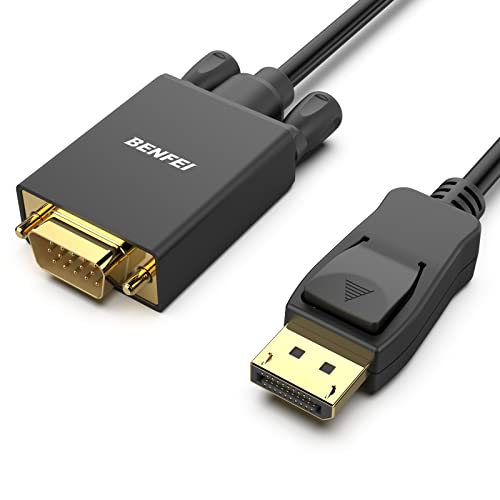
Unlike the separate adapters, this 6-foot cable has male DisplayPort and VGA connectors at opposite ends, so it connects the source and display without an extra VGA lead. BENFEI says its built-in IC converts DisplayPort to VGA and supports resolutions up to 1920 × 1080 at 60 Hz, including 1600 × 1200 and 1280 × 1024. Its gold-plated connector and molded strain relief are useful where the cable will be connected regularly. The fixed 6-foot length is the tradeoff: choose another format if you need a shorter connection or already have a VGA cable.
Bottom line: Choose this if you want a direct, 6-foot connection and need a supported 1080p display mode.
Moread DisplayPort-to-VGA Adapter

The Moread adapter is the only option here that gives a maximum of 1920 × 1200, making it a fit for a display setup that needs that resolution. Its male DisplayPort plug connects to a computer, while the female VGA socket accepts a separately supplied VGA cable. Moread says the adapter supports up to 1920 × 1080 at 60 Hz or 1920 × 1200; the source, display and cable also need to support the target mode. Its compact form suits a travel kit, but buyers without a VGA lead will need one to complete the connection.
Bottom line: Choose this if you need the 1920 × 1200 maximum and have a VGA cable.
BENFEI DisplayPort-to-VGA Adapter

This BENFEI adapter is a compact male-to-female option for a laptop-to-projector setup, unlike the direct cable option. The manufacturer says its built-in IC converts DisplayPort digital video to VGA analog video, and the adapter needs a separate VGA cable. Its small form is convenient for carrying between workspaces, and it can also connect a desktop to a VGA monitor. The product supports one-way conversion from DisplayPort to VGA; it will not connect a VGA computer output to a DisplayPort screen. Confirm the target resolution before choosing it, since a maximum is not included in the specifications.
Bottom line: Choose this for a portable presentation setup when you already have a VGA lead.
Cableader Latched DisplayPort-to-VGA Adapter

The Cableader stands apart with a DisplayPort plug that has latches and a release button, a useful distinction for a connection that should resist being pulled loose. Its male-to-female adapter connects a DP computer to a VGA monitor or projector, and a separate VGA cable is required. Cableader specifies a 25 cm length and an oxygen-free copper core. The direction is DP output to VGA input only. Buyers choosing by supported display mode should verify that the adapter and the rest of their setup support the desired resolution, because a maximum resolution is not included in the specifications.
Bottom line: Choose this if retaining the DisplayPort plug with latches matters to your setup.
How to choose a DisplayPort to VGA connection
Choose a cable if you need one direct run, or an adapter if you already own a VGA cable or want a smaller item to carry. VGA carries analog video, while DisplayPort carries digital video, so a converter must translate between signal types; a simple pin-shape match is not enough. Check the source for a DisplayPort output and the display for a VGA input before selecting a format. A VGA connector is commonly the 15-pin DE-15 type. If your display needs more than 1920 × 1080 at 60 Hz, select only an option whose supported mode meets that need and confirm the computer can output it.
VGA cable length and setup fit
Match the cable length to the distance between the computer and display, with slack for routing rather than tension at the plugs. The integrated cable in BENFEI 6-Foot DisplayPort-to-VGA Cable is 6 feet long; each adapter option requires a separate VGA cable, so that cable determines the full reach. VGA is analog, and longer or poorly shielded runs can show image noise or ghosting more readily than a short, well-routed run. Keep VGA cables away from power cords where practical, and avoid sharp bends at the connector. For a projector mounted far from a laptop, measure the path first and choose a suitable VGA lead rather than relying on a short adapter body.
Resolution and one-way conversion limits
Pick a converter based on the resolution and refresh rate required by the display, not just the connector shapes. BENFEI 6-Foot DisplayPort-to-VGA Cable supports up to 1920 × 1080 at 60 Hz, while Moread DisplayPort-to-VGA Adapter gives a maximum of 1920 × 1200; the remaining two options have no maximum in their specifications. The display, computer output, converter and VGA cable all affect whether a mode works. The products here convert DisplayPort output to VGA input, not the reverse. A VGA source connected to a DisplayPort monitor needs a converter designed for that opposite direction, so swapping cable ends does not solve the mismatch.
Connection checklist before powering on
Confirm the computer’s DisplayPort output, the display’s VGA input and the cable format before connecting the equipment. Adapters with female VGA sockets need a VGA cable; an all-in-one cable does not. Seat the VGA connector evenly and secure its side screws if present, and never force a plug into a port with a different shape. If the screen stays blank, select the display’s VGA input and check the computer’s display-output settings, then test the cable connections. Avoid hot-plugging a loose or damaged connector, and power down before changing wiring if the equipment manual requires it. For a high-resolution target, verify that the whole signal path supports that mode.
Frequently Asked Questions
Can DisplayPort to VGA work in both directions?
No, these products convert a DisplayPort source to a VGA display only. A VGA computer output to a DisplayPort monitor needs a converter built for the reverse direction.
Do DisplayPort to VGA adapters need a VGA cable?
Yes, the male-to-female adapters need a separate VGA cable between their VGA socket and the display. The 6-foot male-to-male cable option has the VGA cable integrated.
Will a DisplayPort to VGA adapter carry sound?
VGA carries video, not audio, so this connection does not provide sound to the display. Use a separate audio connection if sound is needed.
Why does a VGA monitor show no signal from DisplayPort?
First confirm the computer uses its DisplayPort output and the display is set to its VGA input. Also verify the VGA cable is seated and the computer’s output mode is supported by the converter and monitor.