
Tolviviov Home Alarm System: 4 Kits Compared

Tolviviov 12-Piece WiFi Alarm Kit is the clearest match for a Tolviviov home alarm system because its features name the brand and describe app alerts, expansion and no subscription fee. Choose another kit if you need a different sensor count or a keypad-and-hub combination.
We earn a commission if you buy through links on this page. As an Amazon Associate I earn from qualifying purchases. Products are compared on manufacturer specifications, not hands-on testing.
- Best overall: Tolviviov 12-Piece WiFi Alarm Kit – Its features explicitly identify the Tolviviov system and support expansion to 20 sensors.
- Best for entry coverage: 14-Piece WiFi Alarm Kit with Keypad Hub – Includes 8 door/window sensors and 2 motion sensors.
- Best for a larger kit: 15-Piece WiFi Home Security Kit – A 15-piece kit with an advertised 8-hour backup battery.
| Product | Best for | Kit size | Backup battery | Sensor expansion | Shop |
|---|---|---|---|---|---|
| Tolviviov 12-Piece WiFi Alarm Kit | Brand-specific match | 12-piece | 8 hours | Up to 20 sensors | Check Price on Amazon |
| 14-Piece WiFi Alarm Kit with Keypad Hub | Many entry points | 14-piece | 8 hours | — | Check Price on Amazon |
| 15-Piece WiFi Home Security Kit | Larger kit size | 15-piece | 8 hours | Up to 20 sensors | Check Price on Amazon |
| 10-Piece WiFi Door Alarm Kit | Smaller initial kit | 10-piece | — | Up to 20 sensors | Check Price on Amazon |
Tolviviov Home Alarm System Kits
Compare the included kit sizes and supported functions before choosing coverage for your doors, windows and interior areas.
Tolviviov 12-Piece WiFi Alarm Kit

Tolviviov 12-Piece WiFi Alarm Kit is the only option whose features explicitly name Tolviviov, making it the clearest brand match. This 12-piece WiFi alarm kit offers app control, real-time alarm notifications and expansion to as many as 20 sensors and 5 remotes or keypads. The maker says there is no subscription fee and advertises an 8-hour backup battery. Its features mention adding door and window sensors, motion detectors, a wireless doorbell and water detectors. The limitation is that the kit’s exact sensor mix is not clear, so confirm the included components before choosing it for a particular floor plan.
Bottom line: Choose this if matching the named brand matters more than a clearly enumerated sensor mix.
14-Piece WiFi Alarm Kit with Keypad Hub

14-Piece WiFi Alarm Kit with Keypad Hub stands out for its sensor mix: 8 door/window sensors and 2 motion sensors, managed through an all-in-one keypad hub with a built-in siren. WiFi app alerts and an 8-hour backup battery are included among its features, and the maker says there is no monthly fee. This configuration can suit a home with several exterior openings plus interior spaces to monitor. Unlike the brand-explicit option, these features do not name Tolviviov, and they do not give a sensor expansion limit. Check brand identity and compatibility if those affect your setup.
Bottom line: Choose this when the included eight entry sensors and two motion sensors suit your layout.
15-Piece WiFi Home Security Kit

15-Piece WiFi Home Security Kit has the largest kit count among these options, at 15 pieces, and includes a WiFi alarm station with app control and real-time alerts. The maker advertises a 120 dB siren, an 8-hour backup battery, no monthly fee and expansion up to 20 sensors and 5 remotes or keypads. Those capabilities make it a fit for someone prioritizing a larger initial kit and future sensor additions.
Bottom line: Choose this if the 15-piece count and stated expansion capacity are your priorities.
10-Piece WiFi Door Alarm Kit
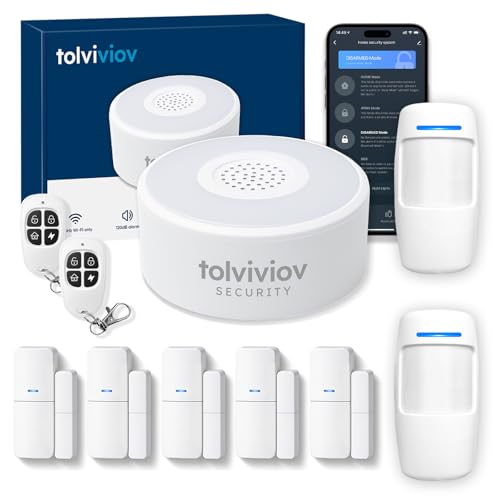
10-Piece WiFi Door Alarm Kit is the smallest kit here, with 10 pieces and door sensors, while retaining app control, phone alerts and expansion to as many as 20 sensors and 5 remotes or keypads. The maker advertises a 120 dB siren and says no monthly fee is required. A smaller initial count may suit a home that needs fewer openings covered at first, with room to add sensors later.
Bottom line: Choose this for a smaller stated kit with room to expand.
How to Choose a Home Alarm Kit
Start with the openings and rooms you want covered, then match the kit’s sensor mix to that map. A door/window contact sensor covers one opening; a motion sensor monitors a room or zone rather than a specific window. Count exterior doors and accessible windows before comparing kit piece counts, since a bundle’s total pieces do not necessarily equal its number of protected openings. For a multi-entry home, favor a kit that explicitly lists sensor quantities, such as 14-Piece WiFi Alarm Kit with Keypad Hub; if you expect to add coverage, check the supported expansion ceiling. A kit’s app notifications also depend on a working network connection, so consider whether local siren alerts alone meet your needs during an internet outage.
What Kit Size Means for Sensor Coverage
A piece count is not the same as a count of protected doors: kits may include a hub, keypad, remotes or other components alongside sensors. Use the sensor breakdown, not the headline number, to estimate coverage. The table separates the available choices by what their fields establish; “—” means the product facts do not establish that value.
| Kit | Stated coverage clue | Expansion |
|---|---|---|
| 10-Piece WiFi Door Alarm Kit | Door sensors | Up to 20 sensors |
| 15-Piece WiFi Home Security Kit | 15-piece kit | Up to 20 sensors |
| Tolviviov 12-Piece WiFi Alarm Kit | 12-piece kit | Up to 20 sensors |
| 14-Piece WiFi Alarm Kit with Keypad Hub | 8 door/window + 2 motion sensors | — |
Plan for a contact sensor at each entry point you want monitored; do not assume a motion detector replaces one. If coverage depends on a specific number of windows or rooms, confirm the included sensor mix before ordering.
WiFi Alerts and Backup Power
WiFi connects these alarm systems to app control and phone notifications, while a siren provides an audible alert at home. Remote notifications require the system to remain connected to the home network and the phone to have connectivity; a siren can still matter when either connection is unavailable. The maker advertises an 8-hour backup battery for 15-Piece WiFi Home Security Kit, Tolviviov 12-Piece WiFi Alarm Kit and 14-Piece WiFi Alarm Kit with Keypad Hub, which is a runtime rather than a guarantee for every outage or use pattern. 10-Piece WiFi Door Alarm Kit has no backup runtime given in its features. Treat a 120 dB siren claim as a reason to place the hub thoughtfully: keep it away from immediate ear-level exposure, and test alarm audibility from occupied rooms.
Installing Sensors and Avoiding Gaps
Place contact sensors on doors and windows that form likely entry points, and make sure the magnet and sensor remain aligned when each opening is shut. Motion sensors are best reserved for interior zones where movement should trigger an alarm; avoid aiming them at places with routine activity that could create unwanted alerts. Before relying on an alarm, arm and disarm it from the keypad or app and open each protected entry to confirm the alert behavior. Expansion limits describe a system ceiling, not the number of sensors included in the box. Labeling sensor locations and keeping the hub within reliable WiFi coverage also make later troubleshooting easier.
Frequently Asked Questions
Does a WiFi alarm still sound without internet?
A local siren can sound when a sensor triggers, but remote app alerts depend on network connectivity. Test the system with the internet disconnected if outage behavior matters to your plan.
How many sensors should a home alarm have?
Plan at least one contact sensor for every door or window you want monitored as an entry point. Add motion sensors for interior zones where movement should trigger an alarm, rather than counting them as substitutes for entry contacts.
What does an 8-hour backup battery cover?
The advertised 8-hour runtime is a battery backup claim for the alarm system, not a guarantee that every component or network connection will work for that duration. Backup runtime can change with alarm activity and connected accessories.
Can I add sensors after installing a kit?
The features for 10-Piece WiFi Door Alarm Kit, 15-Piece WiFi Home Security Kit and Tolviviov 12-Piece WiFi Alarm Kit say the systems support up to 20 sensors, with up to 5 remotes or keypads. Check compatibility before adding third-party sensors, since the expansion limit does not establish that every sensor model will pair.
Where should I place the alarm hub?
Place the hub where its siren can be heard from the areas you occupy and its WiFi connection is reliable. Avoid positioning a loud siren right beside a person’s ear, and test alerts from the rooms that matter.