
Toshiba CT-90325 Remote: Compatible Models Compared

Toshiba CT-90325 is the most suitable starting point for a Toshiba CT-90325 remote because its compatibility list covers many specific Toshiba TV models and it is presented as an original Toshiba remote.
Choose a different option if you want a compact replacement, need a broad remote-model match, or prefer another battery format; confirm your TV’s full model number matches before ordering.
We earn a commission if you buy through links on this page. As an Amazon Associate I earn from qualifying purchases. Products are compared on manufacturer specifications, not hands-on testing.
- Best overall: Toshiba CT-90325 – Its compatibility list names numerous Toshiba TV models, and it is presented as an original Toshiba remote.
- Best for AA batteries: AMAIRIYCA CT-90325 Replacement – It requires two AA batteries and names several compatible TV models.
- Best for multiple remote models: Gvirtue Multi-Model Replacement – It names several compatible Toshiba remote numbers and says most TVs work without setup.
| Product | Best for | Remote type | Batteries | Setup | Shop |
|---|---|---|---|---|---|
| Toshiba CT-90325 | Listed TV models | CT-90325 | — | No setup | Check Price on Amazon |
| CT-90325 ABS Replacement | Soft-button feel | CT-90325 | 2 AAA | No setup | Check Price on Amazon |
| AMAIRIYCA CT-90325 Replacement | Compact handling | CT-90325 replacement | 2 AA | No setup | Check Price on Amazon |
| Gvirtue Multi-Model Replacement | Remote-number range | CT-90325 and other models | 2 AAA | Usually no setup | Check Price on Amazon |
| Universal Toshiba TV Remote | Preprogrammed use | CT-90325 and other models | Not included | No setup | Check Price on Amazon |
Toshiba CT-90325 remotes
Compare the remote number, compatible TV models, battery format and setup requirements before choosing.
Toshiba CT-90325

For buyers who want a remote identified as the CT-90325, this option has a long compatibility list spanning Toshiba TV model families such as C100U, E200U, L1400U and AV600U. The maker presents it as an original Toshiba remote and says it works after batteries are installed, without programming. Match the complete model code on the TV label against the compatibility list, since similar model numbers can differ by suffix. The battery format is the key practical item to confirm before ordering if you do not already have compatible batteries.
Bottom line: Pick this if your Toshiba TV model appears in its compatibility list.
CT-90325 ABS Replacement

This CT-90325 replacement specifically identifies ABS as its body material and describes its buttons as soft and responsive. Its compatibility list overlaps with many older Toshiba models, including 32C100U2, 32C110U, 40E20U and 22AV600U; check the complete suffix rather than relying on a shared model prefix. The package includes one remote, while batteries and a manual are excluded. Two AAA batteries are required, so this is a direct match for buyers who want that battery size. The model list is narrower than the broad multi-remote-number options.
Bottom line: Choose this if your TV matches its list and you prefer two AAA batteries.
AMAIRIYCA CT-90325 Replacement

Unlike the AAA-powered alternatives, this replacement uses two AA batteries and emphasizes a compact, easy-to-grip shape. Its compatibility examples include Toshiba 32C100U2, 40E20U, 46G310U and 55G310U, plus additional models. The maker says no programming or setup is required after inserting batteries. Compare your TV’s entire model code with the examples before choosing, especially when several models share a number but use different letter suffixes. Buyers who already keep AAA batteries on hand may find the AA requirement less convenient.
Bottom line: Pick this if you need AA batteries and your TV matches its examples.
Gvirtue Multi-Model Replacement
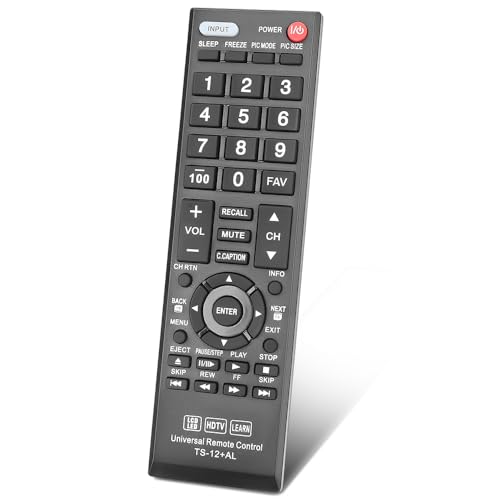
This Gvirtue replacement is identified for several Toshiba remote numbers, including CT-90325, CT-90326, CT-90329 and CT-90366, rather than just one remote number. The maker says it works out of the box for 99% of Toshiba TVs and that the remaining 1% can be set up using instructions. It requires two AAA batteries, which are not included. Its compatibility examples include TV models such as 32C120U1 and 40L5200U. Because the maker describes a small share of TVs as needing setup, this is less suitable if you require a guaranteed no-setup option.
Bottom line: Choose this if you want compatibility with several Toshiba remote numbers.
Universal Toshiba TV Remote

This preprogrammed replacement names a wide range of Toshiba remote numbers, including CT-90325, CT-90326, CT-90329 and CT-8037. The maker says it supports most Toshiba LCD, LED, 3D HDTV, 4K UHD and Smart TVs, and describes stable transmission and coverage of original remote functions. No batteries or user manual are included, and the battery format is not identified here, so verify the required size before buying. Its wide compatibility wording may appeal when the original remote number is uncertain, but matching your TV model remains the safer choice.
Bottom line: Pick this if you need a preprogrammed option covering several Toshiba remote numbers.
How to choose a Toshiba CT-90325 remote
Start with the full TV model number, then compare it with the remote’s named compatibility examples. A shared prefix alone is not enough: model suffixes such as U, U2, UL or UM can distinguish variants. Remote model numbers also matter; some replacements name CT-90325 alone, while others include several CT-series numbers. Use the remote number printed on the old remote as a second check when available. If the TV model is missing from an option’s compatibility list, favor one that names that exact model rather than assuming a broad claim covers it. Check battery size as a separate decision: these options include two-AA and two-AAA requirements, and some omit the battery type.
How Toshiba TV remote compatibility works
A replacement remote must send commands that the TV recognizes; a matching-looking shell does not establish compatibility. Many television remotes use infrared, which requires pointing toward the TV’s receiver without furniture or other obstructions in the way. A camera phone can sometimes show an infrared LED flashing when a button is pressed, but some phone cameras filter infrared, so a dark camera view is not conclusive. The most reliable selection rule is an exact match between your TV model and the replacement’s compatibility list. If the old remote’s buttons worked only at very close range, check batteries and clear the path to the receiver before concluding the remote itself is incompatible.
Battery and setup differences
Battery type is not interchangeable: AA and AAA cells differ in physical size, so use only the compartment’s marked type and polarity. Several of these replacements specify two AAA cells, while one specifies two AA cells; do not force a cell that does not fit. Replacements that say no setup is needed should generally work after batteries are inserted, while one option says a small share of TVs may need setup. Install fresh cells as a pair, align the positive and negative ends with the compartment markings, and remove leaking or damaged batteries promptly. Keep loose batteries away from children, and do not mix old and new cells or different battery chemistries.
Common Toshiba remote replacement mistakes
The most common mistake is matching only the CT-90325 number while overlooking the television’s complete model code. Compare the full code on the TV’s rear or side label, including every letter and number, with the replacement’s examples. Another mistake is assuming “universal” means every Toshiba model: broad compatibility language is not a substitute for a named model match. Also check battery format before ordering, because a remote that needs AAA will not accept AA cells. If a new remote does not respond, verify battery orientation, remove any battery-isolating tab if present, point it toward the TV sensor, and test a second button; an obstructed sensor or incorrect model fit can resemble a dead remote.
Frequently Asked Questions
How can I find my Toshiba TV model number?
Look for the model label on the back or side of the television; the full code includes letters and suffixes, not just the screen size. Compare every character with the replacement’s compatible-model examples.
Do Toshiba CT-90325 replacements need programming?
Several options here say they work without programming once batteries are inserted. One multi-model remote says a small share of Toshiba TVs may need setup, so check its instructions if the TV does not respond.
Can I use AA batteries instead of AAA batteries?
No; AA and AAA cells have different physical dimensions and are not interchangeable in a correctly fitted compartment. Use the size marked inside the remote and match the positive and negative symbols.
Why does a replacement remote not control my TV?
First check battery orientation, fit, and whether anything blocks the path between the remote and TV sensor. If those checks do not help, compare the complete TV model code with the remote’s compatibility list.
Do infrared TV remotes work through walls?
Infrared remotes generally need a clear path to the television’s receiver and do not control a TV through a wall. Aim at the sensor and move objects blocking the line between the remote and set.