
TV With Stand in Middle: 5 Pedestal Options Compared

Rfiver Universal Swivel Stand, 27–60 Inch is a strong choice for a TV with a stand in the middle because it supports up to 99 pounds and fits VESA patterns from 100×100 to 400×400 mm. A center-pedestal tabletop stand attaches to the TV’s mounting holes and rests on furniture, rather than relying on the TV’s original feet.
Choose a different option if you need a smaller-screen fit, a specific swivel range, or a different adjustment range; compare the TV’s VESA pattern and weight before choosing.
We earn a commission if you buy through links on this page. As an Amazon Associate I earn from qualifying purchases. Products are compared on manufacturer specifications, not hands-on testing.
- Best overall: Rfiver Universal Swivel Stand, 27–60 Inch – Supports up to 99 pounds and accommodates VESA patterns through 400×400 mm.
- Best for height adjustment: HOLMAXD Swivel Stand, 27–60 Inch – Offers 9 height settings and a swiveling mount.
- Best for wider base: 5Rcom Swivel Stand, 27–60 Inch – The maker says its base is 10% wider than a general TV stand and swivels 30 degrees each way.
| Product | Best for | Capacity | Max VESA | Height settings | Shop |
|---|---|---|---|---|---|
| Rfiver Universal Swivel Stand, 27–60 Inch | Higher capacity | 99 lb | 400×400 mm | — | Check Price on Amazon |
| HOLMAXD Swivel Stand, 27–60 Inch | More height settings | 88 lb | 400×400 mm | 9 | Check Price on Amazon |
| Rfiver Adjustable Stand, 27–60 Inch | Six height settings | 88 lb | 400×400 mm | 6 | Check Price on Amazon |
| HT02B-001 Stand, 19–43 Inch | Smaller TVs | 99 lb | 200×200 mm | 4 | Check Price on Amazon |
| 5Rcom Swivel Stand, 27–60 Inch | Wider base | 88 lb | 400×400 mm | — | Check Price on Amazon |
TV Stands With a Middle Pedestal
Compare screen fit, mounting patterns, capacity and adjustment features before choosing a stand.
Rfiver Universal Swivel Stand, 27–60 Inch
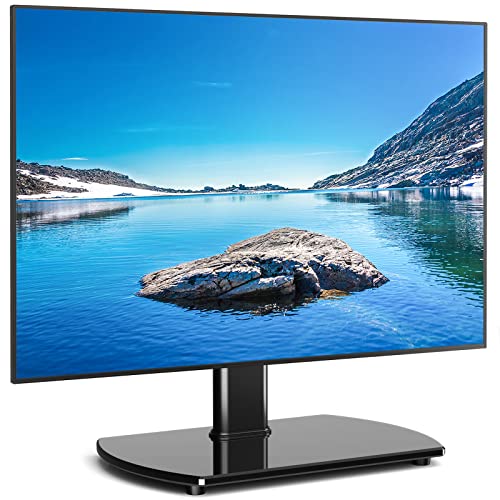
Rfiver Universal Swivel Stand, 27–60 Inch stands out for its 99-pound capacity, higher than the 88-pound maximum given for several other options here. Its mounting pattern range runs from 100×100 to 400×400 mm, and its tempered-glass base measures 16.9 by 11 inches. The stand swivels and adjusts in height, making it useful when a screen needs repositioning on a shared table or console. Check that the TV’s mounting holes fall within the VESA range and that its weight is within the limit. The adjustment count is not available, so this is less suited to buyers who need a specific number of height positions.
Bottom line: Choose this if capacity and broad VESA compatibility matter most.
HOLMAXD Swivel Stand, 27–60 Inch

HOLMAXD Swivel Stand, 27–60 Inch offers 9 height settings, more than the 6 settings specified for Rfiver Adjustable Stand, 27–60 Inch. It fits TVs from 27 to 60 inches, supports up to 88 pounds, and accepts VESA patterns up to 400×400 mm. The maker also describes the mount as swiveling, and the 16.9-by-9.5-inch base provides a compact footprint compared with a broad console. This option suits viewers who want several height positions and the ability to turn the screen. Its weight capacity is below Rfiver Universal Swivel Stand, 27–60 Inch and HT02B-001 Stand, 19–43 Inch, so weigh the TV and check its mounting-hole pattern before selecting it.
Bottom line: Pick this for a larger number of height positions and swivel adjustment.
Rfiver Adjustable Stand, 27–60 Inch

Rfiver Adjustable Stand, 27–60 Inch is a straightforward choice when six height settings meet the setup needs. The stand is sized for 27- to 60-inch TVs, has an 88-pound capacity, and uses a tempered-glass base that measures 15.7 by 9.4 inches. Its overall height is 25.8 inches. Unlike HOLMAXD Swivel Stand, 27–60 Inch, the features do not establish swivel adjustment, so buyers who need to turn the screen should compare that requirement closely. Confirm the TV’s VESA pattern and weight, and leave enough furniture surface around the base for stable support.
Bottom line: Choose this when six height positions are sufficient and swiveling is not essential.
HT02B-001 Stand, 19–43 Inch

HT02B-001 Stand, 19–43 Inch is the only option here sized for TVs as small as 19 inches, with a 19- to 43-inch range. It supports up to 99 pounds, accepts VESA patterns from 75×75 to 200×200 mm, swivels up to 90 degrees, and has 4 height levels. Its height is 18.2 inches, shorter than the heights given for Rfiver Adjustable Stand, 27–60 Inch, HOLMAXD Swivel Stand, 27–60 Inch and Rfiver Universal Swivel Stand, 27–60 Inch. The narrower screen-size and VESA ranges make it a better fit for smaller TVs than for larger sets. Match both the TV’s mounting pattern and screen size before choosing it.
Bottom line: Choose this for a smaller TV with compatible VESA holes and a need for swivel.
5Rcom Swivel Stand, 27–60 Inch

5Rcom Swivel Stand, 27–60 Inch differentiates itself with a 30-degree swivel in either direction and a base the maker says is 10% wider than a general TV stand. The base measures 16.9 by 10.2 inches, and the stand fits 27- to 60-inch screens with VESA patterns up to 400×400 mm. Height adjustment is mentioned without a number of settings, so buyers seeking a specific range should verify it before choosing.
Bottom line: Pick this if a wider base and defined swivel direction suit your setup.
How to Choose a TV Stand With a Middle Pedestal
Start with the TV’s weight and VESA mounting pattern, not screen size alone. VESA measurements describe the horizontal and vertical distance between the four mounting holes in millimeters; a 200×200 pattern means 200 mm between holes in each direction. A TV can fit the screen-size range and still have an incompatible hole pattern. Confirm the stand’s capacity exceeds the TV’s weight, and use the exact stated VESA range as a pass-or-fail check. For example, a TV with a 300×300 mm pattern needs a stand that includes 300×300 mm. If either weight or pattern falls outside the stand’s range, choose another mount rather than improvising an adapter.
Measure the TV and Furniture Before Setup
Measure the table or console’s usable surface and compare it with the stand’s base dimensions. A base that measures 16.9 by 11 inches needs a surface at least that large, with additional room around it to avoid overhang. Also check the TV’s rear mounting holes and the stand’s vertical bracket positions: a screen’s size does not determine where its mounting holes sit. Keep the stand on a firm, level surface and route cables so they cannot pull the TV toward an edge. A useful rule is to reject any setup where the base overhangs the supporting furniture or the furniture rocks under light pressure.
Swivel and Height Adjustment Compared
Swivel range and height settings solve different viewing problems: swivel turns the screen toward a seat, while height adjustment changes its vertical position. Use the table to match a defined feature to the setup rather than assuming every pedestal stand offers the same movement.
| Need | Option | Specified feature |
|---|---|---|
| More height positions | HOLMAXD Swivel Stand, 27–60 Inch | 9 settings |
| Swivel up to 90 degrees | HT02B-001 Stand, 19–43 Inch | 90-degree swivel |
| 30 degrees each direction | 5Rcom Swivel Stand, 27–60 Inch | 30-degree left or right swivel |
| Six height positions | Rfiver Adjustable Stand, 27–60 Inch | 6 settings |
Choose a model with the required movement stated explicitly; a mention of swivel or height adjustment alone does not establish its range.
Install a Pedestal Stand Safely
Install the stand on a stable, level surface and fasten every bracket connection before placing the TV upright. A center pedestal transfers the TV’s load through a single base, so uneven furniture, an overhanging base or loose mounting hardware can undermine stability. Keep children from climbing or pulling on the TV, and use an anti-tip restraint where the TV manufacturer recommends one. Route power and signal cables with slack so screen movement does not tug on connectors. Recheck that the screws match the TV’s mounting holes and do not bottom out before the bracket is tight; use the hardware specified for the TV and stand.
Frequently Asked Questions
How do I find my TV’s VESA pattern?
Measure the horizontal and vertical distance between the centers of the four mounting holes on the back of the TV, in millimeters. A 400×200 mm pattern needs a stand that supports both dimensions.
Does a 55-inch TV fit every 27-to-60-inch stand?
Not necessarily; the TV also has to meet the stand’s weight limit and VESA range. Check those measurements before choosing a stand, even when the screen size is within range.
How much larger should the TV stand base be than the table?
The base should sit fully on a firm, level surface without overhanging any edge. Measure both the base and usable tabletop; leave extra room around the base where possible.
Can I swivel a TV while it is on a pedestal stand?
Only when the stand supports swivel movement. Check the angle and turn the screen gently; stop if the base shifts or the furniture moves.
What should I check before mounting the TV?
Confirm the TV’s weight, VESA pattern and rear clearance against the stand’s limits. Use the correct mounting hardware and make sure the base sits flat before raising the screen.