
Type C to Aux Adapter: 5 Options Compared by Fit

The JXMOX 4-foot USB-C-to-3.5mm cable suits people connecting a USB-C device to an aux input who need extra reach. Choose a compact dongle instead if you want a short connection or wired headphone controls.
A Type-C-to-aux adapter converts digital audio from a USB-C device to analog audio for a 3.5mm connection.
We earn a commission if you buy through links on this page. As an Amazon Associate I earn from qualifying purchases. Products are compared on manufacturer specifications, not hands-on testing.
- Best overall: JXMOX 4-Foot USB-C to 3.5mm Cable – Its 4-foot cable gives more reach for connecting a USB-C device to an aux input.
- Best for wired controls: JXMOX USB-C Headphone Adapter, 2-Pack – It supports headphone microphone, volume and playback controls, and comes as a two-pack.
- Best for compact connections: JSAUX USB-C to 3.5mm Adapter – Its 0.6-foot cable keeps the connection short, and it supports 16-bit/48-kHz audio.
| Product | Best for | Format | DAC support | Pack / length | Shop |
|---|---|---|---|---|---|
| JXMOX 4-Foot USB-C to 3.5mm Cable | Aux reach | Braided cable | Smart DAC chip | 1 pack; 4 ft | Check Price on Amazon |
| JXMOX USB-C Headphone Adapter, 2-Pack | Wired controls | Short adapter cable | 16-bit/48-kHz | 2 pack | Check Price on Amazon |
| USB-C to 3.5mm HiFi Adapter, 2-Pack | Signal ratio | Short adapter | 48-kHz sampling | 2 pack | Check Price on Amazon |
| JSAUX USB-C to 3.5mm Adapter | Short cable | Short cable | 16-bit/48-kHz | 1 pack; 0.6 ft | Check Price on Amazon |
| YGKSAA USB-C to 3.5mm Adapter, 2-Pack | Metal housing | Female-jack adapter | Built-in DAC | 2 pack | Check Price on Amazon |
Type C to Aux Adapter Options
Compare connection style, DAC specifications and included quantity to find the right fit for your audio setup.
JXMOX 4-Foot USB-C to 3.5mm Cable
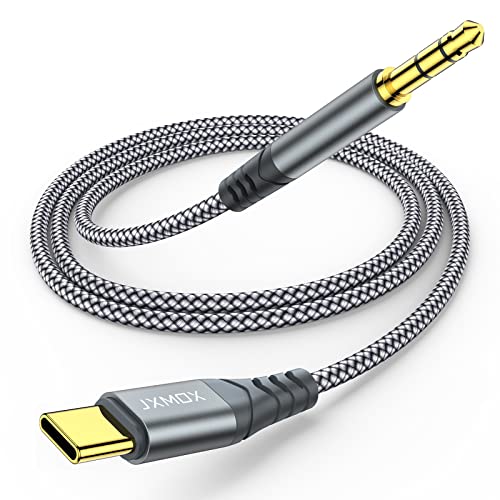
The 4-foot cable makes this a better fit for reaching an aux input than the short dongles. Its USB-C end connects to a compatible device, while the 3.5mm plug connects to a car stereo, speaker, headphones or another 3.5mm audio input. The cable has a nylon braid, and JXMOX says its strain relief withstands more than 12,000 bends. The maker also says its DAC chip provides high-definition audio. Choose it when cable reach matters; its longer cable is less compact to carry than a small adapter.
Bottom line: Pick this if you need extra cable reach to an aux input.
JXMOX USB-C Headphone Adapter, 2-Pack
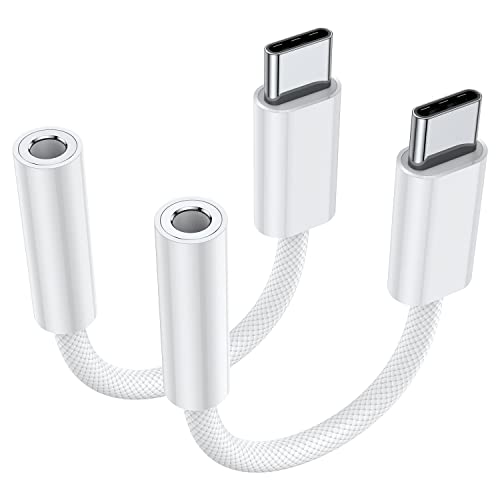
Wired headphone controls set this adapter apart: the maker says it supports microphone, volume, pause and play functions. The two-pack is useful when you want one adapter for a second device or as a spare. Its DAC supports up to 16-bit/48-kHz sampling, according to JXMOX, and the cable uses an ABS shell with nylon braiding. This is a headphone-style adapter rather than a long aux cable, so it suits a nearby connection better than reaching across a car interior. Confirm that your particular headphones’ controls are compatible.
Bottom line: Choose this for a two-pack and wired headphone controls.
USB-C to 3.5mm HiFi Adapter, 2-Pack

A 92 dBFS signal-to-noise ratio is the distinguishing audio specification for this two-pack. The maker also describes a DAC with 48,000 samples per second and noise-reduction technology for calls. Its 3.5mm connection is for headphones or other compatible audio gear, and the maker specifically cautions that Apple EarPods volume adjustment is unsupported. That limitation matters if you plan to change volume with those earbuds; check the device and headphone control combination before relying on inline controls. This option provides two adapters for separate setups.
Bottom line: Pick this if the signal-to-noise ratio matters to your comparison.
JSAUX USB-C to 3.5mm Adapter

The 0.6-foot cable makes this the shortest specified connection here, useful when a compact setup matters more than reaching a distant aux port. JSAUX says its DAC supports 16-bit/48-kHz audio and that compatible headphone function keys can handle calls, volume and playback. The maker excludes microphone and volume functions for Apple EarPods with a 3.5mm plug, so those controls are a meaningful caveat for Apple earbud users. The adapter connects USB-C devices to 3.5mm headphones, headsets or speakers; verify that your device supports USB-C audio output.
Bottom line: Choose this for a short lead and 16-bit/48-kHz DAC support.
YGKSAA USB-C to 3.5mm Adapter, 2-Pack

A metal case and two female 3.5mm jacks distinguish this pair from the cable-style options. Each adapter lets a USB-C device connect to wired headphones or other 3.5mm audio equipment, and the maker says the built-in DAC is designed to reduce interference and noise. Plug-and-play operation means no software or driver installation is needed, according to YGKSAA. The source does not give a sampling-rate figure, so buyers comparing specific audio resolutions should choose an option with a rate instead. Its two-piece set suits separate devices or locations.
Bottom line: Pick this if you want a two-pack with a metal case.
How to Choose a Type C to Aux Adapter
Choose the connection format first: a longer cable helps when the 3.5mm input is farther from the USB-C device, while a compact adapter suits headphones close to the device. USB-C carries digital audio, so an adapter for a conventional 3.5mm connection needs digital-to-analog conversion; the DAC handles that conversion. A 48-kHz sampling rate appears on several options here, but the specification alone does not guarantee that every phone or app will output that rate. Match the adapter’s job to your setup: a 3.5mm plug connects to an aux input, while a female jack accepts a headphone’s 3.5mm plug. Also check the device maker’s USB-C audio support before choosing.
USB-C Audio Compatibility and Controls
USB-C connector shape does not guarantee that every device or accessory supports the same audio functions. Check that the phone, tablet or computer outputs audio over USB-C, then confirm whether the adapter supports the microphone and inline controls you need. CTIA is a common 3.5mm headset wiring arrangement, but compatibility can differ by adapter and headphone; do not assume every volume button or microphone will work. In this group, the JXMOX two-pack claims support for microphone and playback controls, while other options have particular control caveats. If you rely on Apple EarPods controls, note the restrictions attached to the third and fourth options. Test calls and button functions before depending on them for hands-free use.
Aux Cable Length and Connection Fit
Measure the path between the USB-C device and the aux input before selecting a cable. A 4-foot lead allows more reach than a 0.6-foot lead, but extra cable can snag or tangle in a compact setup; secure loose cable away from pedals, steering controls and other moving parts in a vehicle. Check which end each device needs: a cable with a 3.5mm plug connects to an aux input, while an adapter with a female jack accepts the plug from headphones. Keep the plug fully seated, since a partially inserted 3.5mm connection can cause intermittent sound or one-channel playback. This quick fit guide separates the two common hookup tasks.
| Connection need | Choose |
|---|---|
| Reach a distant aux input | Longer cable |
| Connect nearby wired headphones | Short adapter with female jack |
| Use microphone or inline buttons | Adapter that explicitly supports those controls |
DAC Specifications and Common Audio Issues
A DAC converts digital audio to the analog signal used by a conventional 3.5mm connection. A 48-kHz rate means 48,000 samples per second, and 16-bit audio describes sample depth; actual playback also depends on the source device and audio file. A higher stated sample rate is not a guarantee of audible improvement for every listener or recording. If audio is absent, check that the USB-C device routes sound to the adapter and that the 3.5mm plug is fully seated. For crackling or dropouts, inspect the plug and cable for a loose connection. For a call issue, confirm microphone support separately from audio playback.
Frequently Asked Questions
Can a USB-C to aux adapter work with a car stereo?
Yes, it can connect a compatible USB-C audio output to a stereo’s 3.5mm aux input. Use a cable with a 3.5mm plug at the stereo end, and measure the route first if the device will sit away from the aux port.
What does a 48-kHz DAC specification mean?
A 48-kHz sampling rate means the DAC can process up to 48,000 audio samples per second. It does not by itself ensure better-sounding playback, which also depends on the device and audio source.
Will my headphone microphone work through USB-C?
Only if the adapter and device support microphone input as well as audio output. Verify call functionality specifically; successful music playback alone does not confirm microphone support.
Why is sound coming from only one side?
A partly seated or dirty 3.5mm plug is a common cause of one-sided audio. Remove and firmly reinsert the plug, then check the headphones on another compatible source to isolate the connection.