
USB 90 Degree Adapter: A-Type and USB-C Compared

For a USB-A port in a tight space, USB 3.0 Up/Down Adapter 2-Pack is the clearest match because its two adapters turn the connector up or down and support up to 5Gbps. Choose Warmstor USB-A Adapter 6-Pack if you need more direction options or a higher claimed data rate; choose Chadou USB 3.0 90-Degree Extension Cable 2-Pack if you need extra cable reach, or Silkland USB-C USB4 90-Degree Adapter 2-Pack for USB-C rather than USB-A.
A right-angle adapter changes the direction a plug exits a port, which can reduce cable bending where clearance is limited.
We earn a commission if you buy through links on this page. As an Amazon Associate I earn from qualifying purchases. Products are compared on manufacturer specifications, not hands-on testing.
- Best overall: USB 3.0 Up/Down Adapter 2-Pack – Two USB-A adapters turn up or down and support up to 5Gbps.
- Best for direction choices: Warmstor USB-A Adapter 6-Pack – The six-piece set covers multiple right-angle orientations and claims up to 10Gbps.
- Best for extra reach: Chadou USB 3.0 90-Degree Extension Cable 2-Pack – The 90-degree USB-A extension cable adds 7.9 inches.
- Best for USB-C: Silkland USB-C USB4 90-Degree Adapter 2-Pack – The USB-C adapter claims USB4 bandwidth up to 40Gbps.
| Product | Best for | Connector | Max data rate | Pack or length | Shop |
|---|---|---|---|---|---|
| USB 3.0 Up/Down Adapter 2-Pack | Basic USB-A turns | USB-A male to female | 5Gbps | 2 adapters | Check Price on Amazon |
| Warmstor USB-A Adapter 6-Pack | Multiple orientations | USB-A male to female | 10Gbps | 6 adapters | Check Price on Amazon |
| Chadou USB 3.0 90-Degree Extension Cable 2-Pack | Added cable reach | USB-A male to female cable | — | 7.9 inches; 2 cables | Check Price on Amazon |
| Silkland USB-C USB4 90-Degree Adapter 2-Pack | USB-C devices | USB-C male to female | 40Gbps | 2 adapters | Check Price on Amazon |
USB 90 Degree Adapters
Compare connector type, orientation, data rate and added reach before choosing a right-angle adapter.
USB 3.0 Up/Down Adapter 2-Pack

Unlike the multi-direction set, this two-pack is specifically for turning a USB-A connection up or down. The adapter supports USB 3.0 data transfer up to 5Gbps and is backward compatible with USB 2.0; the maker also claims charging up to 5V/2.1A. Its compact, plug-in format suits a laptop, monitor or other USB-A port with little room for a straight plug. The limitation is orientation: buyers needing left- or right-facing turns should choose a different set. Check the available space above or below the port before selecting the direction.
Bottom line: Choose this pair for a simple up-or-down turn on a USB-A port.
Warmstor USB-A Adapter 6-Pack

Compared with the up/down pair, this six-piece set is intended to accommodate more plug directions around crowded ports. Warmstor claims data transfer up to 10Gbps and charging up to 3A, and says the adapters need no driver. The set suits users who need to route connections around nearby walls, hubs or other plugs and want several orientations available.
Bottom line: Pick this set when you need several USB-A turning options and a higher claimed data rate.
Chadou USB 3.0 90-Degree Extension Cable 2-Pack

Unlike the compact rigid adapters, this option is a 7.9-inch USB-A extension cable with a 90-degree angle. The two-pack is intended for peripherals such as printers, cameras, mice and keyboards, so it can move a connection away from a crowded port while adding cable reach. It suits a setup where a short extension is useful as well as a turn. No maximum data rate or charging figure is supplied in the specifications, so buyers with a specific speed or power requirement should verify compatibility before choosing it.
Bottom line: Choose this cable pair when extra reach matters as much as the right-angle connection.
Silkland USB-C USB4 90-Degree Adapter 2-Pack
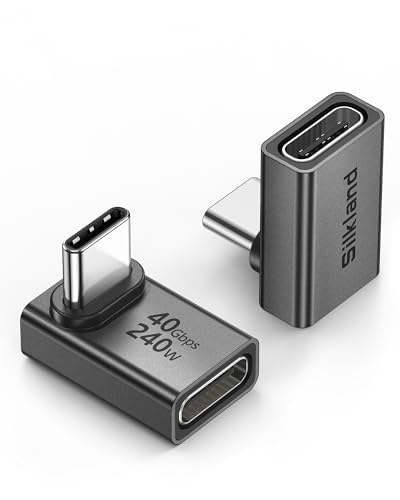
This adapter differs from the other options by using USB-C rather than USB-A. Silkland says it supports USB4 bandwidth up to 40Gbps, 8K video at 60Hz and charging up to 240W; those capabilities depend on the connected device, cable and power source. The aluminum-alloy pair suits USB-C gear when a right-angle connection is needed and the port is fully exposed. The maker cautions that bulky cases can interfere with fit, so measure the case clearance and confirm the port is unobstructed before choosing this adapter.
Bottom line: Choose this pair for a USB-C port when its case clearance and device capabilities align.
How to Choose a USB 90 Degree Adapter
Start with the connector at the device: a USB-A adapter will not fit a USB-C port, even when both turn a cable by 90 degrees. Then match the direction to the surrounding clearance; a plug that turns upward can still collide with a shelf, while a sideways turn may clear it. USB 3.0 signaling tops out at 5Gbps, and USB 3.1 Gen 2 reaches 10Gbps; those are theoretical link rates, not guaranteed file-copy speeds. For a connection that must carry video or high-wattage power, check support across the device, adapter and cable rather than relying on the adapter’s maximum claim alone.
USB-A and USB-C Angle Adapters Compared
USB-A and USB-C are different connector shapes, so choose the one that matches the device port before comparing speed. USB-A options commonly support USB 2.0 or USB 3.x data modes, while USB-C can carry different capabilities depending on the device and cable. USB4 has a maximum signaling rate of 40Gbps, but not every USB-C port or accessory supports USB4. The table separates the connector and claimed ceiling from the added reach, which matters when a port sits behind furniture or a wall-mounted screen.
| Need | Adapter type | Key check |
|---|---|---|
| USB-A tight-space turn | USB-A male-to-female angle adapter | Up/down or left/right clearance |
| USB-A plus extra reach | Angled USB-A extension cable | Cable length and supported speed |
| USB-C with high-bandwidth use | USB-C angle adapter | Device, cable and adapter capability |
Measure Clearance Before Connecting
Measure the open space around the port and the plug body, not just the adapter’s angle. A few millimeters can decide whether an angled connector clears a case lip, adjacent port or wall; also account for the cable’s bend after it exits the adapter. A 90-degree connector changes cable routing but does not guarantee a flush fit, especially with protective cases. For ports next to one another, check whether the adapter body blocks the neighboring socket. Disconnect accessories before changing a tight connection, and avoid forcing a plug into a port; USB connectors should align without pressure.
Frequently Asked Questions
Will a USB 3.0 right-angle adapter work with USB 2.0?
USB 3.0 is backward compatible with USB 2.0 when the device and connection support the older mode. The connection then operates at the USB 2.0 rate rather than the adapter’s 5Gbps USB 3.0 ceiling.
Does a 90-degree adapter reduce USB transfer speed?
A passive angle adapter does not inherently set a lower speed, but the connection is limited by its slowest component. USB 3.0 supports up to 5Gbps and USB 3.1 Gen 2 up to 10Gbps; cable quality, device ports and signal integrity also matter.
Can a USB-C adapter charge a laptop at 240 watts?
Only if the laptop, charger, cable and adapter all support the required USB Power Delivery profile. USB-C connector shape alone does not guarantee 240W charging, and the weakest component limits the delivered power.
How do I choose the direction of a right-angle adapter?
Look at the device port and identify where the cable needs to exit: up, down, left or right. Measure nearby case edges, walls and neighboring ports, since the adapter body can need more clearance than the plug alone.
Can I use an angled USB adapter for video?
Video works only when the device port, adapter and cable support the video mode being used. For USB-C video, confirm the device supports DisplayPort Alt Mode or the applicable USB4 video capability; a USB-C-shaped port by itself does not ensure video output.