
TopShade Office Cubicle and Desk Shade Compared

The TopShade office cubicle and desk shade is a practical fit for desk setups that need a 35-by-51-inch canopy and 16-to-31-inch height adjustment. Choose a different option if you need a larger circular canopy, a higher adjustment range, or foldable storage.
These desk shades sit above a workspace to reduce overhead light and screen glare; choose by the canopy shape and dimensions that suit your desk.
We earn a commission if you buy through links on this page. As an Amazon Associate I earn from qualifying purchases. Products are compared on manufacturer specifications, not hands-on testing.
- Best overall: TopShade Office Cubicle & Desk Shade – Its 35-by-51-inch canopy and 16-to-31-inch height adjustment suit a range of desk setups.
- Best for broad coverage: STAYDEN 65-Inch Cubicle Shade – The 65-inch-diameter canopy and 20-to-40-inch adjustable rod offer the broadest circular coverage.
- Best for storage: BALAPET Foldable Desk Shade – The shade folds for storage and includes a storage bag.
- Best for circular coverage: Ayuanb 62-Inch Adjustable Cubicle Shade – The 62-inch-diameter canopy has a 23-to-37-inch adjustable height range.
| Product | Best for | Canopy dimensions | Adjustable height | Shop |
|---|---|---|---|---|
| TopShade Office Cubicle & Desk Shade | Everyday desk coverage | 35 × 51 in | 16–31 in | Check Price on Amazon |
| STAYDEN 65-Inch Cubicle Shade | Broad circular coverage | 65 in diameter | 20–40 in | Check Price on Amazon |
| BALAPET Foldable Desk Shade | Portable storage | 35.4 × 23.6 × 35.4 in | — | Check Price on Amazon |
| Ayuanb 62-Inch Adjustable Cubicle Shade | Adjustable circular shade | 62 in diameter | 23–37 in | Check Price on Amazon |
Office cubicle and desk shades
Compare canopy dimensions and adjustment ranges to find a shade that suits your desk and lighting setup.
TopShade Office Cubicle & Desk Shade

TopShade pairs a rectangular 35-by-51-inch canopy with height adjustment from 16 to 31 inches, making it a fit for desks where a wide, directional shade is preferable to a circular canopy. The desk-clamp mount and rotational adjustment let you position coverage around a workstation as light conditions change. It is intended to reduce overhead lighting, screen glare and visual distractions. The tradeoff is its fixed rectangular footprint: shoppers seeking a broader circular canopy or a folding shade for storage should compare other shapes.
Bottom line: Choose this if you want a rectangular canopy with adjustable height and rotation.
STAYDEN 65-Inch Cubicle Shade

STAYDEN has the largest circular canopy here, at 65 inches in diameter, and its extension rod adjusts from 20 to 40 inches. The canopy uses 420D Oxford fabric; the maker says it can block 99% of light. That combination suits buyers prioritizing broad coverage and a taller adjustment range over a compact rectangular shade. Its dimensions are circular rather than a desk-width-and-depth measurement, so check the available space above your workstation before choosing it.
Bottom line: Choose this for a large circular canopy and a 20-to-40-inch adjustment range.
BALAPET Foldable Desk Shade

BALAPET stands apart with a foldable shade cloth and an included storage bag, useful when a canopy must be put away or moved between workspaces. Its dimensions are 35.4 by 23.6 by 35.4 inches; the product also offers height and angle adjustment, 360-degree rotation and horizontal swiveling. A clamp-on mount secures it to the desk. The dimensions do not give a separate adjustable-height range, so buyers who need a specific clearance should confirm the fit before ordering.
Bottom line: Choose this if folding the canopy away or carrying it between workspaces matters.
Ayuanb 62-Inch Adjustable Cubicle Shade
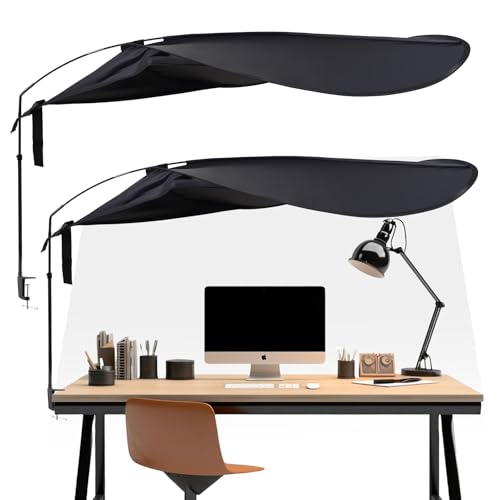
Ayuanb uses a 62-inch circular canopy, smaller than STAYDEN’s 65-inch diameter, with a height range of 23 to 37 inches. Its support arm adjusts 360 degrees, and straps can tighten or loosen the canopy size. The product is described as a foldable plastic privacy canopy, with a clip for securing it. This option suits buyers who want a circular shade and arm adjustment; the 23-inch minimum height is higher than the minimum ranges of the first two options.
Bottom line: Choose this for a circular canopy with an adjustable arm and 23-to-37-inch height range.
How to choose an office cubicle shade
Choose by the space you need covered, then check how high the shade can sit above the desk. Circular canopies specify a diameter, while rectangular canopies give width and length; those measurements describe different footprints and should not be compared as if they were the same shape. Measure the desk area where you want shade, including space for a clamp or support arm. For screen work, keep the monitor roughly 20 to 40 inches from your eyes and position its top at or slightly below eye level, rather than letting a shade force an awkward viewing posture. A shade reduces overhead light, but it should not make the screen too dark to read comfortably.
Canopy size and desk fit
Measure the intended coverage area before choosing between a circular and rectangular canopy. A 65-inch circular shade extends about 32.5 inches from its center in every direction, while a 35-by-51-inch rectangular shade has distinct width and depth; leave room for nearby walls, shelves and coworkers. Check how the shade attaches: a clamp needs an accessible desk edge, and the desk edge must accommodate its grip. If the workspace is shared, measure clearances above and around the desk so the canopy does not obstruct adjacent work areas. When the fit depends on a specific desk-edge thickness or clearance, confirm that measurement before ordering.
Height, angle and glare control
Position the canopy between the overhead light source and the screen or work area where glare appears. The useful height depends on the desk, seated position and light location, so compare the adjustment range with the actual space above your desk rather than choosing by maximum height alone. A rotating or swiveling canopy can redirect coverage as the light source or seating position changes; a fixed position may suit a permanent workstation. Keep enough ambient light to read paper and see keyboard controls without strain. After adjusting the shade, check the monitor from your normal seated position and reposition it if the display becomes dim or reflections remain.
Office shade shapes and features
Rectangular canopies make sense when the work area is a specific desk-width zone; circular canopies provide coverage around a central support. Foldability matters when the shade must be stowed between uses, while rotation and swivel adjustment help redirect a canopy without moving the whole desk. Use this comparison to match the feature to the workspace constraint rather than treating canopy dimensions as interchangeable.
| Workspace need | Feature to prioritize |
|---|---|
| Directional coverage over a desk | Rectangular canopy footprint |
| Coverage around a central support | Circular canopy diameter |
| Frequent stowing or moves | Foldable shade and storage bag |
| Changing light or seating position | Rotational or swivel adjustment |
Frequently Asked Questions
How far should an office shade sit above a desk?
There is no single ideal height because desk height, seated posture and overhead lighting vary. Measure the clearance you have, then choose a model whose adjustment range can cover it without obstructing your monitor.
Can a cubicle shade stop screen glare?
A canopy can block some overhead light before it reaches a screen, but glare can also come from windows and bright surfaces. Position the screen at roughly a right angle to windows where practical, then adjust the shade toward the remaining overhead source.
What size office shade should I choose?
Measure the width and depth that need coverage and compare those dimensions with the canopy footprint. A circular canopy’s diameter is not equivalent to a rectangular shade’s width or length.
Will a desk shade fit every desk?
No; desk-edge shape and available overhead clearance can limit fit. Measure the desk edge and vertical clearance before choosing a clamp-mounted shade or one with a minimum height above your available space.
How should I position a shade for computer work?
Keep the monitor about 20 to 40 inches from your eyes, with the top of the screen at or just below eye level. Adjust the canopy to block the offending light without making the display difficult to read.