
TENS 7000 TENS Units: Compare Features and Fit

TENS 7000 Digital Unit is the closest match for someone seeking the standard digital TENS 7000, while TENS 7000 Rechargeable stands out for its rechargeable battery and TENS 7000 Digital with 16 Electrodes includes a 16-pack of electrodes. A TENS unit sends low-voltage electrical pulses through skin electrodes; choose based on power source and how many pads you want included.
Choose a different type of device if you specifically need a replacement electrode-pad pack rather than a stimulator.
We earn a commission if you buy through links on this page. As an Amazon Associate I earn from qualifying purchases. Products are compared on manufacturer specifications, not hands-on testing.
- Best overall: TENS 7000 Digital Unit – It is the digital TENS 7000 unit with accessories, without a rechargeable-only distinction.
- Best for rechargeable use: TENS 7000 Rechargeable – It has a built-in rechargeable battery and claims stimulation up to 100 mA.
- Best for extra pads: TENS 7000 Digital with 16 Electrodes – It includes a 16-pack of replacement electrodes.
| Product | Best for | Electrodes included | Dimensions | Shop |
|---|---|---|---|---|
| TENS 7000 Digital Unit | Standard digital unit | Accessories; count not given | 8.75 × 7.75 × 2 in. | Check Price on Amazon |
| TENS 7000 Rechargeable | Rechargeable operation | 4 electrodes | 4 × 1 × 2.5 in. | Check Price on Amazon |
| TENS 7000 Digital with 16 Electrodes | Extra included electrodes | 16 electrodes | 9 × 7.5 × 2 in. | Check Price on Amazon |
TENS 7000 Units Compared
Compare the unit versions by power source, included electrodes and dimensions before choosing.
TENS 7000 Digital Unit

TENS 7000 Digital Unit is the standard digital TENS 7000 option among these units, with accessories included but no electrode count provided. The maker describes it as intended for common pain areas including the back, neck, shoulder and elbow; those are the maker’s claims, not a guarantee of results. Its dimensions are 8.75 × 7.75 × 2 inches, so check your storage space if you plan to keep it in a small case. This is the straightforward choice if rechargeable power or a larger pad supply is not your deciding factor.
Bottom line: Choose this if you want the standard digital unit and do not need a specified pad count or rechargeable battery.
TENS 7000 Rechargeable

TENS 7000 Rechargeable is the only unit here with a built-in rechargeable battery, which avoids routine battery replacement. It comes with four electrodes and measures 4 × 1 × 2.5 inches, a more compact footprint than the other units in this comparison. The maker claims adjustable settings and stimulation up to 100 mA; the maximum output alone does not determine whether a setting is suitable or comfortable. Choose this version if rechargeable operation and a compact unit matter more than getting a 16-pad supply in the package.
Bottom line: Pick this if you specifically want a rechargeable unit with four included electrodes.
TENS 7000 Digital with 16 Electrodes
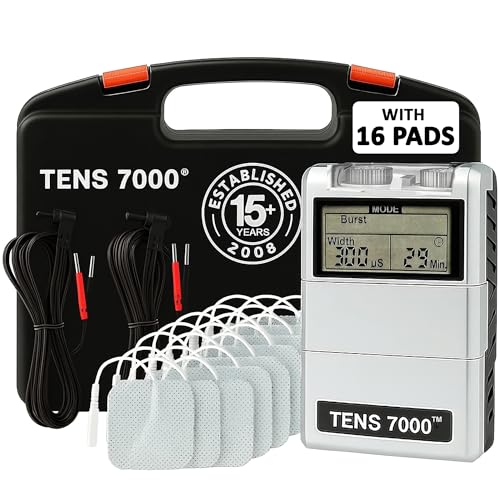
TENS 7000 Digital with 16 Electrodes pairs a digital TENS 7000 unit with a 16-pack of electrodes, making its included pad supply the key distinction. Its dimensions are 9 × 7.5 × 2 inches. The maker describes multiple settings and use for muscle stimulation and common pain areas; these are maker claims rather than a promise of benefit. Compared with the rechargeable version, this package emphasizes replacement electrodes rather than a rechargeable battery. Choose it if having extra pads on hand matters, and confirm the connector style is compatible with your intended setup.
Bottom line: Choose this if the included 16-pack of electrodes is more useful than rechargeable power.
How to Choose a TENS 7000 Unit
Choose by power source and electrode supply before comparing other features. A TENS device sends electrical pulses through adhesive skin electrodes; conventional TENS aims for a strong but comfortable tingling sensation, not painful stimulation. For a unit you expect to use away from a wall outlet, the rechargeable model is the only option here explicitly described with a built-in rechargeable battery. If you expect frequent pad replacement, compare included electrode counts instead. TENS output and comfort depend on settings, electrode contact, placement and individual sensitivity, so a high maximum output is not automatically a better fit. Do not use electrical stimulation while driving or operating machinery, and stop if use causes pain, irritation or an unexpected reaction.
Electrode Placement and Fit
Electrode placement determines which area receives stimulation, so follow the device instructions and keep pads on clean, dry skin. A common setup places two pads around, rather than directly on, the area being targeted; keep them separated and avoid placing electrodes across the chest, on the front or sides of the neck, or on the head. Do not place pads over broken or irritated skin. Pad size affects coverage: 2 × 2-inch electrodes cover a different area than larger pads, and the electrode product in this group is a 2 × 2-inch size. Check lead and connector compatibility before buying replacement pads, since compatible shapes and connections matter as much as the pad count.
TENS Unit Types and Included Accessories
The main difference among these TENS 7000 units is what comes with the device, not a proven difference in pain relief. One is a standard digital unit with accessories, one specifically adds rechargeable power and four electrodes, and one pairs a digital unit with a 16-electrode supply. Use this comparison to match the package to your routine rather than treating a larger pad count or higher output claim as a clinical ranking.
| Need | What to prioritize |
|---|---|
| Rechargeable power | Built-in rechargeable battery |
| Extra pads included | Higher electrode count |
| Simple standard unit | Digital unit with accessories |
For replacement pads, confirm connector compatibility and the dimensions you need; a 16-pack of 2 × 2-inch electrodes is a different purchase from a complete stimulator.
Safe TENS Use and Common Mistakes
Keep TENS electrodes away from the chest, front or sides of the neck, and head; incorrect placement can create avoidable risk. Do not use a TENS unit while driving, bathing or sleeping, and do not put pads on irritated or damaged skin. Start at a low setting and increase gradually only to a comfortable sensation; a stronger setting is not automatically more effective. People with implanted electronic devices such as pacemakers, or who are pregnant, should ask a healthcare professional before using electrical stimulation. Stop if the skin becomes painful or unusually irritated, and avoid sharing adhesive pads because skin oils and contamination can reduce adhesion and hygiene.
Frequently Asked Questions
How many TENS electrodes should I use at once?
Use the number and arrangement specified for your unit and treatment plan; a common basic setup uses two pads around the target area. More pads do not automatically mean better results, and they should not be positioned across the chest or on the head or neck.
Can I use a TENS unit every day?
Daily use is not automatically appropriate for everyone; session duration and frequency depend on the unit instructions and individual circumstances. Avoid using TENS while sleeping or driving, and stop if the skin becomes irritated.
Where should TENS pads not be placed?
Do not place electrodes across the chest, on the front or sides of the neck, or on the head. Avoid broken or irritated skin, and keep pads apart rather than letting them touch.
Do TENS electrode pads need to be replaced?
Replace pads when they no longer adhere evenly or have become dirty or damaged; poor contact can make stimulation uneven. Keep reusable pads clean according to their instructions, and verify lead connector compatibility before buying replacements.
Can I use TENS with a pacemaker?
Ask a healthcare professional before using TENS if you have a pacemaker or another implanted electronic device. Electrical stimulation can interfere with implanted devices, so do not assume a standard placement is safe for you.