
Verbatim USB Flash Drives: 4 Options Compared

For most people, Verbatim Store ‘n’ Stay Nano 32GB is the best fit because its USB 3.0 interface and low-profile shape suit devices where a drive can stay connected. Choose Verbatim Pinstripe 32GB 10-Pack instead for ten 32GB drives to distribute, or Verbatim Pinstripe 16GB 5-Pack for color-coded 16GB storage in a five-pack.
We earn a commission if you buy through links on this page. As an Amazon Associate I earn from qualifying purchases. Products are compared on manufacturer specifications, not hands-on testing.
- Best overall: Verbatim Store ‘n’ Stay Nano 32GB – USB 3.0 connectivity and a snag-free nano design make it suitable for a drive left plugged in.
- Best for bulk sharing: Verbatim Pinstripe 32GB 10-Pack – The pack contains ten individual 32GB USB 2.0 drives.
- Best for color coding: Verbatim Pinstripe 16GB 5-Pack – Five 16GB drives come in different colors for organizing files.
- Best for simple carry: Verbatim Slider 32GB – A retractable USB 2.0 connector protects the plug without a separate cap.
| Product | Best for | Capacity | USB interface | Pack size | Shop |
|---|---|---|---|---|---|
| Verbatim Store ‘n’ Stay Nano 32GB | Low-profile use | 32GB | USB 3.0 | 1 drive | Check Price on Amazon |
| Verbatim Pinstripe 32GB 10-Pack | Bulk distribution | 32GB each | USB 2.0 | 10 drives | Check Price on Amazon |
| Verbatim Pinstripe 16GB 5-Pack | Color-coded files | 16GB each | USB 2.0 | 5 drives | Check Price on Amazon |
| Verbatim Slider 32GB | Single retractable drive | 32GB | USB 2.0 | 1 drive | Check Price on Amazon |
Verbatim USB flash drives compared
Compare capacity, connector style, interface, and pack size to match a drive to how you store or share files.
Verbatim Store ‘n’ Stay Nano 32GB

Unlike the retractable models, this nano drive has a very short, low-profile body designed to stay connected without snagging easily. It provides 32GB of storage through a USB-A connector and works with compatible Windows, macOS, and Linux systems. Verbatim says the USB 3.0 interface supports fast transfers, but actual speed depends on the host port and files. This is a practical choice for a notebook or car stereo with a port that can remain occupied. Its small size also makes it easier to misplace than a larger drive.
Bottom line: Choose this when you want compact storage that can remain plugged in.
Verbatim Pinstripe 32GB 10-Pack
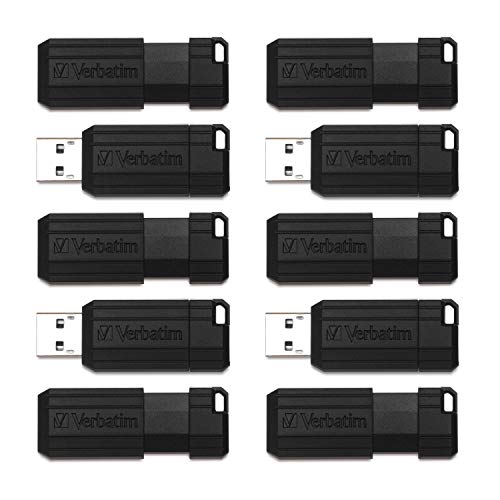
The ten-drive pack is the only option here built for distributing matching drives across a team, class, or event. Each black Pinstripe drive holds 32GB and has a retractable USB-A connector, so no separate cap is needed. The USB 2.0 interface suits routine document and presentation transfers on compatible devices. Downloadable password protection software is included as a feature, but password software does not replace keeping separate backups of important files. This pack is less useful when you need only one drive or want different colors to distinguish files.
Bottom line: Pick this when you need multiple matching 32GB drives for sharing.
Verbatim Pinstripe 16GB 5-Pack
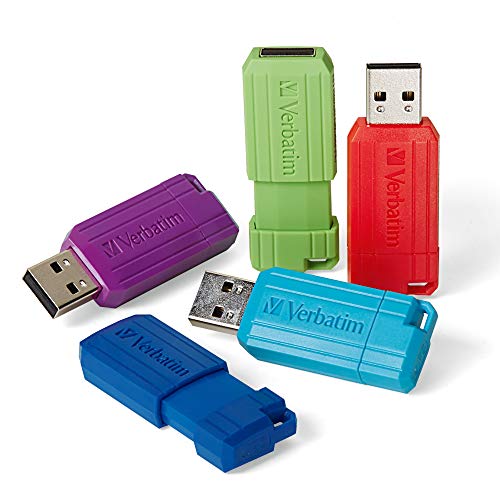
Five different colors distinguish this set from the black bulk pack, making it handy when separate drives need clear visual labels. Each retractable Pinstripe drive has 16GB capacity and a USB-A 2.0 connection; the sliding housing protects the plug without a loose cap. The slim, lightweight design is intended for everyday school or business storage and works with compatible Windows and Mac systems. The tradeoff is less capacity per drive than the 32GB options, so it may not suit larger video or archive collections.
Bottom line: Choose this set when color separation matters more than per-drive capacity.
Verbatim Slider 32GB

This is the straightforward single-drive choice: 32GB of storage, a black body, and a retractable USB-A connector. Unlike the nano model, the larger slider is easier to handle and less likely to disappear in a pocket, while still avoiding a separate cap. The USB 2.0 interface supports everyday file access and sharing on compatible devices. Verbatim backs it with a five-year warranty. The larger body can occupy more surrounding space than the nano drive, so check port clearance if adjacent ports are crowded.
Bottom line: Pick this if you want one easy-to-handle drive with a retractable connector.
Choosing a Verbatim USB flash drive
Start with how many drives you need, then compare capacity and connector style. A single 32GB drive suits routine documents and photos; a multi-pack makes sense when the goal is distributing separate copies. The nano model is the only one here specifically shaped to remain plugged in, while the Pinstripe and Slider models retract their connectors for carrying. USB generation is another distinction: USB 3.0 can transfer faster than USB 2.0 when both the drive and host port support the faster standard, but the USB 2.0 devices remain suitable for ordinary file handling. For large transfers, pick the fastest interface supported by the computer and avoid assuming a USB-A shape guarantees the same transfer rate.
USB 2.0 and USB 3.0 differences
USB 3.0 has a higher theoretical signaling rate than USB 2.0: 5 Gbps versus 480 Mbps. Real copying is slower and depends on the drive controller, port, file size, and computer; many small files take longer than one large file of the same total size. The two standards are designed for backward compatibility, so a USB 3.0 drive can generally operate in a USB 2.0 port at the slower rate. This comparison has USB 3.0 only on Verbatim Store ‘n’ Stay Nano 32GB, while the other options use USB 2.0. A simple rule: if transfers are frequent or large, prioritize USB 3.0 and a compatible port; for occasional documents, pack size or form factor may matter more.
| Need | Interface choice | Reason |
|---|---|---|
| Large or frequent transfers | USB 3.0, with a matching port | Higher interface ceiling |
| Occasional documents | USB 2.0 | Suitable for routine storage |
Choosing between retractable and nano designs
Retractable drives shield the connector inside the housing, while nano drives minimize how far the body protrudes from a port. A low-profile drive is useful when a laptop or car stereo port may stay occupied, but remove it before placing a device in a tight sleeve or bag where pressure could stress the connector. A larger retractable body is easier to grasp when plugging and removing it, and the slider design avoids the separate cap that can be lost. Measure available clearance around adjacent ports if a device has closely spaced sockets; with less than about 0.7 inch of free space beyond the port, the nano shape is the safer fit among these options.
Safe handling and file protection
USB flash drives are convenient transfer media, not a substitute for a backup: keep a second copy of important files on another device or storage medium. Safely eject a drive before removal when the computer is writing files, because unplugging during a write can corrupt data. Flash memory also has finite write endurance, so avoid using a thumb drive as the only home for frequently rewritten files. The 32GB Pinstripe pack includes downloadable password protection software, but encryption or a password cannot recover a lost or damaged drive; retain a separate backup and protect sensitive files before sharing a drive.
Frequently Asked Questions
Can a USB 3.0 Verbatim drive work in USB 2.0 ports?
Yes, USB 3.0 is designed for backward compatibility with USB 2.0. A 3.0 drive in a 2.0 port runs at the slower interface rate, so use a 3.0 port at both ends when transfer speed matters.
How much can a 32GB flash drive store?
A 32GB drive holds fewer than 32 billion bytes of user files after formatting and system overhead. The number of photos or documents depends on average file size, so check the total size of the files you plan to carry.
Should I safely eject a USB flash drive?
Yes, eject the drive before unplugging whenever files may still be writing. Wait until transfers finish; removing a drive during a write can corrupt files or the drive’s file system.
Are USB flash drives good for backing up files?
A flash drive can hold a backup copy, but it should not be the only copy. Keep important files in at least two separate places, since a small removable drive can be lost, damaged, or corrupted.
Can I leave a nano flash drive plugged into a car stereo?
A low-profile nano drive is designed to protrude less and reduce snagging, but check that the stereo port is compatible and the drive clears nearby controls. Remove it before a tight cover or object can press on the connector.