
Bluetooth Mouse Without Dongle: 3 Models Compared

The Logitech M240 is the named Bluetooth mouse without a dongle, and its compact ambidextrous shape and three buttons suit straightforward travel and everyday use. Choose another model if you want adjustable pointer sensitivity, additional side buttons, or a more sculpted grip.
Bluetooth mice connect directly to a computer’s Bluetooth radio, so they do not occupy a USB port with a receiver; confirm your device supports Bluetooth mouse input before choosing.
We earn a commission if you buy through links on this page. As an Amazon Associate I earn from qualifying purchases. Products are compared on manufacturer specifications, not hands-on testing.
- Best overall: Logitech M240 Compact – Compact, ambidextrous shape and dongle-free Bluetooth pairing.
- Best for DPI control: Lenovo WL310 Bluetooth Silent Mouse – Switches among three sensitivity settings: 1,000, 1,200 and 1,600 DPI.
- Best for extra buttons: wegear Sculpted Bluetooth Mouse – Six buttons include forward and back controls for browsing.
| Product | Best for | Buttons | Bluetooth | Shop |
|---|---|---|---|---|
| Logitech M240 Compact | Travel and quiet | 3 | Bluetooth | Check Price on Amazon |
| Lenovo WL310 Bluetooth Silent Mouse | DPI adjustment | — | Bluetooth 5.0 | Check Price on Amazon |
| wegear Sculpted Bluetooth Mouse | Browser shortcuts | 6 | Bluetooth 5.0 | Check Price on Amazon |
Bluetooth mouse without dongle options
These Bluetooth models connect without a USB receiver, with distinct shapes and controls to weigh against your workspace needs.
Logitech M240 Compact
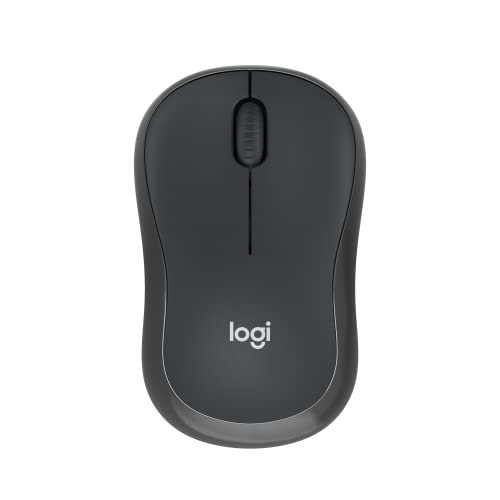
The M240 stands apart with an explicitly receiver-free connection and a compact, ambidextrous shape. It has three non-customizable buttons and quiet clicks; Logitech says click sound is reduced by 90% and battery life is up to 18 months with auto sleep. The small profile suits users who carry a mouse or switch between right- and left-handed use. Its fixed button set and lack of adjustable DPI may matter to users who want programmable controls or sensitivity changes. The mouse measures about 3.9 inches long by 2.4 inches wide.
Bottom line: Choose this for a compact, simple Bluetooth mouse with quiet clicks.
Lenovo WL310 Bluetooth Silent Mouse

The WL310 differs from the compact Logitech with three selectable DPI settings, letting you choose 1,000, 1,200 or 1,600 DPI. Lenovo describes the mouse as ergonomic and silent-click, with Bluetooth 5.0 pairing and compatibility with Windows, Mac and Chromebook. Its 4.2-inch length and 2.5-inch width provide a larger footprint than the M240, which can suit a desk setup better than a small travel mouse. The shape description does not establish handedness, so buyers who need a left-hand-specific or ambidextrous form should verify the fit before ordering.
Bottom line: Choose this if changing among three DPI settings matters more than a smaller footprint.
wegear Sculpted Bluetooth Mouse

The wegear mouse is the only option here with six buttons, including forward and back controls that can speed up browser navigation. Its sculpted grip contrasts with the ambidextrous M240, while Bluetooth 5.0 and Microsoft Swift Pair are listed for pairing. The left, right and scroll-wheel clicks are described as quiet, and the mouse is medium-sized. The controls do not provide a DPI range or a battery-life figure, unlike some competing feature combinations; buyers who need a specific pointer sensitivity or runtime should verify those before choosing.
Bottom line: Choose this for a sculpted grip and dedicated browser navigation buttons.
How to choose a Bluetooth mouse without a dongle
Choose first by your computer’s Bluetooth support, then by hand fit and controls. Bluetooth mice pair with a host device’s built-in radio rather than a USB receiver; Bluetooth versions can differ, but devices generally negotiate a compatible connection when their profiles and operating systems support the mouse. A mouse’s DPI changes pointer distance per inch of movement: higher DPI moves farther on screen for the same hand motion, while screen resolution and personal preference affect the useful setting. For travel, compare physical length and width with the space in your bag; for desk use, prioritize grip shape and button layout. The M240 is compact and ambidextrous, the WL310 offers three DPI settings, and wegear adds side navigation buttons.
One practical rule: if your computer has no working Bluetooth radio, a receiver-free mouse cannot connect directly, so choose a different connection type or add Bluetooth capability.
Bluetooth versions and pairing fit
Bluetooth 5.0 is backward-compatible with earlier Bluetooth versions, but the host still needs Bluetooth support and a compatible mouse profile. Pairing normally requires putting the mouse into pairing mode and selecting it in the computer’s Bluetooth settings; subsequent connections usually happen automatically when both devices are on and in range. The Logitech M240 is identified as Bluetooth, while the Lenovo WL310 and wegear specify Bluetooth 5.0; all three are intended to work without a USB receiver. Operating-system compatibility is explicit for the Logitech and Lenovo, while the wegear specifications identify laptop, PC and Mac use. For shared computers, remove an old pairing from the host when troubleshooting a mouse that will not reconnect.
Mouse shape, buttons and pointer control
Shape and controls change how a mouse suits the hand and task. An ambidextrous body can work for either hand, while a sculpted profile may favor a particular grip; check the contour in relation to your hand size and natural wrist angle. Three buttons cover basic pointer and scroll tasks, whereas forward and back buttons can reduce repeated browser navigation. DPI is not the same as screen resolution: it describes how far the pointer moves relative to physical mouse movement. Compare the selectable values rather than assuming a mouse with a higher maximum is automatically more precise. Avoid gripping tightly or bending the wrist sharply during long sessions; reposition the mouse so the forearm and hand remain aligned.
Quiet clicks and battery expectations
Quiet-click labels concern button sound, not whether every movement or scroll is silent. Logitech says the M240 reduces click sound by 90% and has up to 18 months of battery life with auto sleep; the wegear fields describe quiet left, right and scroll-wheel buttons. Battery life depends on usage, power management and battery type, so treat a maker’s maximum as an estimate rather than a guaranteed interval. Wireless mice also need a usable battery and unobstructed access to the controls; keep a replacement battery available if the mouse is essential for work. For a noise-sensitive shared room, prioritize explicit quiet-click information, then check whether the scroll wheel and side buttons matter to your use.
Frequently Asked Questions
Can a Bluetooth mouse work without a USB receiver?
Yes, a receiver-free Bluetooth mouse pairs with the computer’s built-in Bluetooth radio. The computer must support Bluetooth mouse input; without that radio, the mouse cannot connect directly.
Does Bluetooth 5.0 mouse work with older computers?
Bluetooth 5.0 is designed to interoperate with earlier Bluetooth versions, but an older computer still needs a compatible Bluetooth radio and mouse support. Check whether Bluetooth is enabled if pairing does not appear.
What DPI should I use for a Bluetooth mouse?
A useful DPI depends on hand movement and screen setup, not just the maximum number. The Lenovo’s settings of 1,000, 1,200 and 1,600 DPI give three sensitivity choices; start at the middle setting and adjust for comfortable pointer travel.
Are silent Bluetooth mice completely noiseless?
No; quiet-click claims refer to button sound and do not guarantee silence from scrolling or movement. If shared-room noise is a concern, confirm which buttons are covered by the quiet-click feature.
How often should I replace a wireless mouse battery?
Battery intervals vary with use and power management. Logitech says the M240 can run up to 18 months with auto sleep, but keep a replacement ready if uninterrupted use is important.