
Gamenetics PS4 Mouse Click Buttons and Triggers

No Gamenetics kit is included here; among the PS4 options, eXtremeRate Clicky Hair Trigger Kit, Black is the closest fit for shorter trigger travel, with a 1.5 mm distance. Choose eXtremeRate Whole Tactile Clicky Kit instead if you want a kit that also covers face buttons and the D-pad.
These kits replace internal controller flex cables and buttons, so check your controller’s model before choosing; the PS5 kit and standalone controller are different products.
We earn a commission if you buy through links on this page. As an Amazon Associate I earn from qualifying purchases. Products are compared on manufacturer specifications, not hands-on testing.
- Best overall: eXtremeRate Clicky Hair Trigger Kit, Black – Its maker says the kit shortens trigger travel to 1.5 mm.
- Best for tactile feel: eXtremeRate Tactile Hair Trigger Kit, Blue – Its silicon tact switches pair tactile clicks with a 3 mm trigger distance.
- Best for wider button coverage: eXtremeRate Whole Tactile Clicky Kit – The whole-kit design includes shoulder, face-button, and D-pad controls.
| Product | Best for | Trigger distance | Coverage | Shop |
|---|---|---|---|---|
| eXtremeRate Clicky Hair Trigger Kit, Black | Short trigger travel | 1.5 mm | Shoulder triggers | Check Price on Amazon |
| eXtremeRate Tactile Hair Trigger Kit, Blue | Tactile trigger clicks | 3 mm | Shoulder triggers | Check Price on Amazon |
| eXtremeRate Whole Tactile Clicky Kit | Whole-button changes | — | Shoulders, face buttons, D-pad | Check Price on Amazon |
PS4 Mouse Click Buttons and Triggers
Match the kit to your controller generation first, then choose by trigger travel or button coverage.
eXtremeRate Clicky Hair Trigger Kit, Black
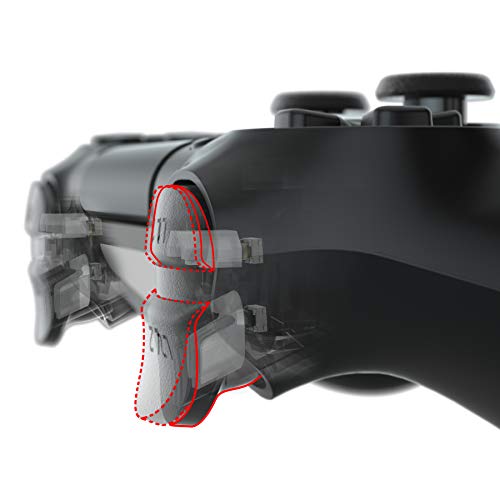
For the shortest trigger distance among these PS4 kits, eXtremeRate Clicky Hair Trigger Kit, Black is the shoulder-button option. The maker says its built-in buttons shorten trigger travel to 1.5 mm; the kit includes a conductive flex cable, FPC board, screwdrivers, and spare screws. It is designed for PS4 Gen 2 CUH-ZCT2 controllers with JDM-040, JDM-050, or JDM-055 boards. This suits players prioritizing quick trigger actuation over broader button changes. Installation requires opening the controller, and the controller and trigger parts are not included, so it is not a complete replacement controller.
Bottom line: Pick it if your controller matches and shorter trigger travel is the priority.
eXtremeRate Tactile Hair Trigger Kit, Blue

Unlike the shorter-travel alternative, eXtremeRate Tactile Hair Trigger Kit, Blue specifies a 3 mm trigger distance and uses silicon tact switches for a tactile mouse-click feel. The maker says the custom flex cable shortens trigger distance; the package includes the cable and an FPC board with built-in buttons. Compatibility is limited to PS4 Gen 2 CUH-ZCT2 controllers with JDM-040, JDM-050, or JDM-055 boards. This is a focused choice for shoulder-button changes rather than a whole-button conversion. The controller must be taken apart for installation, and the kit does not cover the face buttons or D-pad.
Bottom line: Pick it if you want tactile shoulder clicks and a 3 mm trigger distance.
eXtremeRate Whole Tactile Clicky Kit

For broader button coverage, eXtremeRate Whole Tactile Clicky Kit extends beyond shoulder triggers to face buttons and the D-pad. Its custom whole tactile cable is designed to shorten bumper-trigger stop distance and change face-button response; the maker says silicon tact switches provide the clicky feel. Compatibility is for PS4 Gen 2 CUH-ZCT2 controllers with JDM-040, JDM-050, or JDM-055 boards. This is the fit when you want one kit for several control areas rather than a trigger-only modification.
Bottom line: Pick it if changing face buttons and the D-pad matters alongside shoulder controls.
How to choose a PS4 clicky trigger kit
Start with controller compatibility, then compare the button areas and trigger distance. These kits target PS4 Gen 2 CUH-ZCT2 controllers and name JDM-040, JDM-050, and JDM-055 board models; a PS4 console or controller label alone may not tell you the internal board revision. The trigger-only options give a distance of 1.5 mm or 3 mm, while the whole-button kit does not give a numeric distance. Choose a shoulder-only kit if you want to modify L1/R1 or L2/R2 controls without changing face buttons. Choose a whole-button kit if you also want the face buttons and D-pad included. A kit is not a complete controller.
How to check PS4 controller compatibility
Check the controller’s internal JDM board code before installing a kit; the named compatible codes here are JDM-040, JDM-050, and JDM-055. PS4 Gen 2 CUH-ZCT2 is the controller family, but matching the generation does not replace checking the board revision. The model number may require opening the controller to inspect its board, so confirm compatibility before starting a disassembly. A mismatch can leave the flex cable or button layout incompatible, even when the controller is made for the same console family.
Trigger distance and button coverage compared
Choose by the modification you want rather than by the word “clicky” alone. A shorter trigger distance means less movement before actuation according to the kit descriptions, while a whole-button kit changes more control areas. This table separates the trigger distances from the coverage differences.
| Need | Choose |
|---|---|
| Shortest trigger distance | eXtremeRate Clicky Hair Trigger Kit, Black — 1.5 mm |
| Tactile triggers with 3 mm distance | eXtremeRate Tactile Hair Trigger Kit, Blue |
| Shoulders plus face buttons and D-pad | eXtremeRate Whole Tactile Clicky Kit |
Neither trigger distance indicates the force needed to press a button, and the whole-kit option gives no numeric travel figure. Treat those as separate specifications when comparing control feel.
Installation and mistakes to avoid
These internal kits require opening the controller and replacing a flex cable or built-in button assembly; they are not external clip-on accessories. Work with the controller disconnected and keep screws organized during disassembly, since small fasteners and ribbon connections can be damaged by force. Use the kit’s model-specific installation guidance and confirm the board revision first. A common mistake is buying by console generation alone, then discovering that the controller’s JDM board does not match. Another is choosing a shoulder-only kit when the desired changes include face buttons or the D-pad. If you are not comfortable opening a controller, choose a modification that does not require internal installation.
Frequently Asked Questions
How do I find my PS4 controller model?
Check the controller’s model and internal board markings; the compatible board codes for these kits are JDM-040, JDM-050, and JDM-055. You may need to open the controller to verify the JDM code, so confirm the fit before installing.
What does a 1.5 mm trigger distance mean?
A 1.5 mm distance is the trigger travel for the clicky kit before actuation. It is a travel measurement, not a measure of press force or a guarantee of faster gameplay.
Can I use a PS4 clicky kit on a PS5 controller?
No; the PS4 kits here are specified for PS4 Gen 2 CUH-ZCT2 controllers with particular JDM boards. PS5 controllers use different model codes and internal layouts, so choose parts made for the exact controller model.
Do clicky trigger kits change the face buttons?
Shoulder-only kits focus on trigger controls, while a whole-button kit covers shoulders, face buttons, and the D-pad. Choose based on which control areas you intend to modify.
Does installing a clicky kit require opening the controller?
Yes, the installation described for these kits requires taking the controller apart and replacing internal parts. Disconnect the controller first and avoid forcing ribbon connectors or small fasteners during disassembly.