
Earphones for Galaxy S22: 5 USB-C and Wireless Picks

USB-C Wired Earbuds with Volume Control suits most Galaxy S22 owners who want wired USB-C earbuds with a microphone and volume control. Choose a different option if you want Bluetooth freedom, or if a different control set or in-ear design better fits your routine.
The Galaxy S22 has a USB-C port rather than a 3.5 mm headphone jack, so wired earbuds need a USB-C plug or a compatible adapter.
We earn a commission if you buy through links on this page. As an Amazon Associate I earn from qualifying purchases. Products are compared on manufacturer specifications, not hands-on testing.
- Best overall: USB-C Wired Earbuds with Volume Control – USB-C wired earbuds with a microphone and volume control.
- Best for wireless use: Bluetooth Earbuds with LED Case Display – Bluetooth earbuds with a charging case and claimed 60-hour total playback.
- Best for magnetic storage: AILZPXX Magnetic USB-C Earbuds – Wired USB-C earbuds with magnetic earpieces and an in-ear design.
| Product | Best for | Connection | Microphone | Controls or design | Shop |
|---|---|---|---|---|---|
| USB-C Wired Earbuds with Volume Control | Wired daily listening | USB-C wired | Built-in mic | Volume control | Check Price on Amazon |
| BENEWY USB-C Headphones | DAC-equipped wired audio | USB-C wired | Built-in mic | Volume control | Check Price on Amazon |
| AILZPXX Magnetic USB-C Earbuds | Magnetic storage | USB-C wired | Built-in mic | Magnetic earpieces | Check Price on Amazon |
| Bluetooth Earbuds with LED Case Display | Wireless listening | Bluetooth wireless | Built-in mic | LED case display | Check Price on Amazon |
| USB-C Wired Earbuds with Microphone | Broad USB-C compatibility | USB-C wired | Microphone | — | Check Price on Amazon |
Earphones for Galaxy S22
Compare these Galaxy S22-compatible options by connection type, call features and fit-related design.
USB-C Wired Earbuds with Volume Control
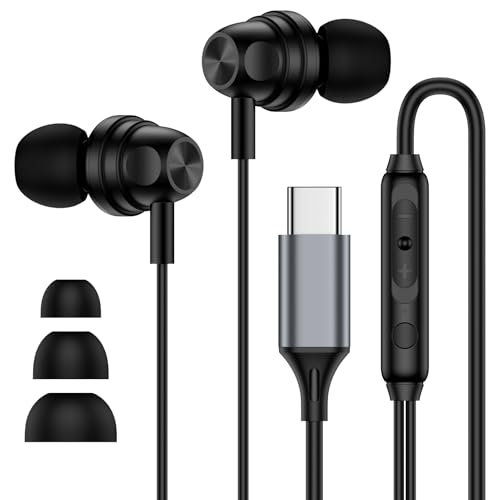
USB-C Wired Earbuds with Volume Control is a straightforward wired choice for Galaxy S22 owners who want both a microphone and volume control. The USB-C plug connects to the phone’s charging port, and the package offers S, M and L size options. The maker lists the S22 among compatible devices, along with other USB-C phones. This is a practical fit for calls and listening without Bluetooth pairing or a charging case. The limitation is the cable: choose another option if you want to move around without a wire or need a different control set.
Bottom line: Pick these if you want wired listening with call and volume controls.
BENEWY USB-C Headphones
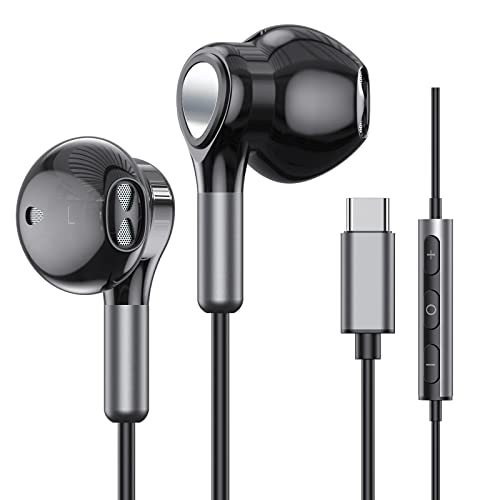
BENEWY USB-C Headphones stands apart by identifying a built-in DAC chip, alongside a microphone and volume control. The maker says the chip reduces sound-transfer loss; the earbuds use a USB-C connection and include the Galaxy S22 in their compatibility range. That makes them worth considering for a buyer who prefers a wired connection and wants the DAC called out as a feature. They do not offer the cable-free use of Bluetooth earbuds, and the specifications do not establish how the DAC compares with the phone’s audio hardware.
Bottom line: Choose these if a wired USB-C connection and built-in DAC matter to you.
AILZPXX Magnetic USB-C Earbuds
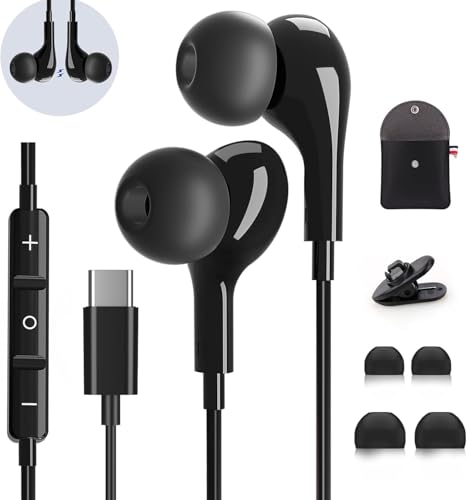
AILZPXX Magnetic USB-C Earbuds adds magnetic earpieces to the wired USB-C format, a design distinction for keeping the earbuds together when not in use. The product name also identifies a microphone and stereo sound, and the maker lists Galaxy S22 models among compatible USB-C devices. Choose this set if you prefer in-ear wired earbuds and magnetic storage over a charging case. The specifications do not give an ear-tip size range, so buyers who need a particular fit should confirm the available tip sizes before ordering.
Bottom line: Pick these if magnetic earpieces are useful for storage between listens.
Bluetooth Earbuds with LED Case Display
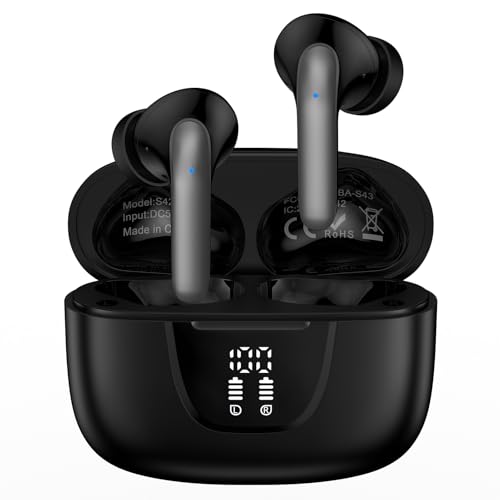
Bluetooth Earbuds with LED Case Display is the wireless alternative here, pairing by Bluetooth instead of occupying the S22’s USB-C port. The maker says the earbuds provide up to 6 hours on one charge and up to 60 hours total with the case; a dual LED display shows remaining power for the earbuds and case. A 13 mm dynamic driver is also named. These claimed runtimes suit buyers who want a case-based setup, but wireless use requires keeping the earbuds and case charged, unlike wired options.
Bottom line: Choose these if you want Bluetooth listening and a case with a battery display.
USB-C Wired Earbuds with Microphone

USB-C Wired Earbuds with Microphone is another USB-C wired option, with an extensive compatibility range that includes the Galaxy S22 and a built-in microphone with remote control identified in its features. Its broad device range may suit someone who uses the same wired earbuds with more than one USB-C phone or tablet. The specifications do not establish a specific remote function set, so do not assume that it offers the same volume controls as other choices. The wired format also means a cable remains attached during use.
Bottom line: Pick these if you want a USB-C set with a mic and remote for multiple devices.
Choosing wired or Bluetooth earphones for Galaxy S22
Choose wired USB-C earbuds if you want a direct connection without charging another device; choose Bluetooth if you want to listen without a cable. The Galaxy S22 uses USB-C for charging and wired audio rather than a built-in 3.5 mm headphone jack, so a wired set needs a USB-C plug or an appropriate adapter. Bluetooth earbuds need to be paired and their batteries charged. A simple decision rule is to choose wired if you regularly listen near the phone and want to avoid battery upkeep; choose wireless if cable movement is a nuisance. For calls, compare microphone and remote-control features separately: a mic does not guarantee that every playback or call command is supported.
USB-C earbud fit and compatibility
USB-C describes the connector shape, but it does not guarantee that every headset works with every phone; audio support and controls can vary by device. These products name the Galaxy S22 as compatible, but buyers who depend on a particular remote command should confirm that function before ordering. In-ear fit also affects comfort and how securely earbuds stay put: many designs include multiple ear-tip sizes, and a snug fit should not feel painful. Only one option here gives S, M and L sizes. For a fit-sensitive purchase, prioritize a range of tip sizes over assuming that a generic in-ear shape will suit everyone.
Wired and wireless earphone differences
Wired USB-C earbuds draw their connection through the phone port and avoid maintaining a separate earbud battery; Bluetooth earbuds trade that cable for pairing and charging. Use this quick comparison to narrow the format before choosing controls or fit.
| Need | Better match | Trade-off |
|---|---|---|
| No separate earbud charging | USB-C wired | Cable stays attached |
| Listen without a cable | Bluetooth | Charge earbuds and case |
| Volume adjustment on earbuds | Wired option naming volume control | Remote functions differ by model |
Connector and feature claims should be considered separately: USB-C compatibility does not by itself tell you which remote controls work, while a Bluetooth label does not establish battery life. Check the specific feature that matters most to your routine.
Using and caring for Galaxy S22 earphones
Keep wired earphones unplugged by gripping the connector rather than pulling the cable, which reduces stress at the plug and cable joint. Store earbuds dry and away from sharp objects; moisture resistance should never be assumed without an explicit rating. For Bluetooth models, return the earbuds to the case when not in use and keep the case charged so it can replenish them. Clean ear tips gently with a dry, soft cloth and remove detachable tips before cleaning if the design allows it. Avoid inserting anything sharp into speaker openings, and lower the volume before putting earbuds in your ears.
Frequently Asked Questions
Can Galaxy S22 use USB-C wired earphones?
Yes, a USB-C wired headset can connect through the phone’s USB-C port, provided the headset supports audio on the device. The Galaxy S22 does not have a built-in 3.5 mm headphone jack.
Do USB-C earphones need to be charged?
Passive wired USB-C earphones generally do not need a separate battery charge, while Bluetooth earbuds do. Check whether a particular wired model includes electronics that require power before relying on that distinction.
Will earphone volume controls work with Galaxy S22?
Volume controls can depend on the headset’s remote design and device compatibility, so a volume-control claim alone does not guarantee every remote command works. Confirm the exact control functions if you rely on track skipping or call commands.
How should in-ear earbuds fit comfortably?
A well-fitting ear tip should seal the ear canal without pain or pressure. Try different included tip sizes, and take a break if discomfort develops rather than forcing an oversized tip.
How often should I clean earphone ear tips?
Wipe ear tips after heavy or sweaty use and clean them regularly with a soft, dry cloth. Keep moisture out of speaker openings unless the earphones have a water-resistance rating.