
Fellowes DM12C Paper Shredder: Models Compared

The Fellowes DM12C is the 12-sheet P-4 cross-cut model, suited to routine home-office batches; choose a larger-capacity alternative if you shred more sheets at once or need autofeed.
Paper shredders cut documents into strips or particles; security level, sheet capacity and cooldown time help determine which model fits your workload.
We earn a commission if you buy through links on this page. As an Amazon Associate I earn from qualifying purchases. Products are compared on manufacturer specifications, not hands-on testing.
- Best overall: Fellowes Powershred 12-Sheet Cross-Cut – Its 12-sheet capacity, P-4 cross-cut output and 20-minute run time suit routine home-office batches.
- Best for autofeed: Fellowes AutoMax 100MA – The auto-feed tray handles up to 100 sheets, with manual feed also available.
- Best for larger batches: Fellowes Powershred 99Ci 18-Sheet – Its 18-sheet pass capacity is the highest among these cross-cut options.
| Product | Best for | Sheets per pass | Cut type | Bin capacity | Shop |
|---|---|---|---|---|---|
| Fellowes Powershred 12-Sheet Cross-Cut | Home-office batches | 12 sheets | Cross-cut, P-4 | 5 gallons | Check Price on Amazon |
| Fellowes Powershred 99Ci 18-Sheet | Larger batches | 18 sheets | Cross-cut, P-4 | — | Check Price on Amazon |
| Fellowes AutoMax 100MA | Autofeed sessions | 100 sheets auto; manual feed | Micro-cut, P-4 | 4.5 gallons | Check Price on Amazon |
| Fellowes 14C10 14-Sheet Cross-Cut | Quiet desk use | 14 sheets | Cross-cut, P-4 | 5 gallons | Check Price on Amazon |
| Fellowes P-40C 8-Sheet Cross-Cut | Small workloads | 8 sheets | Cross-cut, P-4 | 4 gallons | Check Price on Amazon |
Fellowes DM12C Paper Shredders
Compare the matching 12-sheet cross-cut shredder with related Fellowes models by capacity, cut format and workload.
Fellowes Powershred 12-Sheet Cross-Cut

The 12-sheet cross-cut model is the closest match to the DM12C search: it combines P-4 output with a 20-minute continuous run time. It shreds paper, staples, paper clips, credit cards and unopened junk mail, and its 5-gallon pull-out bin contains the waste. The Safety Lock can disable the shredder when it is not in use. This model suits a home office with occasional larger batches, but its 12-sheet feed limit is less suited to frequent jobs that call for processing more sheets at once.
Bottom line: Choose this for a home office that needs P-4 cross-cut shredding and batches of up to 12 sheets.
Fellowes Powershred 99Ci 18-Sheet

The 99Ci accepts 18 sheets per pass, six more than the matching 12-sheet model, while retaining P-4 cross-cut output. It also handles staples, credit cards, paper clips, CDs/DVDs and junk mail, and SafeSense automatically disables the shredder when hands or paws touch the opening. That wider media range and higher capacity suit a busy shared workspace. The trade-off is its larger, heavier footprint: it weighs 36.38 pounds and measures 25.19 inches high, so it is less convenient to move or tuck beside a small desk.
Bottom line: Choose this when higher sheet capacity and SafeSense matter more than a compact footprint.
Fellowes AutoMax 100MA

The AutoMax 100MA stands apart with an auto-feed tray for up to 100 sheets, alongside a manual feed opening. The maker says auto feed can shred that stack in 5 minutes; manual operation runs continuously for up to 7 minutes, while auto feed runs up to 10 minutes. Its P-4 micro-cut output is a different cut format from the cross-cut DM12C, and it also handles credit cards, paper clips and staples through manual feed. The 4.5-gallon bin is smaller than the matching model’s bin, which matters if you want less frequent emptying.
Bottom line: Choose this for hands-off batches and a micro-cut format rather than a standard cross-cut feed.
Fellowes 14C10 14-Sheet Cross-Cut
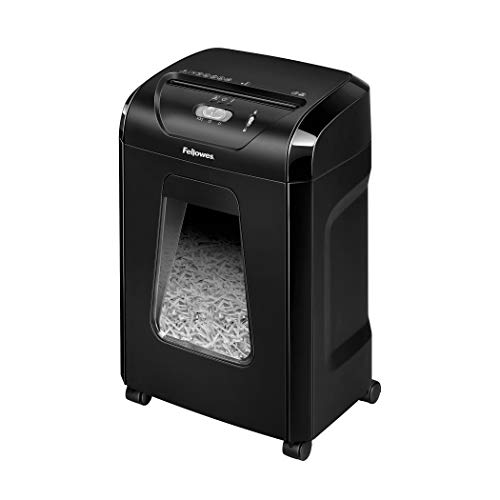
The 14C10 raises pass capacity to 14 sheets while keeping P-4 cross-cut output and a 5-gallon pull-out bin. It handles credit cards, paper clips, staples and unopened junk mail, and includes a Safety Lock to disable the machine. Quiet operation is a distinguishing feature for a shared room or home workspace where noise matters. The maker gives no run-time figure, so buyers planning long, uninterrupted sessions should confirm the operating cycle before choosing it over a model with a run time.
Bottom line: Choose this for a quieter desk-side setup with a little more per-pass capacity.
Fellowes P-40C 8-Sheet Cross-Cut
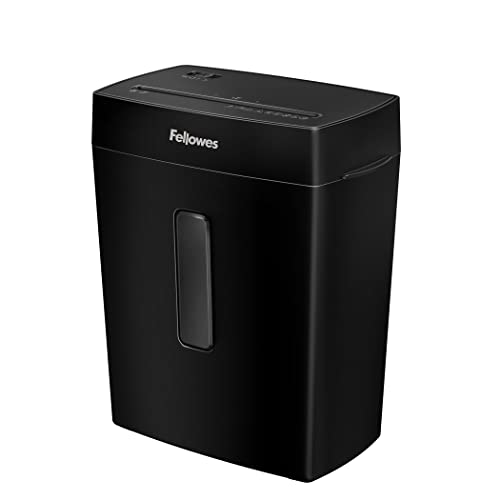
The P-40C is the smallest-capacity choice here, feeding up to 8 sheets per pass and producing P-4 cross-cut particles. Its Rapid Reverse feature is designed to clear jams, and it shreds staples and credit cards as well as paper. The operating cycle is up to 3 minutes of shredding followed by a 30-minute cooldown, a constraint that makes it better for short, occasional jobs than a sustained stack. Its 4-gallon bin is also smaller than the 5-gallon bins on the 12-sheet and 14-sheet choices.
Bottom line: Choose this for occasional short batches when an 8-sheet limit is sufficient.
How to choose a Fellowes paper shredder
Choose by security level, sheet capacity and duty cycle rather than sheet count alone. P-4 is a cross-cut security level under DIN 66399; its maximum particle area is 160 square millimeters. A larger sheet-per-pass rating can reduce the number of feeds, but actual throughput also depends on paper weight and how often the machine needs to cool. For a few documents at a time, an 8- to 12-sheet feed may be adequate; for repeated stacks, prioritize a longer stated run cycle or auto feed. If you shred confidential records, select at least P-4; choose a higher security level when your organization’s policy or the sensitivity of the documents calls for it.
Cross-cut versus micro-cut shredders
Cross-cut and micro-cut describe how a shredder reduces paper, while the P-level gives a security classification. Cross-cut shredders cut paper in two directions into short particles; micro-cut produces finer particles. The exact cut size still matters, so compare the dimensions rather than relying on the cut-style label alone. DIN 66399 places paper security levels from P-1 through P-7, with higher numbers representing smaller permitted particles. For ordinary confidential office documents, P-4 is a common selection; highly sensitive material may call for a higher level under workplace policy. More secure particle sizes can also mean slower feeding, so balance privacy needs with batch volume.
| Need | Selection cue |
|---|---|
| Routine confidential paperwork | P-4 or higher, based on policy |
| Large stack with little hand-feeding | Auto-feed capacity and cycle time |
| Frequent multi-user batches | Higher sheet capacity and suitable run cycle |
Shredder capacity and cooldown planning
Plan around both feed capacity and continuous run time: a machine that accepts more sheets at once may still need a cooldown sooner than another model. Treat the sheet rating as a maximum per pass, not a guarantee of speed with every paper stack. Avoid forcing a thick bundle into the feed, and remove staples or clips unless the model explicitly accepts them. For household or small-office use, divide a large backlog into sessions that fit the maker’s run cycle and cooldown. If the shredder will be used by multiple people, a pull-out bin can make emptying simpler, but capacity in gallons does not directly tell you how many sheets it will hold.
Safe placement and shredder upkeep
Keep fingers, loose clothing, hair and cords away from the feed opening; safety features are not a substitute for supervision. Place the shredder on a stable, level surface with room around its vents so heat can escape, and keep it away from liquids. Unplug it before clearing a jam or servicing the cutting area. Paper dust and adhesive residue can build up on cutters, so use shredder oil made for the machine when maintenance is due; avoid aerosol lubricants unless the manual allows them. Check the manual for compatible media and maintenance intervals, since accepting staples or cards does not mean every model can shred every non-paper item.
Frequently Asked Questions
What does P-4 mean on a paper shredder?
P-4 is a paper security level in the DIN 66399 classification, with a maximum particle area of 160 square millimeters. It is commonly used for confidential office paperwork, while more sensitive material may warrant a higher level under workplace policy.
How many sheets should I feed into a shredder?
Stay at or below the model’s per-pass sheet rating; the matching Fellowes model here is rated for 12 sheets. Thick, folded or damp paper can feed differently, so do not force a jammed stack through.
How long can a paper shredder run continuously?
Run time is model-specific: the matching 12-sheet shredder is rated for up to 20 minutes, while the P-40C runs up to 3 minutes before a 30-minute cooldown. Let the motor cool according to the model’s cycle rather than running it continuously beyond that limit.
Can paper shredders cut credit cards and staples?
Some can, but media compatibility varies by model. Check the model’s accepted materials before feeding a credit card, paper clip, staple, disc or junk mail; never assume a paper-only machine can handle them.
How often should I oil a paper shredder?
Oil the cutters when the manufacturer’s maintenance schedule calls for it or when performance indicates lubrication is due. Use shredder oil made for the machine, and unplug it before servicing or clearing a jam.