
Thermalright Frozen Prism 240: Black and White Compared

Choose the Thermalright Frozen Prism 240 Black if you want a black 240mm cooler with two PWM fans; the white model is the alternative for a light-colored build and specifies two 120mm fans.
AIO liquid coolers circulate coolant through a radiator and CPU block, so confirm your case supports a 240mm radiator and your motherboard socket is on the cooler’s compatibility list before ordering.
We earn a commission if you buy through links on this page. As an Amazon Associate I earn from qualifying purchases. Products are compared on manufacturer specifications, not hands-on testing.
- Best overall: Thermalright Frozen Prism 240 Black – The black 240mm variant specifies two PWM fans and identifies an efficient PWM-controlled pump.
- Best for white builds: Thermalright Frozen Prism 240 White ARGB – The white version specifies two 120mm PWM fans rated to 1,850 RPM.
| Product | Best for | Color | Fan setup | Compatibility | Shop |
|---|---|---|---|---|---|
| Thermalright Frozen Prism 240 Black | Black builds | Black | 2× TL-E12 PWM | AM4/AM5; Intel 1150/1156/1200/1700/20XX | Check Price on Amazon |
| Thermalright Frozen Prism 240 White ARGB | White builds | White | 2× 120mm PWM, 1,850 RPM | AM4/AM5; Intel LGA1150/1151/1200/1700/1851 | Check Price on Amazon |
| Thermalright Frozen Prism 240 Black ARGB | ARGB appearance | Black | 120mm ARGB PWM fan | AMD AM4/AM5; Intel | Check Price on Amazon |
Thermalright Frozen Prism 240 coolers
Compare these Frozen Prism 240 variants by finish, fan configuration and listed socket fit.
Thermalright Frozen Prism 240 Black
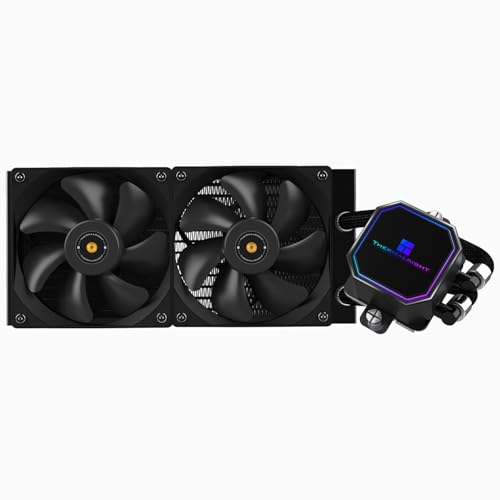
The black Frozen Prism 240 pairs a 240mm cooler with two TL-E12 V2 PWM fans, while its pump is described as reaching 2,800 RPM ±10%. The pump uses a magnetic removable top cover and an aluminum-alloy shell; the water-block life is 40,000 hours. This version suits a black build where fan speed can respond to CPU temperature. Its compatibility list differs from the other variants, so check the exact socket—particularly if your Intel board uses LGA 1851 or 1151—before choosing it.
Bottom line: Choose this version for a black build and a two-fan PWM setup.
Thermalright Frozen Prism 240 White ARGB

The white Frozen Prism 240 is the color-matched option and specifies two 120mm PWM fans with a maximum speed of 1,850 RPM. Its construction includes a copper-base water block, aluminum radiator fins and polymer-woven coolant tubes; the pump has 5V ARGB lighting and a removable magnetic top. The wide Intel socket coverage, including LGA 1851, is useful for newer builds. Fan speed alone does not establish cooling performance, and the white finish may not suit a dark, color-coordinated case.
Bottom line: Pick this for a white build or an Intel LGA 1851 socket.
Thermalright Frozen Prism 240 Black ARGB

The first black variant stands apart by explicitly pairing a 120mm ARGB PWM fan with the Frozen Prism 240 name. Its pump has a magnetic removable top cover, octagonal styling and 5V ARGB lighting. This is a fit for buyers prioritizing synchronized lighting and listed support for LGA 1851, 1700 or the other named sockets. The dimensions are approximately 4.72 inches high and wide, but do not establish radiator clearance; check your case’s 240mm radiator mounting space before selecting an AIO.
Bottom line: Choose it when black ARGB styling and the socket fit are priorities.
How to choose a 240mm AIO cooler
A 240mm AIO is built around a radiator that uses two 120mm fan positions, but case support depends on the mounting location and clearance. Check the case manual for a 240mm radiator fit, then allow room for radiator thickness plus fans; the specifications here do not give a complete mounted thickness. A front mount can compete with graphics-card length, while a top mount can conflict with motherboard heatsinks or memory. Match the cooler’s socket list to the exact motherboard socket rather than relying on processor brand alone.
Socket fit and radiator clearance
Socket compatibility and physical fit are separate checks: a socket match does not guarantee that a radiator fits the case. The variants here identify AMD AM4 and AM5, with Intel coverage varying across LGA 1150, 1151, 1156, 1200, 1700, 1851 and 20XX. Confirm the exact socket entry for the model you choose, and check whether the case has room for a 240mm radiator at the top or front. Also verify RAM and motherboard-heatsink clearance at the intended location; those dimensions are case-specific. Before installation, use the socket mounting hardware and follow the cooler maker’s mounting sequence so the block makes even contact with the CPU.
ARGB and PWM differences
PWM fans use a four-pin control signal to vary fan speed, while ARGB lighting typically uses a separate 5V addressable header; a 5V ARGB connector must not be plugged into a 12V RGB header. The white model names two 120mm PWM fans and gives a 1,850 RPM rating; the black ARGB variant names one 120mm ARGB PWM fan, while the other black model specifies two TL-E12 V2 PWM fans. Check the motherboard’s header count and voltage before planning synchronized lighting, and confirm the fan count and mounting positions for the exact variant. Pump speed and fan speed are different specifications, so do not compare their RPM figures as equivalent cooling measures.
Installing and maintaining an AIO
AIO installation requires radiator placement, fan direction and even block pressure; airflow should generally enter at the front or bottom and leave at the rear or top. Keep the pump from becoming the highest point in the loop where the case layout allows, which helps avoid air collecting in the pump. Secure the radiator before routing tubes, and avoid sharp bends or tension at the CPU block. Dust buildup reduces airflow, so inspect radiator fins and fans periodically and clean them with the system powered off. Liquid coolers are sealed systems and should not be opened for routine maintenance; if a leak appears, shut the computer down and disconnect power before handling components.
Frequently Asked Questions
Does every Frozen Prism 240 support Intel LGA 1851?
No; the socket support differs by variant. The white model and one black ARGB variant include LGA 1851, while the other black model’s compatibility list does not.
Will a 240mm AIO fit in any PC case?
No; the case must support a 240mm radiator at the chosen mounting position. Check the case’s clearance for radiator and fans, as well as possible conflicts with the graphics card, memory or motherboard heatsinks.
Can I connect 5V ARGB to a 12V RGB header?
No; 5V addressable RGB and 12V RGB use different voltages and connectors. Match the cooler’s ARGB plug to a 5V ARGB header or a compatible controller.
How often should I clean an AIO radiator?
Inspect radiator fins every few months and clean sooner if dust is visible or airflow is restricted. Dust accumulation depends on the room and case filters; power off and unplug the computer before cleaning.
Does a higher pump RPM mean better CPU cooling?
Not by itself; cooling also depends on radiator area, fan airflow, mounting, CPU heat and case ventilation. Compare pump RPM only with pump RPM, not with the fan speed rating.