
LevelMatePRO Wireless Vehicle Leveling Systems Compared

LogicBlue LevelMatePRO is the closest match for RV owners who want live front-to-back and side-to-side readings on one phone screen, plus saved hitch position. Choose another system if you prefer a dedicated display, rechargeable power, or a remote with LED indicators.
We earn a commission if you buy through links on this page. As an Amazon Associate I earn from qualifying purchases. Products are compared on manufacturer specifications, not hands-on testing.
- Best overall: LogicBlue LevelMatePRO – Combines readings on both axes in one app screen and saves hitch position.
- Best for USB-C charging: MRCARTOOL AM350 – Uses a built-in rechargeable battery with a Type-C charging port.
- Best for a dedicated display: OBEST Wireless RV Leveling System – Includes a separate screen, so monitoring does not require a phone.
- Best for remote LEDs: CARMTEK Level Wizard – Reports level status on both a base module and a wireless remote.
| Product | Best for | Readout | Axes or sensor | Power | Shop |
|---|---|---|---|---|---|
| LogicBlue LevelMatePRO | Phone app leveling | Phone app | Side-to-side and front-to-back | Replaceable button cell | Check Price on Amazon |
| Beech Lane Wireless RV Leveling System | AA battery power | Phone app | 3-axis accelerometer | AA batteries | Check Price on Amazon |
| MRCARTOOL AM350 | Rechargeable power | Phone app | Dual-axis | Built-in 1000mAh rechargeable battery | Check Price on Amazon |
| OBEST Wireless RV Leveling System | Separate display | Dedicated display | Corner adjustment feedback | — | Check Price on Amazon |
| CARMTEK Level Wizard | Remote LED readout | LED base and remote | Height needed at each wheel | — | Check Price on Amazon |
Wireless vehicle leveling systems
Compare how each system presents leveling information and what its features mean for setup.
LogicBlue LevelMatePRO

LogicBlue LevelMatePRO stands out for showing front-to-back and side-to-side level positions on the same app screen, and it can save and recall a hitch position. Its real-time guidance indicates how much and which corner to adjust, which suits RV owners leveling without a second person. The unit uses a user-replaceable button cell battery. The phone-based readout may not suit buyers who want a dedicated screen or who prefer not to use an app while setting up.
Bottom line: Pick this if you want two-axis readings and saved hitch position in a phone app.
Beech Lane Wireless RV Leveling System

Beech Lane Wireless RV Leveling System differs by using a 3-axis digital accelerometer and AA batteries, with real-time measurements and correction guidance shown through its phone app. It suits RV owners who want both the measured angle and a suggested correction in the app. The product name also identifies it as made in the USA. Its phone-app approach is a limitation for buyers who want a standalone screen, and its compatibility excludes the 2016 iPhone SE, so check device compatibility before relying on it.
Bottom line: Choose this if you want AA power and app-based correction guidance.
MRCARTOOL AM350
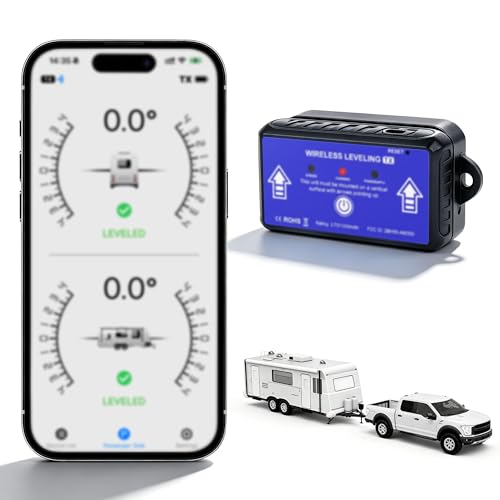
MRCARTOOL AM350 is the rechargeable option here: it has a built-in 1000mAh battery and a Type-C charging port, rather than replaceable cells. Its app displays front-to-back pitch and side-to-side roll together, and the transmitter has a physical power button for storage. The maker rates a full charge for up to 300 days of typical use. This system suits travelers who want to recharge between trips; buyers who prefer AA or button-cell replacement will want a different power arrangement.
Bottom line: Choose this if you want two-axis app readings and Type-C recharging.
OBEST Wireless RV Leveling System
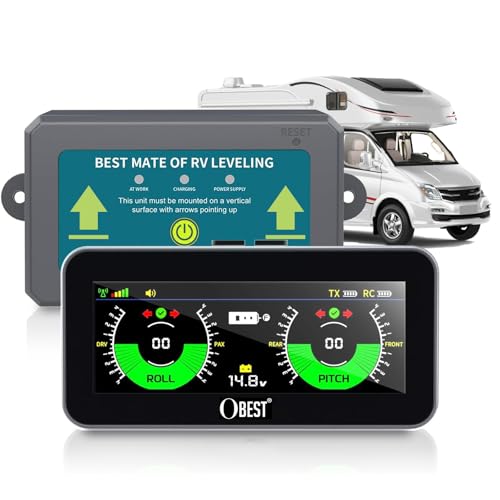
OBEST Wireless RV Leveling System differs from the phone-app systems by pairing a transmitter with a dedicated display. The display lets a user check the RV’s status without a phone or watch, and the system gives real-time feedback about how much and which corner to adjust. Its setup uses one-click start and does not require app parameter settings. That makes it a fit for buyers who want a separate readout; those who want app-based readings or a rechargeable power arrangement should compare another option.
Bottom line: Pick this if a dedicated screen matters more than a phone app.
CARMTEK Level Wizard

CARMTEK Level Wizard uses a base module and a wireless remote module, with LED indicators on both to show level status. It also indicates how much height is needed and where, so an owner can stack blocks at the indicated wheel positions. This setup suits RV users who want a remote status check while positioning the vehicle. The feature description centers on LED modules rather than a phone app or dedicated screen, so choose another system if those are essential to your routine.
Bottom line: Choose this if you want a wireless remote with LED level indicators.
How to choose a wireless RV leveling system
Choose by the readout you can use comfortably while the RV is stationary: phone app, separate display, or remote LEDs. A system that shows both front-to-back and side-to-side readings can reduce switching between measurements; correction guidance can help identify which corner needs attention. Power is another practical divider: replaceable cells avoid charging, while a rechargeable unit needs a charging routine. Before leveling, park on firm, reasonably level ground and use wheel chocks to prevent movement. Electronic readings help measure tilt; they do not replace safe parking or the RV maker’s guidance on jacks and supports.
Leveling readings and correction
RV leveling typically involves two directions: side-to-side roll and front-to-back pitch. Correct side-to-side with suitable leveling blocks under the low-side wheels, then use the trailer tongue jack or the vehicle’s leveling system for front-to-back adjustment as appropriate. Make small corrections and recheck the readings after each change; moving too far in one step can overshoot level. Never place a hand or body beneath a vehicle supported only by a jack. Stabilizers are intended to reduce movement after setup, not to lift a vehicle unless the manufacturer specifically allows that use.
App, display, and remote systems compared
The main choice is where the level reading appears and how directly the system guides correction. Phone apps can combine measurements and other features; standalone displays and remote indicators offer a readout without keeping a phone in hand. Match the format to your setup workflow and phone compatibility.
| Readout need | System format | What to consider |
|---|---|---|
| Combined angle readings | Phone app | Check device compatibility and app workflow |
| Phone-free monitoring | Dedicated display | Keep the screen visible during adjustment |
| Remote status glance | LED remote module | Confirm the remote suits your viewing position |
Whichever format you use, make the correction from a safe position and keep people clear of wheels and moving equipment.
Common RV leveling mistakes
The most important mistake is treating stabilizers as lifting jacks: stabilizers generally limit rocking, while leveling equipment carries the load and corrects height. Another is leveling on soft or sloped ground where blocks can shift; use firm footing and chock wheels before making adjustments. On a travel trailer, side-to-side correction is commonly made before unhitching, while front-to-back leveling follows once the trailer is secured, but the exact sequence depends on the trailer and towing setup. Keep the tow vehicle connected until the trailer is safely supported and the correct sequence is confirmed in its manual.
Frequently Asked Questions
Do RV leveling systems measure both directions?
Many electronic RV levelers report side-to-side and front-to-back tilt, but readouts differ by model. Check that the system you choose provides the directions you need.
Should I use stabilizers to level my RV?
No; stabilizers are generally intended to reduce movement, not lift the RV. Use the leveling equipment approved for your vehicle, and never work beneath a vehicle supported only by a jack.
Do I level a travel trailer before unhitching?
Side-to-side leveling is commonly done while the trailer remains connected, then front-to-back leveling after it is secured. Follow the trailer and hitch maker’s safe sequence for your specific setup.
How do I keep leveling blocks from shifting?
Use blocks on firm, stable ground and align them squarely with the tires. Avoid soft ground or a slope that could let the blocks slide, and chock the wheels before making adjustments.
Can an RV leveling app replace wheel chocks?
No; an app measures tilt but does not prevent the vehicle from rolling. Use wheel chocks on a parked RV and keep people clear while making leveling corrections.