
Xbox One X Vertical Stand: 5 Options Compared

The Mcbazel vertical cooling stand suits most Xbox One X owners who want upright placement plus three fans and three USB ports. Choose a simpler base if you only need to position the console vertically, or compare the model-specific fit before choosing any stand.
We earn a commission if you buy through links on this page. As an Amazon Associate I earn from qualifying purchases. Products are compared on manufacturer specifications, not hands-on testing.
- Best overall: Mcbazel Cooling Stand – Adds three selectable fan modes, three USB 2.0 ports and a light bar to an Xbox One X stand.
- Best for a compact base: KlsyChry Vertical Stand – A simple upright stand with non-slip grips and no added fan or USB hub.
- Best for a locking fit: eXtremeRate Vertical Stand – Locks into the console’s bottom slots and gives a click when secured.
| Product | Best for | Cooling and USB | Stability feature | Shop |
|---|---|---|---|---|
| Mcbazel Cooling Stand | Fans and USB | 3 fans; 3 USB 2.0 ports | Lock; non-slip pad | Check Price on Amazon |
| KlsyChry Vertical Stand | Simple upright base | None specified | Non-slip grips | Check Price on Amazon |
| eXtremeRate Vertical Stand | Locking attachment | None specified | Locks into bottom slots | Check Price on Amazon |
| FASTSNAIL Cooling Stand | Cooling and charging | 3 fans; 3 USB 2.0 ports | — | Check Price on Amazon |
| Chenkxin Vertical Stand | Locking simple base | None specified | Locks onto console | Check Price on Amazon |
Xbox One X Vertical Stands
Compare these Xbox One X stands by their added features, securing method and model compatibility.
Mcbazel Cooling Stand

The Mcbazel stand adds three cooling fans, three USB 2.0 ports and a light bar, unlike the simpler bases here. Its fan has high, low and off modes, and the stand includes a lock and non-slip pad to help secure the console. The maker says the fans help prevent overheating during long gaming sessions. This model suits an Xbox One X setup that can use the extra ports for controllers or other accessories; its USB ports do not support external hard drives.
Bottom line: Pick this if you want fan modes and extra USB ports alongside upright placement.
KlsyChry Vertical Stand

The KlsyChry is a straightforward upright holder, without the fans, USB ports or light bar found on some alternatives. Its non-slip grips are intended to minimize vibration and sliding, and installation is simply placing the Xbox One X onto the stand. That makes it a fit for buyers who want a small base rather than an accessory hub. It is specifically for Xbox One X, so it is not the right choice for the Xbox One S or original Xbox One.
Bottom line: Choose this for a basic, grip-equipped base without cooling accessories.
eXtremeRate Vertical Stand
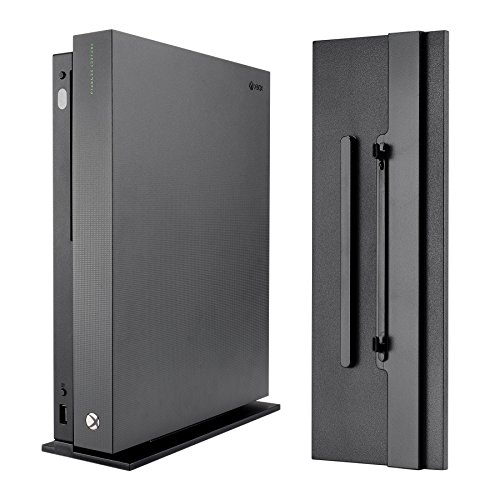
The eXtremeRate stand secures to the console through its bottom slots, rather than relying only on a stand that the console rests on. Its installation requires seating the stand in the slots and sliding it until it clicks; the direction depends on orientation. This suits owners who want an attached base and are comfortable aligning the stand during installation. The product is designed for Xbox One X, not Xbox One S or the standard Xbox One, and it does not add cooling fans or USB ports.
Bottom line: Pick this if an attachment that clicks into the console matters most.
FASTSNAIL Cooling Stand
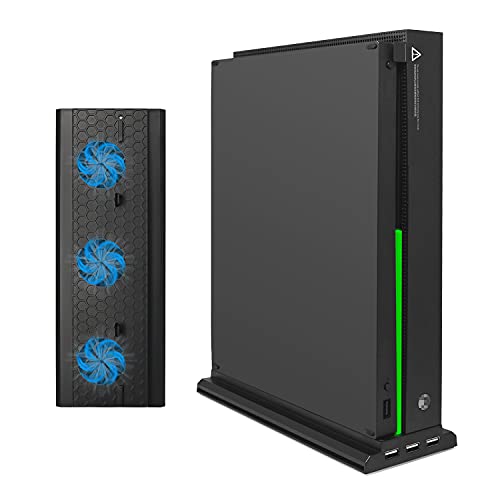
The FASTSNAIL combines three fans and three USB 2.0 ports with an upright stand, making it an alternative to the Mcbazel for buyers seeking an accessory hub. The ports can connect or charge controllers, phones, keyboards and other USB devices. The maker says the fans help keep the console cool during long play sessions. The stand’s USB ports are not intended for external hard drives, so buyers who need storage connectivity should connect a drive directly to the console instead.
Bottom line: Choose this for a fan-equipped stand with ports for controllers and other USB devices.
Chenkxin Vertical Stand
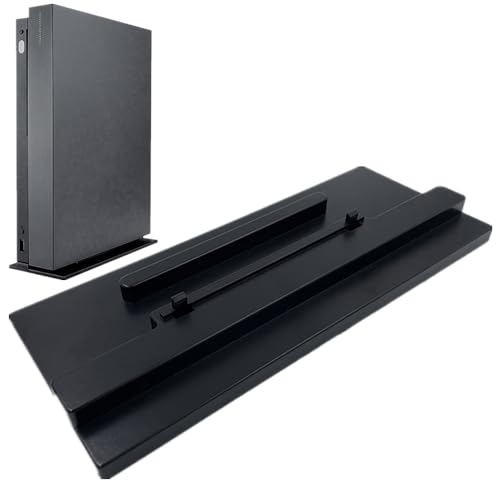
The Chenkxin is a simple locking base: it positions the console vertically and is designed to lock onto it for added stability. Unlike fan-equipped options, it keeps the feature set focused on upright placement and space saving. Its plug-and-play installation suits buyers who do not need a USB hub or cooling fans. Compatibility is limited to Xbox One X; it is not intended for Xbox One or Xbox One S, so check the console model before choosing.
Bottom line: Pick this if you want a simple base designed to lock onto the Xbox One X.
How to Choose an Xbox One X Vertical Stand
Choose an Xbox One X stand by deciding whether you need only upright support or also want fans and USB ports. A basic stand keeps the setup simple; a cooling stand adds fans and often a USB hub, but its extra features do not replace clear airflow around the console. If you need to connect an external hard drive, avoid relying on the USB hubs in the fan models here, which exclude that use. Before placing the console, leave about 4 inches of open space around its ventilation areas as a practical clearance rule; a tight shelf can restrict airflow regardless of fan count.
Xbox One X Stand Fit and Placement
Match the stand to the exact Xbox model: these options specify Xbox One X compatibility, and several explicitly exclude Xbox One S and the original Xbox One. A model name matters because the consoles have different shapes and attachment points, even when the names look similar. Place the upright console on a firm, level surface, not on carpet or a soft pad that can block openings. Keep cables from pulling sideways on the console, and leave enough room to remove them without tipping the base. For stands that lock into slots, align the attachment carefully and confirm that it is seated before connecting power.
Simple Bases Versus Cooling Stands
Simple bases add upright support, while cooling stands add powered fans and sometimes extra connection ports. More fans are not a substitute for unobstructed ventilation, and extra USB ports are useful only for devices the stand supports. Compare the stand types by the job they do:
| Stand type | Useful when | Trade-off |
|---|---|---|
| Basic vertical base | You need upright placement only | No added fans or hub |
| Fan stand with USB hub | You want added fans and accessory ports | Hub may not support every device |
For a narrow setup with no need for added ports, choose a basic base. If you plan to use a fan stand’s USB connections, confirm that your accessories are supported before connecting them.
Safe Ventilation for an Upright Console
Keep the Xbox One X ventilation areas open whenever the console is running; a stand cannot compensate for vents pressed against a wall or enclosed shelf. As a practical setup target, leave about 4 inches of clearance around openings and avoid placing the system inside a closed cabinet during play. Do not cover the console with fabric or stack objects against it. A cooling stand’s powered fans add another moving part and cable, so route its cable where it cannot snag or pull the console. If the system repeatedly shuts down or shows an overheating warning, stop play and check placement and ventilation before using it again.
Frequently Asked Questions
How much space should I leave around the console?
Leave about 4 inches around ventilation areas as a practical clearance target. Keep the console out of closed cabinets during play and do not let a wall or cable obstruct its openings.
Can I connect an external hard drive to a cooling stand?
The USB hubs on the fan-equipped options here exclude external hard drives. Connect a drive directly to the console rather than relying on those hubs.
Does a vertical stand include the Xbox One X console?
No, the stand products are accessories rather than consoles; the KlsyChry package explicitly says the console is not included. Plan to use a compatible Xbox One X with the stand.
Should I use a fan stand if the console has clear airflow?
A fan stand is an optional accessory, not a replacement for open ventilation. If the console already has about 4 inches of open space around its vents, choose based on whether the added fans or USB ports are useful to your setup.