
Bluetooth Transmitter for Xbox One: 3 Options Compared

For most Xbox One players, YOCOWOCO Xbox Bluetooth 5.2 Adapter is the clearest fit because it is made for Xbox controllers and its display shows codec and mic status. Choose Skull & Co. AudioBox instead if built-in voice chat matters more; consider UGREEN Bluetooth 5.4 3.5mm Adapter only if you can confirm its 3.5mm connection works with your setup.
A controller audio transmitter sends sound to Bluetooth headphones, but codec support must match on both the adapter and headphones for low-latency playback.
We earn a commission if you buy through links on this page. As an Amazon Associate I earn from qualifying purchases. Products are compared on manufacturer specifications, not hands-on testing.
- Best overall: YOCOWOCO Xbox Bluetooth 5.2 Adapter – Xbox controller compatibility and a display for codec and mic status.
- Best for voice chat: Skull & Co. AudioBox – Built-in mic supports voice chat without connecting a headphone.
- Best for 3.5mm audio: UGREEN Bluetooth 5.4 3.5mm Adapter – Transmits audio from a 3.5mm jack and can also receive Bluetooth audio.
| Product | Best for | Xbox fit | Audio features | Power | Shop |
|---|---|---|---|---|---|
| YOCOWOCO Xbox Bluetooth 5.2 Adapter | Visible status display | Xbox One, Series X|S, Elite 2 | OLED; aptX Low Latency | — | Check Price on Amazon |
| Skull & Co. AudioBox | Voice chat support | Xbox One, Series X|S, Elite 2 | Low-latency codecs; built-in mic | Controller-powered, under 1 W | Check Price on Amazon |
| UGREEN Bluetooth 5.4 3.5mm Adapter | 3.5mm audio setups | General 3.5mm audio; Xbox fit to verify | TX and RX; dual pairing | Up to 8 h TX | Check Price on Amazon |
Bluetooth transmitters for Xbox One
Compare controller-focused adapters with a general 3.5mm transmitter before choosing for your setup.
YOCOWOCO Xbox Bluetooth 5.2 Adapter

For players who want pairing and codec status visible, this controller adapter has an OLED display that shows volume, codec format, mic status, and paired devices. The maker says aptX Low Latency can synchronize audio when the headphones support the same codec. It is compatible with Xbox One, Series X|S, and Elite Series 2 controllers. Pairing uses a two-button hold: press Vol+ and Vol− together until “Searching” appears. The codec benefit depends on compatible headphones, so players with headphones that lack aptX Low Latency should not choose it for that feature.
Bottom line: Choose it if controller fit and visible codec and mic status are priorities.
Skull & Co. AudioBox

For voice chat without plugging in a headphone, this controller-powered adapter has a built-in mic, a feature that separates it from the screen-focused option. It supports low-latency codecs and is compatible with Xbox One, Xbox Series X|S, and Elite 2 controllers. The maker says it uses less than 1 W of controller battery power. Its codec support is not named, so buyers seeking a specific codec match should verify that the headphones and adapter support the same one. Apple device software updates may affect compatibility with some AirPods models.
Bottom line: Pick it when a built-in mic and controller-powered operation matter most.
UGREEN Bluetooth 5.4 3.5mm Adapter
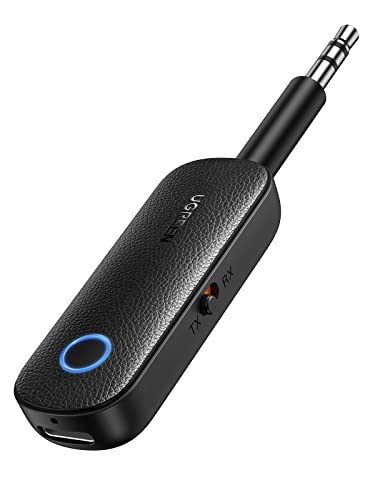
Unlike the controller-specific adapters, this UGREEN unit is a general 3.5mm transmitter and receiver: TX sends audio from a non-Bluetooth device to Bluetooth headphones, while RX sends phone or laptop audio to wired speakers or a stereo. The maker says TX playback lasts up to 8 hours under ideal test conditions and supports pairing two devices simultaneously. It may suit an Xbox setup only if the required 3.5mm audio connection is available and compatible, so confirm that connection before ordering. Its general-purpose design is less direct than an adapter expressly made for Xbox controllers.
Bottom line: Consider it only if a compatible 3.5mm audio connection suits your setup.
How to choose an Xbox One Bluetooth transmitter
Start with the connection: controller-mounted adapters are made for Xbox controllers, while a general 3.5mm transmitter needs a compatible audio jack. Next, match the headphone codec to the transmitter; low-latency playback requires the same supported codec at both ends. A display can make codec and mic status easier to see, while a built-in mic matters if you want voice chat without a separate headset connection. Use this decision rule: if you need voice chat and do not plan to connect a headset mic, favor an adapter that explicitly includes a mic. If your headphones do not support the transmitter’s low-latency codec, choose based on fit and chat features instead of the codec claim.
Bluetooth codec and gaming audio latency
Low-latency audio depends on both the transmitter and headphones supporting a compatible codec; an adapter’s codec alone cannot guarantee synchronization. Bluetooth audio processing can add delay compared with a wired connection, so timing-sensitive games are where codec matching matters most. A codec name is more useful than a general “low latency” label because it lets you compare both ends of the connection. If the product does not identify the specific codec, check that compatibility before buying if latency is your deciding factor. A controller adapter may also route voice-chat audio differently from a standard music transmitter, so verify that chat is supported when you need it.
Controller adapters versus 3.5mm transmitters
Controller adapters are designed to attach to a compatible game controller, while 3.5mm transmitters send audio from devices with a suitable analog jack. A receiver works in the opposite direction, feeding Bluetooth audio into wired speakers or a stereo. These types serve different connection paths, so do not assume that a general transmitter connects directly to an Xbox controller. Use this comparison to narrow the connection type before weighing codec or chat features.
| Type | Connection path | Best suited to |
|---|---|---|
| Controller adapter | Compatible Xbox controller | Controller-specific fit and chat features |
| 3.5mm TX/RX adapter | Analog audio jack | Devices with a compatible jack; TX or RX use |
Voice chat and headphone compatibility
Voice chat requires more than sending game audio to headphones: the adapter must also support a microphone path. A built-in mic can provide chat without plugging in a headset, while other setups depend on a connected headset mic. Confirm whether your intended headphones and adapter support the chat arrangement you need. Bluetooth headphone compatibility can also vary with device firmware, and AirPods models may be affected by Apple software updates. For low-delay play, check the codec match separately from the mic feature; one does not establish the other.
Frequently Asked Questions
Will any Bluetooth headphones work with an Xbox adapter?
Many adapters work with Bluetooth headphones, but low-latency playback requires the headphones and transmitter to support a compatible codec. Check codec support at both ends when audio synchronization matters.
Can Bluetooth audio have delay during gaming?
Yes, Bluetooth processing can add audible delay compared with wired audio. A matching low-latency codec can help, but both the transmitter and headphones must support it.
Do I need a separate microphone for Xbox chat?
Not always; an adapter with a built-in mic can support voice chat without a connected headphone. If the adapter has no built-in mic, confirm that your chosen headset connection carries microphone audio.
What is the difference between Bluetooth TX and RX mode?
TX mode sends audio from a device with an audio output to Bluetooth headphones, while RX mode receives Bluetooth audio and sends it to wired speakers or a stereo. A 3.5mm adapter needs a compatible jack for the selected connection.
Can I use a Bluetooth adapter with AirPods?
Some Bluetooth adapters pair with AirPods, but compatibility can vary by model and software version. For gaming latency, also confirm that the AirPods support the transmitter’s low-latency codec.