
Fire Stick HDMI Extender: 5 Cable Lengths Compared

For most Fire Stick setups, LEENUE 20 cm 2-Pack HDMI Extenders is the closest match because its 20 cm cable is designed for streaming sticks and tight spaces behind a TV. Choose Silkland 3.3 ft HDMI 2.1 Extender or ZeniKon 3.3 ft 4K HDMI Extender instead when you need about 3.3 feet of reach, or VCE 0.4 ft HDMI 2.0 Extender when a very short 0.4-foot extension is enough.
An HDMI extender is a male-to-female cable that moves the device away from the TV’s port; it does not add streaming features or replace a power connection.
We earn a commission if you buy through links on this page. As an Amazon Associate I earn from qualifying purchases. Products are compared on manufacturer specifications, not hands-on testing.
- Best overall: LEENUE 20 cm 2-Pack HDMI Extenders – Its 20 cm length and streaming-stick focus suit a close, constrained TV setup.
- Best for extra reach: Silkland 3.3 ft HDMI 2.1 Extender – The 3.3-foot cable provides more placement flexibility than the short adapters.
- Best for higher bandwidth: Highwings 1 ft HDMI 2.1 Extender – It claims HDMI 2.1 support with 48 Gbps bandwidth and 8K at 60 Hz.
| Product | Best for | Length | HDMI version | Bandwidth | Shop |
|---|---|---|---|---|---|
| LEENUE 20 cm 2-Pack HDMI Extenders | Tight TV setups | 7.9 in | HDMI 2.0 | 18 Gbps | Check Price on Amazon |
| Silkland 3.3 ft HDMI 2.1 Extender | Longer placement | 39.6 in | HDMI 2.1 | 48 Gbps | Check Price on Amazon |
| ZeniKon 3.3 ft 4K HDMI Extender | Extended 4K setups | 39.6 in | HDMI 2.0 | 18 Gbps | Check Price on Amazon |
| Highwings 1 ft HDMI 2.1 Extender | Higher bandwidth | 12 in | HDMI 2.1 | 48 Gbps | Check Price on Amazon |
| VCE 0.4 ft HDMI 2.0 Extender | Minimal extension | 4.8 in | HDMI 2.0 | 18 Gbps | Check Price on Amazon |
Fire Stick HDMI Extender Cables
Compare each cable’s length and claimed video capability against the distance and devices in your setup.
LEENUE 20 cm 2-Pack HDMI Extenders

The two-cable pack is the only option here that explicitly combines a short 20 cm length with a streaming-stick focus. LEENUE says the male-to-female extenders support 4K at 60 Hz, 3D, ARC, and Dolby TrueHD 7.1 audio over 18 Gbps bandwidth. The compact cable can help reposition a stick around a crowded TV port without adding several feet of slack. Its limitation is reach: 20 cm is suited to nearby placement, not a stick that needs to sit across a shelf or cabinet.
Bottom line: Choose this pack when a short extension and a spare cable matter more than extra reach.
Silkland 3.3 ft HDMI 2.1 Extender
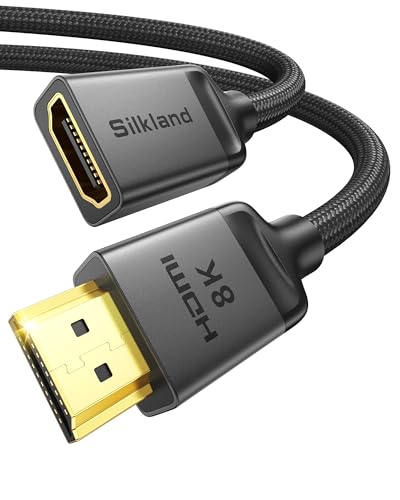
At 3.3 feet, this cable offers substantially more placement range than the short adapters. Silkland says it supports 8K at 60 Hz, 4K at 120 Hz, dynamic HDR, and HDMI 2.1, while also naming Fire TV Stick and Roku among compatible devices. That length is useful when a wall-mounted TV leaves little room near the HDMI socket. The tradeoff is extra cable to route and secure; for a streaming stick that only needs a small offset, a shorter extender is less cumbersome.
Bottom line: Pick this when the stick needs to sit farther from the TV’s HDMI port.
ZeniKon 3.3 ft 4K HDMI Extender

This 3.3-foot extender pairs extra reach with HDMI 2.0-class bandwidth, rather than the 48 Gbps claim of the HDMI 2.1 options. ZeniKon says it supports 4K at 60 Hz, HDR, ARC, and 3D, and identifies Fire TV Stick and Roku devices as compatible. It can suit a stick that needs to be moved clear of a wall-mounted screen or nearby electronics. Its limitation is that the long cable may be unnecessary in a tight installation, and the 4K ceiling is lower than 4K at 120 Hz.
Bottom line: Choose it for more reach when 4K at 60 Hz is sufficient.
Highwings 1 ft HDMI 2.1 Extender
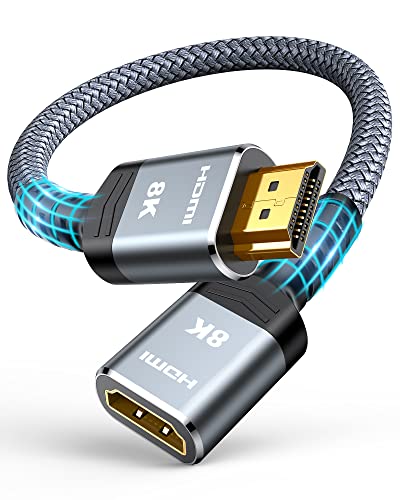
The one-foot length provides a middle ground between compact adapters and the 3.3-foot cables. Highwings says this HDMI 2.1 extender supports 48 Gbps, 8K at 60 Hz, 4K at 120 Hz, HDR, and ARC; it also names Roku Stick compatibility. The reinforced nylon design and 25,000-flex claim distinguish its construction. A Fire Stick-specific compatibility claim is not included, so confirm that the HDMI connection and clearance suit your exact setup before ordering.
Bottom line: Pick this for a one-foot extension and the higher-bandwidth capability claim.
VCE 0.4 ft HDMI 2.0 Extender

The 0.4-foot cable is the shortest option here, intended to shift a hard-to-reach HDMI connection without leaving much slack. VCE says it supports 4K at 60 Hz, 18 Gbps, HDR, 3D, Dolby Atmos, and ARC. Its small length can help reduce strain where a TV sits close to a wall, but offers less freedom to move a stick than the one- or 3.3-foot choices. The specifications name broad HDMI compatibility rather than Fire Stick specifically, so verify the fit of the connector and available space.
Bottom line: Choose this when only a small adjustment from the TV port is needed.
How to choose a Fire Stick HDMI extender
Choose by the distance the stick must move first, then by the video format your TV and streaming device actually use. For a stick that only needs clearance behind a screen, a 20 cm or 0.4-foot cable avoids excess slack; a one-foot or 3.3-foot cable offers more placement flexibility. HDMI 2.0 commonly carries 4K at 60 Hz, while HDMI 2.1 supports higher bandwidth modes such as 4K at 120 Hz when every device in the chain supports them. An extender cannot make a Fire Stick output a resolution or refresh rate it does not support.
Bandwidth is a whole-chain limit: the source, cable, extender, and display all need compatible capabilities. For ordinary streaming at 4K/60, prioritize useful length and a secure connection over a higher maximum bandwidth claim.
Fire Stick HDMI extender lengths and placement
For a close wall-mounted television, start with the smallest length that lets the stick sit without pressing against the wall or bending at the HDMI socket. A 20 cm cable offers about 8 inches of reach, while a 3.3-foot cable gives room to position a stick on a nearby shelf. Leave a gentle bend rather than folding the cable tightly at either connector; sharp bends can stress the plug and port.
The following guide maps common placement needs to the available lengths.
| Placement need | Useful length | Tradeoff |
|---|---|---|
| Small port offset | 0.4 ft or 20 cm | Little slack, limited repositioning |
| Moderate clearance | 1 ft | More routing room |
| Nearby shelf or farther placement | 3.3 ft | More cable to route |
HDMI 2.0 and HDMI 2.1 for streaming sticks
HDMI 2.0’s common 18 Gbps ceiling is enough for 4K at 60 Hz, while HDMI 2.1’s 48 Gbps maximum is intended for higher-bandwidth formats such as 4K at 120 Hz or 8K at 60 Hz. Those maximums do not guarantee that a streaming stick will use them; its output capability and the TV’s input both matter. A cable marked 8K will not improve a standard HD stream.
Match the extender to the most demanding source and display combination. If both are limited to 4K/60, an HDMI 2.0 extender is a reasonable fit; if the chain needs a higher refresh rate, every link must support that mode.
Safe setup and common fit mistakes
HDMI carries audio and video, not the power a streaming stick needs, so keep the stick’s power connection in place. Use the extender to relieve tight connector clearance or improve placement, not as a substitute for the device’s power adapter. Avoid letting the stick’s weight hang from an unsupported plug, particularly when the TV port points sideways or downward.
Check that the cable’s female end has enough room for the stick’s plug and that nearby ports remain accessible. Do not force a connector that does not seat easily; HDMI plugs are keyed, and pushing at an angle can damage the socket. For an unusually recessed TV port, confirm connector clearance before choosing a short adapter.
Frequently Asked Questions
Will an HDMI extender improve Fire Stick Wi-Fi?
An HDMI extender can move the stick away from the back of the TV, but it does not increase Wi-Fi speed or range. If streaming buffers, check the network signal and connection separately from the HDMI cable.
Does a Fire Stick HDMI extender carry power?
No; HDMI carries audio and video, while the Fire Stick needs its separate power connection. Keep the device powered as directed for its model.
What HDMI extender length works behind a wall-mounted TV?
A short cable around 20 cm or 0.4 feet can provide a small clearance offset, while 3.3 feet suits placement farther from the screen. Measure the distance and allow enough slack for a relaxed bend rather than a tight turn.
Can an HDMI extender support 4K at 60 Hz?
Yes, HDMI 2.0 extenders with an 18 Gbps rating commonly support 4K at 60 Hz. The source and display must also support 4K at that refresh rate.
Can an HDMI extender fix a loose TV HDMI port?
An extender may reduce strain from a device pressing against the television, but it cannot repair a loose or damaged socket. Stop using a port that will not hold a connector securely and have the connection assessed.