
HDMI ARC Bluetooth Transmitters Compared by Fit

For an HDMI ARC Bluetooth transmitter, Tendak HDMI ARC Bluetooth Transmitter is the closest match if your TV has ARC rather than eARC and you want optical output as well as Bluetooth. Choose Tendak eARC/ARC Bluetooth Transmitter or eARC/ARC Bluetooth Transmitter with Display instead if your TV uses eARC; 1Mii NightPair TX Auracast Transmitter adds Auracast for compatible hearing aids and headphones.
An ARC transmitter takes TV audio from the HDMI port marked ARC and sends it to wireless headphones or speakers. Confirm your TV’s port and audio-output settings before choosing.
We earn a commission if you buy through links on this page. As an Amazon Associate I earn from qualifying purchases. Products are compared on manufacturer specifications, not hands-on testing.
- Best overall: Tendak HDMI ARC Bluetooth Transmitter – Supports HDMI ARC, two Bluetooth devices, and optical output.
- Best for eARC TVs: Tendak eARC/ARC Bluetooth Transmitter – Supports eARC and ARC, with a display and simultaneous two-device pairing.
- Best for Auracast: 1Mii NightPair TX Auracast Transmitter – Supports Auracast broadcast as well as traditional Bluetooth, plus HDMI ARC, optical, and AUX inputs.
| Product | Best for | TV connection | Bluetooth pairing | Extra audio connection | Shop |
|---|---|---|---|---|---|
| Tendak HDMI ARC Bluetooth Transmitter | ARC with optical | HDMI ARC | 2 Bluetooth devices | Optical output | Check Price on Amazon |
| Bluetooth 5.2 ARC Transmitter with LCD | TV and AUX inputs | HDMI ARC; 3.5 mm | 2 Bluetooth devices | Optical output | Check Price on Amazon |
| Tendak eARC/ARC Bluetooth Transmitter | eARC with display | HDMI eARC/ARC | 2 Bluetooth devices | Display | Check Price on Amazon |
| eARC/ARC Bluetooth Transmitter with Display | Codec flexibility | HDMI eARC/ARC | 2 Bluetooth devices | Display; CEC | Check Price on Amazon |
| 1Mii NightPair TX Auracast Transmitter | Auracast listeners | HDMI ARC; optical; AUX | Auracast or Bluetooth | Optical; AUX | Check Price on Amazon |
HDMI ARC Bluetooth Transmitters
Compare the TV connection, listening options, and audio outputs to match the transmitter to your setup.
Tendak HDMI ARC Bluetooth Transmitter

Tendak HDMI ARC Bluetooth Transmitter stands out for pairing two Bluetooth headphones or speakers while also providing optical output. It uses HDMI ARC to extract TV audio, and the maker says Bluetooth 5.2 and a detachable antenna support connection stability. That combination suits an ARC-equipped TV when one listener needs a wired optical connection and others want Bluetooth. The important limitation is compatibility: this model supports ARC only, not eARC, so it is not the right choice for a TV whose audio return connection is eARC-only.
Bottom line: Choose it for an ARC TV when optical output and two Bluetooth listeners matter.
Bluetooth 5.2 ARC Transmitter with LCD
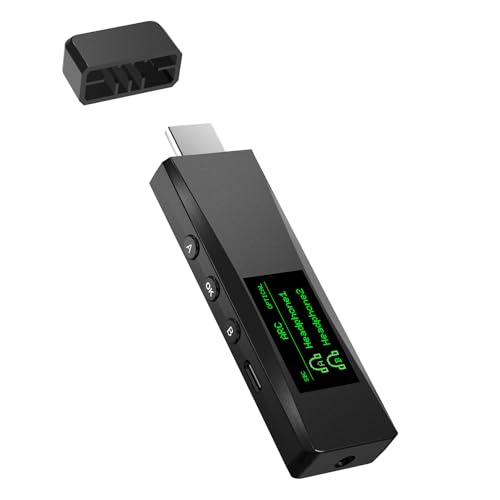
Bluetooth 5.2 ARC Transmitter with LCD differs by adding a 3.5 mm stereo input alongside HDMI ARC, so it can take audio from a TV or another source with an analog output. It pairs with two Bluetooth headphones or speakers at once, and the maker gives a wireless range of up to 12 meters. Its optical output adds a wired digital connection. This is a useful fit for a setup that may switch between a TV and a console, computer, or projector with 3.5 mm audio. Check that the source actually provides a compatible analog output before relying on AUX.
Bottom line: Pick it when both HDMI ARC and a 3.5 mm source need support.
Tendak eARC/ARC Bluetooth Transmitter

Tendak eARC/ARC Bluetooth Transmitter is the Tendak option here that explicitly supports both eARC and ARC, and its screen shows operating status. It also pairs with two Bluetooth headphones or speakers simultaneously. The maker claims 24-bit/48 kHz audio and Bluetooth 5.2. That makes it a candidate for a TV with an eARC port when shared wireless listening and visible pairing status are priorities. The screen and dual pairing do not guarantee lip-sync performance with every headphone; the transmitting device and headphones need compatible latency support for synchronized dialogue.
Bottom line: Choose it for eARC support, two listeners, and an operating-status display.
eARC/ARC Bluetooth Transmitter with Display
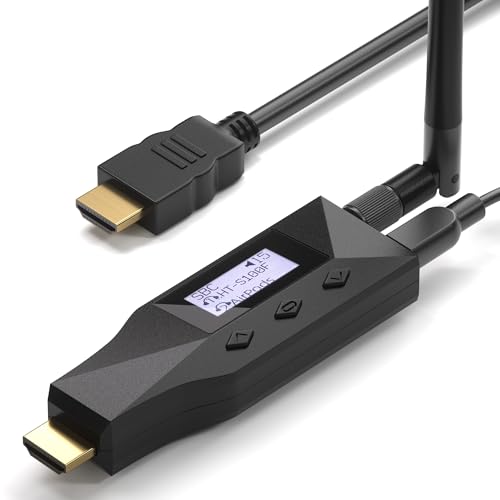
eARC/ARC Bluetooth Transmitter with Display distinguishes itself with CEC-enabled volume control and support for aptX, aptX-HD, aptX-LL, and AAC, in addition to eARC/ARC and two-device pairing. The maker claims 24-bit/48 kHz audio and says the TV remote can control volume through CEC. That feature set may suit someone who wants to keep volume control on the existing remote and has headphones that support a matching codec. Codec names alone do not ensure low latency: the transmitter and receiving headphones must share the same codec, and CEC behavior depends on the TV.
Bottom line: Pick it if CEC volume control and codec options suit your TV and headphones.
1Mii NightPair TX Auracast Transmitter

1Mii NightPair TX Auracast Transmitter is the only option here that supports Auracast broadcast as well as traditional Bluetooth, and it accepts HDMI ARC, optical, and AUX audio inputs. The maker says Auracast mode can connect to compatible hearing aids, headphones, earbuds, speakers, or receivers; standard Bluetooth mode serves compatible Bluetooth devices. This is a fit when Auracast compatibility is a priority or the TV setup needs several input types. Its Auracast benefit depends on the receiving device supporting Auracast; ordinary Bluetooth headphones do not gain that feature just by pairing with this transmitter.
Bottom line: Choose it for Auracast-compatible receivers or multiple types of audio input.
How HDMI ARC Bluetooth transmitters work
An ARC transmitter receives audio through the TV’s HDMI port labeled ARC and sends it onward over Bluetooth or another audio output. ARC is an audio return path over HDMI, so the TV and transmitter must be connected to the correct ARC-capable ports; a regular HDMI input will not do the same job. TV menus also commonly require selecting HDMI ARC or an external audio system as the sound output. ARC can carry stereo PCM and compressed surround formats, while eARC has greater bandwidth for higher-bitrate formats. For ordinary headphone listening, confirm the TV can send a compatible audio format rather than assuming every HDMI sound setting will work.
How to choose ARC or eARC support
Choose an ARC-only transmitter only when the TV has an ARC port and that port is the intended audio connection; choose an eARC/ARC model if your TV is labeled eARC or you want broader return-channel compatibility. The HDMI port label matters more than the number of HDMI sockets on a TV. ARC and eARC are backward-compatible in many setups, but the TV’s output setting, connected port, and audio format still matter. If your TV offers a choice of PCM, Dolby Digital, or automatic output, PCM stereo is a useful starting point for Bluetooth headphones. A practical decision rule is simple: if the TV’s audio return port says eARC, select a transmitter that explicitly names eARC rather than relying on ARC-only support.
Bluetooth pairing, latency, and shared listening
Two-device pairing lets two compatible Bluetooth receivers listen at once, but the receiver headphones must still be paired successfully and remain within wireless range. Bluetooth audio delay is affected by both ends of the connection: a low-latency codec helps only when the transmitter and headphones support the same codec. aptX Low Latency is distinct from aptX or aptX HD, so a codec list should be matched against the headphone specifications before choosing. For spoken TV programs, dialogue sync is often more noticeable than for music. If lip-sync matters, favor an explicitly supported low-latency mode and verify compatibility at both ends rather than assuming Bluetooth 5.x alone removes delay.
Compare the input and output connections
Match the transmitter’s inputs to the TV or other source and its outputs to the listening equipment. An optical output is useful for an optical-input sound system, while a 3.5 mm input can accept stereo analog audio from a source with a headphone or line output. The following connection map helps narrow the choices before setup.
| Need | Connection or feature | Check before choosing |
|---|---|---|
| TV audio return | HDMI ARC or eARC | Match the label on the TV port |
| Wired digital audio | Optical output | Confirm the receiving device has optical input |
| Analog source | 3.5 mm stereo input | Confirm the source has analog audio out |
| Broadcast listening | Auracast | Receiver must support Auracast |
Frequently Asked Questions
Does an HDMI ARC transmitter work with eARC?
An ARC-only transmitter should not be assumed to support eARC; choose one that explicitly specifies eARC if that is the TV port you plan to use. Many eARC devices also support ARC, but verify the exact port and output setting.
Why is Bluetooth TV audio out of sync?
The delay can come from the transmitter, the headphones, or codec compatibility between them. A low-latency codec such as aptX Low Latency helps only when both devices support that same codec.
Can two Bluetooth headphones listen at once?
A transmitter that supports dual pairing can send audio to two Bluetooth receivers simultaneously. Both headphones must pair with the transmitter, and their range and codec support can affect the result.
What HDMI port should I use for ARC audio?
Use the TV HDMI port labeled ARC or eARC, connected to the transmitter’s matching HDMI audio port. If the TV has multiple HDMI sockets, the label—not the socket count—identifies the audio return connection.
Does Auracast work with any Bluetooth headphones?
No; Auracast requires a receiver that supports Auracast broadcast audio. Standard Bluetooth headphones can use traditional Bluetooth mode, but that does not make them Auracast-compatible.