
Overture 3D Printer Filament: PLA and PETG Compared

For general-purpose prints, OVERTURE High Speed PLA, Black is the straightforward Overture 3D printer filament choice: it is 1.75 mm PLA on a 1 kg spool. Choose OVERTURE Matte PLA, Light Brown instead for a matte surface, or OVERTURE High Speed PETG, 4-Color Bundle if you want PETG in four colors and need a 4 kg bundle.
These are FDM filaments, plastic strands melted and deposited layer by layer; match the material and diameter to your printer before choosing a spool.
We earn a commission if you buy through links on this page. As an Amazon Associate I earn from qualifying purchases. Products are compared on manufacturer specifications, not hands-on testing.
- Best overall: OVERTURE High Speed PLA, Black – Standard 1.75 mm PLA in a single 1 kg black spool suits general-purpose prints.
- Best for matte finish: OVERTURE Matte PLA, Light Brown – Matte PLA is intended to create a frosted, gloss-free surface.
- Best for PETG bundle: OVERTURE High Speed PETG, 4-Color Bundle – Four 1 kg PETG spools provide a 4 kg total in black, white, red and green.
| Product | Best for | Material and color | Spool quantity | Shop |
|---|---|---|---|---|
| OVERTURE High Speed PLA, Black | General PLA printing | PLA, black | 1 kg | Check Price on Amazon |
| OVERTURE Matte PLA, Light Brown | Matte surface finish | Matte PLA, light brown | 1 kg | Check Price on Amazon |
| OVERTURE High Speed PETG, 4-Color Bundle | Multi-color PETG stock | PETG, black/white/red/green | 4 × 1 kg | Check Price on Amazon |
Overture 3D Printer Filament Options
Compare material, finish, and spool quantity to match the filament to your printer and project.
OVERTURE High Speed PLA, Black

For a basic PLA choice in a single color, this black spool keeps the material and quantity simple: it contains 1 kg of 1.75 mm filament. Overture says its high-speed PLA uses a monitored extrusion process for diameter consistency, and says the spool is dried before vacuum sealing. The neat-winding design may suit buyers who want orderly spool handling. Choose it for prints where standard PLA and a black finish fit the project; it is not the pick when you specifically want a matte surface or PETG material.
Bottom line: Choose this for everyday projects that call for black PLA rather than a specialized finish or PETG.
OVERTURE Matte PLA, Light Brown
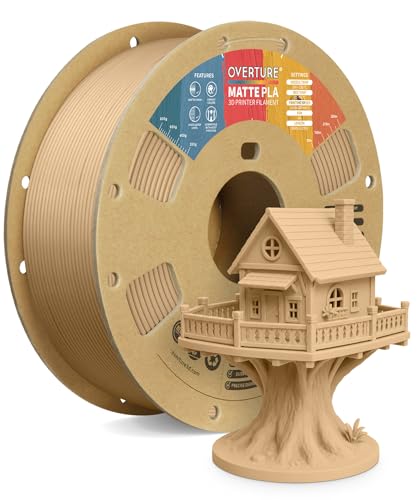
The distinguishing feature here is the light brown matte finish, intended for prints where a gloss-free, frosted appearance matters more than a conventional PLA look. This spool contains 1 kg of 1.75 mm filament. Overture says the formula is designed for low warping and easy support removal, and describes its surface as concealing layer lines. That finish can be useful for display pieces, but it is the wrong match when you need black filament or a material with PETG’s different print behavior.
Bottom line: Pick this when the light brown matte appearance is a priority for the finished part.
OVERTURE High Speed PETG, 4-Color Bundle

This is the only PETG option among these choices and the only multi-spool bundle: four 1 kg spools in black, white, red, and green. Overture says the high-speed formulation is engineered for printing up to 300 mm/s and describes the winding as AMS-friendly. PETG is commonly chosen when users want a tougher, less brittle part than typical PLA, though actual results depend on printer setup and part design. The larger bundle is less suitable if you only need one color or prefer a PLA print material.
Bottom line: Choose the bundle when PETG and four color options fit your work.
Choosing Overture PLA or PETG
Start with the material your print requires: PLA is generally easier to print, while PETG is often selected for parts needing more toughness and flexibility. Typical PLA nozzle temperatures fall around 190–220°F? No—printer temperatures are in Celsius: about 190–220°C, with beds around 50–60°C. PETG commonly uses about 220–250°C at the nozzle and 70–85°C at the bed. These are starting ranges, not guaranteed settings; filament formulation, hotend, cooling, and build surface can change the usable window. If a printer’s profile is outside these ranges, use the printer and filament guidance to set a compatible starting point before a long print.
Choose PLA for uncomplicated decorative or general-purpose parts, and consider PETG when the part needs more impact tolerance. Neither material choice alone guarantees a finished part’s strength: layer direction, wall count, infill, and geometry also affect how it handles load.
Matching filament diameter and printer
Check the printer’s supported filament diameter before buying; 1.75 mm is common, but some machines use 2.85 mm filament and cannot accept the smaller size without compatible hardware. All three choices here specify 1.75 mm filament, so verify the machine accepts that diameter. A practical decision rule is to choose only a spool matching the printer’s feed path and hotend, not just the material name.
Spool dimensions matter too: a spool can fit the extruder but still fail to fit a holder or enclosed dry box. Measure the holder’s usable width and spool opening before switching spool formats. These products list spool weights, but those do not establish compatibility with every automatic material system. Confirm the spool dimensions and system compatibility before ordering if your printer uses an enclosed or automated feeder.
PLA and PETG print behavior
PLA and PETG differ in temperature, cooling, and how they behave during printing. PLA typically tolerates stronger part cooling and is less prone to stringing, while PETG often benefits from reduced cooling and can string if retraction or temperature is poorly matched. Start with the material-specific profile and adjust one setting at a time; changing temperature and retraction together makes the cause of a print defect harder to identify.
Bed adhesion and release need attention with either material. A surface that holds too firmly can be damaged during removal, especially if a print is pried off while hot. Let the build plate cool and use a suitable removal tool carefully. Avoid forcing a blade toward your hand; a sharp scraper can cut skin.
Storing filament and printing safely
Keep opened filament dry and sealed between print sessions; moisture can contribute to popping, rough extrusion, and stringing, especially with PETG. A filament dryer or sealed container with desiccant can help manage humidity, but drying temperature depends on the material and spool construction. Do not guess at a high heat setting, since plastic spools can deform.
FDM printing heats plastic and can release ultrafine particles and volatile compounds, so use ventilation and avoid placing a printer in a bedroom or other occupied space without adequate airflow. Keep hotend and bed temperatures away from children, pets, and flammable materials. Never touch the nozzle during printing or immediately after; it can cause a serious burn.
Frequently Asked Questions
What nozzle temperature should I start with for PLA?
A common PLA starting range is about 190–220°C at the nozzle, with a heated bed around 50–60°C. The best point within that range changes with the specific filament, hotend, and print speed.
What temperature range is typical for PETG filament?
PETG commonly prints around 220–250°C at the nozzle and 70–85°C at the bed. Start with a material profile and tune within that window if you see poor bonding or excessive stringing.
Can a 1.75 mm filament spool fit every 3D printer?
No; the printer must support 1.75 mm filament, and some machines are built for 2.85 mm instead. Check both the feed path and spool-holder clearance, since spool fit is separate from filament diameter.
How should I store an opened filament spool?
Seal opened filament in a dry container with desiccant when it is not in use. Moisture can lead to popping, rough extrusion, and stringing; use a material-appropriate dryer setting rather than applying arbitrary heat.
Is PETG stronger than PLA for every printed part?
No single material is stronger in every use: PETG is often chosen for toughness, while print orientation, wall thickness, infill, and shape affect the finished part’s strength. Match the material to the load and environment the part must handle.