
Osmo Pocket Accessories: Types and Fits Compared

Osmo Pocket accessories work best when they match your camera generation and how you plan to shoot: choose the PellKing kit for a Pocket 3 setup, or a charging base if you need a mount and USB-C power together. Choose a different accessory type if you only need to connect a Pocket 2 to a phone.
We earn a commission if you buy through links on this page. As an Amazon Associate I earn from qualifying purchases. Products are compared on manufacturer specifications, not hands-on testing.
- Best overall: PellKing Osmo Pocket 3 Kit – The Pocket 3 kit combines a carrying case, phone holder, mini tripod, straps, mounts and protectors.
- Best for charging while mounted: NEEWER AC018 Charging Base – Its USB-C charging base also has a 1/4-inch thread and Arca-type base.
- Best for phone connection: Hanatora USB-C Smartphone Adapter – The lightweight USB-C adapter connects a Pocket 2 or Osmo Pocket to a smartphone.
- Best for varied mounting: Pocket 4/3 Mounting Kit – The kit includes a bike clamp, suction cup, chest and head straps, and a backpack clip.
| Product | Best for | Compatibility | Connection or mount | Included pieces | Shop |
|---|---|---|---|---|---|
| PellKing Osmo Pocket 3 Kit | Pocket 3 kit | Osmo Pocket 3 | Mounts and phone holder | Multiple accessories | Check Price on Amazon |
| NEEWER AC018 Charging Base | Charging base | Osmo Pocket 4 and 3 | USB-C, 1/4-inch, Arca-type | Charging base | Check Price on Amazon |
| Pocket 4/3 Mounting Kit | Hands-free mounting | Osmo Pocket 4 and 3 | Bike clamp, suction cup, straps | Multiple accessories | Check Price on Amazon |
| Hanatora USB-C Smartphone Adapter | Phone connection | Pocket 2 and Osmo Pocket | USB-C smartphone adapter | 1 adapter | Check Price on Amazon |
Osmo Pocket Accessories by Type
Match the accessory to your camera generation, then choose the connection or mounting setup you need.
PellKing Osmo Pocket 3 Kit
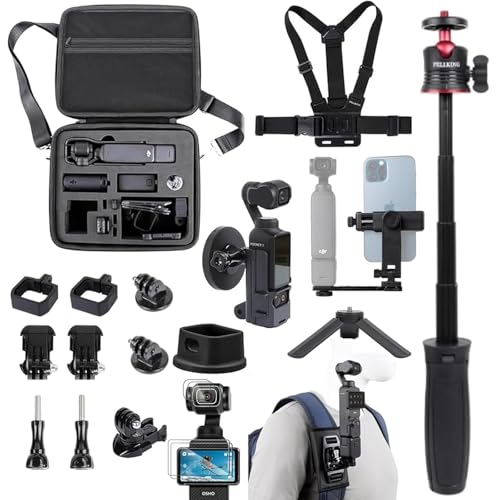
The PellKing kit is the broadest single-package option here for a Pocket 3, combining storage and shooting accessories rather than focusing on one connection. It includes a carrying case with a 59-inch shoulder belt, phone monitor holder, mini tripod, selfie stick, straps, mounts, and screen and lens protectors. That range suits someone building out a Pocket 3 setup for carrying, mounting, and monitoring. The tradeoff is that a large collection may be unnecessary if you only need a phone connection or a charging base; confirm each mount suits your intended setup before relying on it.
Bottom line: Pick this if you want a Pocket 3 kit with storage, mounting, and monitoring pieces.
NEEWER AC018 Charging Base

The NEEWER base combines charging and mounting, unlike the phone adapter or multi-piece kits. It fits Pocket 4 and Pocket 3, has a USB-C port for charging while shooting, and adds a 1/4-inch thread and Arca-type base for mounting options. The base measures 1.5 by 1.1 by 0.9 inches and weighs about 0.07 pound. It suits extended shoots where keeping power connected and using a tripod-style mount are both priorities. Its narrower role is the limitation: it is a single charging base, not a collection of carrying or hands-free accessories.
Bottom line: Choose this when charging and mounting are the main needs.
Pocket 4/3 Mounting Kit

The Pocket 4/3 kit emphasizes hands-free and surface mounting, with an aluminum-alloy bike clamp, suction cup, chest and head straps, and backpack clip. It also includes a magnetic bracket, selfie stick that doubles as a tripod, and glass screen protector. This mix suits activity-based footage where attachment choices matter more than a dedicated phone monitor holder or a charging base. The kit is less targeted for storage: unlike the Pocket 3-focused PellKing set, its components center on mounting and shooting positions. Check that each attachment is secure before putting the camera in motion.
Bottom line: Choose this for a range of hands-free and surface-mount options.
Hanatora USB-C Smartphone Adapter

The Hanatora adapter is the smallest, most focused option: it connects an Osmo Pocket or Pocket 2 to a smartphone for use with the DJI Mimo app. It weighs about 0.0035 pound and measures 0.98 by 0.51 by 0.20 inches, making it suited to buyers who need phone connectivity rather than a mount or a kit. Its key limitation is camera fit: the compatibility is Pocket 2 and Osmo Pocket, not Pocket 3 or Pocket 4. Match the adapter to your camera generation before choosing it.
Bottom line: Pick this for connecting a Pocket 2 or Osmo Pocket to a phone.
How to Choose Osmo Pocket Accessories
Start with camera generation, then decide whether the job is power, phone connection, carrying, or mounting. A Pocket 2 phone adapter does not serve the same purpose as a Pocket 3/4 charging base, and an activity mount kit is a different choice again. For a simple decision, choose an adapter when phone-to-camera connection is the only need; choose a kit when you need at least three kinds of accessories, such as storage, mounting, and protection. Pocket cameras use a moving gimbal, so check that a cage, strap, or mount does not block the gimbal’s range of motion before recording. For moving shots, secure the camera and mount before starting rather than adjusting an attachment while in motion.
Mounts, Threads, and Secure Attachment
A 1/4-inch tripod thread is a common camera-mount connection, while an Arca-type base is intended for compatible quick-release mounting hardware; the two terms do not mean the same interface. Match the mount to the support you already own instead of assuming every clamp or plate will connect directly. For a bike, suction-cup, chest, or head mount, keep the camera’s weight close to the attachment point and verify that the attachment cannot rotate or release during use. Avoid placing the camera where a fall could hit a person or obstruct vehicle controls. A kit with several mount styles offers placement choices, but each attachment still needs a secure fit for its specific surface or activity.
Use this guide to narrow the accessory type before choosing a particular setup.
| Need | Accessory type | Fit check |
|---|---|---|
| Phone app connection | Smartphone adapter | Camera generation and USB-C match |
| Power while mounted | Charging base | Charging port and support interface |
| Hands-free activity footage | Mount kit | Attachment security and camera fit |
| Several setup needs | Accessory kit | Included pieces match intended use |
Protectors and Carrying Cases
Screen and lens protectors should match the camera’s exact model and cover area; a protector made for one Pocket generation may not align with another. Check for clean alignment around the lens and screen, and keep dust out from beneath the protector during installation because trapped grit can scratch a surface. A carrying case is useful when it has separate space for the camera and the accessories you actually bring; a kit case that holds a battery handle, microphone, tripod, or filters may be more room than a minimal setup needs. Remove or reposition accessories that can press against the gimbal in storage, and do not force a camera into a crowded compartment.
Using Charging and Smartphone Adapters
USB-C accessories can serve different roles: a charging base supplies a connection for power while shooting, while a smartphone adapter connects a compatible camera to a phone for app use. Check the camera generation first, then confirm which port or adapter orientation the device requires. Keep connectors dry and free of debris, and avoid bending a cable sharply at the port while recording. A connected phone or cable can add leverage to a small camera, so support the setup rather than letting a dangling cable pull on the camera. Before a long session, verify that the camera recognizes the connection and that the mount leaves the gimbal free to move.
Frequently Asked Questions
Do Osmo Pocket accessories fit every generation?
No; compatibility can be generation-specific. For example, the smartphone adapter here fits Pocket 2 and Osmo Pocket, while the charging base fits Pocket 3 and Pocket 4.
What does a 1/4-inch camera thread fit?
A 1/4-inch thread fits supports made for that common camera screw connection, such as many tripod heads. Check the support’s interface because an Arca-type base is a different mounting interface.
Can I use a phone adapter while charging?
A phone adapter and charging base have different functions, so do not assume one provides the other’s connection. Choose a base that explicitly combines USB-C charging and mounting if you need power while shooting.
How do I keep a Pocket camera mount safe?
Check that the attachment is locked and cannot rotate before recording, especially on a bike or other moving setup. Keep the mount from blocking the moving gimbal, and do not adjust it while in motion.
How should I choose a screen protector?
Match the protector to the exact Pocket generation and the surface it is meant to cover. Install it with a clean, dust-free surface so grit is not trapped underneath.