
LSI SAS 9300-8i: Compatible HBA Cards Compared

For most builds seeking an LSI SAS 9300-8i, LSI Broadcom SAS 9300-8i is the direct 8-port card, with two internal SFF-8643 connectors and up to 12Gb/s throughput.
We earn a commission if you buy through links on this page. As an Amazon Associate I earn from qualifying purchases. Products are compared on manufacturer specifications, not hands-on testing.
- Best overall: LSI Broadcom SAS 9300-8i – Direct 9300-8i, 8-port design with two internal SFF-8643 connectors.
- Best for IT mode: SAS3008 9300-8i IT-Mode HBA – Specifies non-RAID IT mode firmware and includes two SAS cables.
| Product | Best for | Direct drive support | Firmware mode | Shop |
|---|---|---|---|---|
| LSI Broadcom SAS 9300-8i | Direct 8-port fit | 8 ports | — | Check Price on Amazon |
| SAS3008 9300-8i IT-Mode HBA | IT mode NAS | 8 drives | IT mode, non-RAID | Check Price on Amazon |
| KCMconmey LSI 9300-8i HBA | Bracket flexibility | — | IT mode, non-RAID | Check Price on Amazon |
LSI SAS 9300-8i HBA cards
Compare the direct 8-port card with compatible alternatives by drive count, connector layout, and firmware mode.
LSI Broadcom SAS 9300-8i

The LSI Broadcom SAS 9300-8i is the direct match for a search for the 9300-8i, with eight ports, two internal SFF-8643 connectors, and support for SATA and SAS devices at up to 12Gb/s. Its PCI Express 3.0 interface suits a compatible server or workstation slot. The product name identifies a low-profile host bus adapter, useful where chassis height is a constraint. The maker does not establish its firmware mode or included cables, so buyers who need a particular mode or cable set should confirm those before ordering.
Bottom line: Choose this for a direct 8-port 9300-8i match.
SAS3008 9300-8i IT-Mode HBA

For a 9300-8i-compatible card where firmware mode and cables matter, this SAS3008 option specifically provides IT-mode, non-RAID operation and includes two SFF-8643-to-SFF-8482 cables. It has a PCIe 3.0 x8 host interface and supports direct attachment of up to eight drives; a compatible SAS expander can extend the setup. The maker identifies ZFS, TrueNAS, unRAID, Proxmox, and ESXi storage builds as intended uses. Unlike the direct Broadcom-branded card, it is a compatible alternative, so buyers seeking the original card rather than a compatible unit should choose accordingly.
Bottom line: Pick this when IT-mode firmware and included drive cables are priorities.
KCMconmey LSI 9300-8i HBA
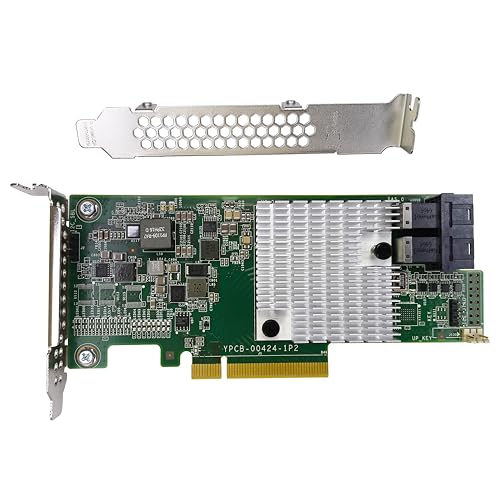
The KCMconmey card is another 9300-8i configuration, distinguished by its P16 IT-mode firmware and inclusion of both full-height and low-profile brackets. Its LSI SAS3008 chipset, two internal SFF-8643 connectors, and PCIe 3.0 x8 interface align with an eight-port-class internal SAS/SATA HBA. The package gives flexibility for different chassis bracket heights. Unlike the cable-included alternative, the package information names the card and brackets but no SAS cables, so a build that lacks compatible cables should account for that before installation.
Bottom line: Choose this if you need the two bracket-height options and P16 IT mode.
How to choose an LSI SAS 9300-8i card
Start with port count and firmware mode: eight directly attached drives suit a standard 9300-8i setup, while 16-drive cards trade exact model fit for more connectors. IT-mode HBAs expose drives individually to software RAID or ZFS rather than creating hardware RAID volumes; RAID firmware is a different operating model. PCIe 3.0 x8 is the host interface on the compatible alternatives described here, and the slot must accommodate that connection. For a NAS using ZFS or similar drive-management software, prefer a card that explicitly says IT mode; if a named original model matters, distinguish it from compatible alternatives.
Connectors, cables, and drive count
Each internal SFF-8643 connector carries four SAS lanes, so two connectors provide the eight-lane connection pattern associated with an 8i card. The four-connector option doubles direct drive support to 16. Drive-side cabling still matters: SFF-8643-to-SFF-8482 cables are for compatible SAS/SATA drive connections, while the physical drive and power connectors must match your devices. Direct attach is simpler for a small array; a SAS expander adds fan-out when the card and enclosure support it. Choose the eight-drive card if your present setup needs no more than eight direct drives, and consider the 16-drive option only when its extra connectors are useful.
Fit and installation checks
PCIe 3.0 x8 requires a compatible motherboard slot and sufficient physical clearance; an x8 card can often fit a longer x16 slot, but motherboard slot wiring and chassis space still determine compatibility. Low-profile and full-height refer to bracket height, not the card’s PCIe lane count. Check bracket height and card clearance against the case before installing, and verify the motherboard’s slot placement does not block airflow or adjacent cards. SAS cabling also has a practical length limit: internal passive SAS cables are generally kept around 1 meter or less to preserve signal integrity. Confirm the needed cable ends and drive power connections before assembly.
HBA safety and configuration basics
Storage HBAs do not make a drive array a backup: maintain a separate copy of important files, since RAID and ZFS cannot protect against every failure or accidental deletion. SAS supports multiple devices through expanders, but an expander needs compatible connections and its own suitable power and cooling. Keep the card’s airflow path clear because server add-in cards rely on chassis airflow, especially in dense multi-drive systems. Before replacing a controller, preserve drive order and configuration data where relevant; changing firmware mode or controller behavior can affect how an operating system sees an existing array. Match firmware mode to the storage software before moving data.
Frequently Asked Questions
What does the 8i mean on a SAS HBA?
The “8” identifies eight SAS lanes and the “i” indicates internal connections. A typical SFF-8643 connector carries four lanes, so two internal connectors provide eight lanes.
Can an LSI 9300-8i connect SATA drives?
Yes, the SAS 9300-8i family supports SATA as well as SAS drives. SATA devices commonly use 6Gb/s signaling, while the card family supports SAS links up to 12Gb/s.
What does IT mode do on an HBA?
IT mode presents drives individually instead of organizing them into hardware RAID volumes. That is useful for software-managed storage such as ZFS, but verify the operating system and storage stack support the controller.
Can I fit a PCIe x8 HBA in an x16 slot?
A PCIe x8 card can commonly be installed in a compatible x16-length slot. Check the motherboard slot’s electrical support and clearance, since a long connector does not guarantee x8 wiring.
How many drives can a SAS expander support?
A SAS expander can fan out connections beyond the HBA’s direct port count, but the usable total depends on expander capability, cabling, and bandwidth needs. For a setup with no expander, use direct-drive count as the limit: eight for an 8i card.