
Single-DIN Apple CarPlay Stereos Compared by Screen and Fit

Single-DIN Wireless CarPlay Stereo, 4.2-Channel suits most drivers who want wireless or wired Apple CarPlay plus dual subwoofer outputs and DSP sound controls. Choose another model if a larger screen, included backup camera, or a more compact display matters more to your dashboard layout.
Single-DIN describes the radio opening size, not necessarily the dimensions or movement of a touchscreen attached to it, so check dashboard clearance as well as the receiver opening.
We earn a commission if you buy through links on this page. As an Amazon Associate I earn from qualifying purchases. Products are compared on manufacturer specifications, not hands-on testing.
- Best overall: Single-DIN Wireless CarPlay Stereo, 4.2-Channel – Offers wired and wireless CarPlay, a DSP with 10-band EQ, and two subwoofer outputs.
- Best for a 6.5-inch screen: GBEER 6.5-Inch InCell Stereo – Pairs a 6.5-inch InCell touchscreen with wired and wireless phone connectivity.
- Best for a larger display: 6.9-Inch UHD Wireless CarPlay Stereo – Uses a 6.9-inch UHD touchscreen and includes Type-C fast charging.
- Best for voice control: 6.36-Inch Wireless CarPlay Stereo – Includes voice control, a 10-band EQ, and a backup camera.
| Product | Best for | Screen size | Phone connectivity | Audio or camera features | Shop |
|---|---|---|---|---|---|
| Single-DIN Wireless CarPlay Stereo, 4.2-Channel | Audio adjustments | — | Wired and wireless | DSP, 10-band EQ, dual subwoofer outputs | Check Price on Amazon |
| GBEER 6.5-Inch InCell Stereo | Mid-size touchscreen | 6.5 inches | Wired and wireless | 1080P backup camera, Type-C charging | Check Price on Amazon |
| 6.9-Inch UHD Wireless CarPlay Stereo | Larger touchscreen | 6.9 inches | Wireless | 1080P backup camera, Type-C charging | Check Price on Amazon |
| 6.36-Inch Wireless CarPlay Stereo | Hands-free commands | 6.36 inches | Wireless | 10-band EQ, backup camera | Check Price on Amazon |
Single-DIN Apple CarPlay Stereos
Compare display size, phone connections, and listed audio or camera features against your dashboard and installation needs.
Single-DIN Wireless CarPlay Stereo, 4.2-Channel
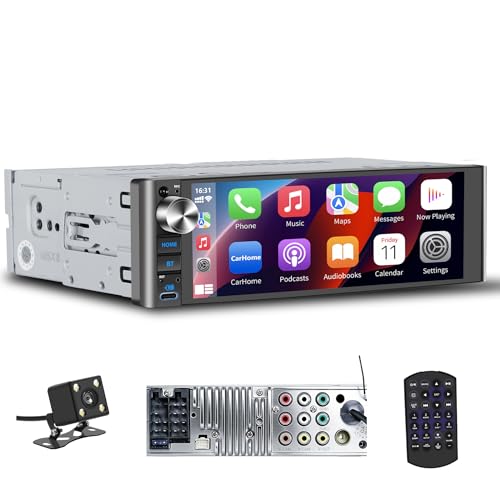
Dual subwoofer outputs and a built-in DSP distinguish this receiver for drivers planning a more adjustable audio setup. It supports wired and wireless Apple CarPlay and Android Auto, with Bluetooth 5.3 and USB/Type-C connections. The maker says its 4.2-channel RCA output and dual subwoofer ports support a 240W peak configuration; peak power is not the same as continuous output. Choose it if audio controls matter more than a specified screen size. The dimensions are 6.7 inches wide, 4.9 inches long, and 2.2 inches high, so compare them with the space behind your dash.
Bottom line: Pick this if DSP adjustment and two subwoofer outputs are priorities.
GBEER 6.5-Inch InCell Stereo

The 6.5-inch InCell touchscreen gives this receiver a defined mid-size display, while its feature set includes wired and wireless Apple CarPlay and Android Auto. It also lists Bluetooth 6.0, Type-C fast charging, GPS, voice control, and a 1080P backup camera. The maker says the InCell screen offers faster touch response and improved sunlight visibility compared with traditional OnCell screens. Consider this model if you want a specified screen size and camera in the same package. Its screen dimension alone does not establish whether it will clear your vehicle’s vents or dashboard controls.
Bottom line: Choose this for a 6.5-inch display and included camera.
6.9-Inch UHD Wireless CarPlay Stereo

A 6.9-inch UHD touchscreen sets this receiver apart for drivers seeking a larger display in a single-DIN-style unit. It supports wireless Apple CarPlay and Android Auto, and its features include Bluetooth, a 1080P backup camera, mirror link, navigation, USB Type-C fast charging, FM/AM, EQ, and steering-wheel control support. The maker specifies compatibility with 12V automotive DC only and notes that the screen may block vents or buttons in some vehicles. Measure the open dash area and check for obstructions before choosing a large-screen design; nominal DIN fit does not guarantee clear surrounding controls.
Bottom line: Pick this if the larger 6.9-inch display fits your dashboard.
6.36-Inch Wireless CarPlay Stereo

An included external microphone is a distinguishing feature of this 6.36-inch receiver, which also supports voice control through Siri or Google Assistant. Its features include wireless Apple CarPlay and Android Auto, a backup camera, a 10-band EQ, steering-wheel control, FM radio, and USB-C. The maker says the camera is waterproof and has 12 LED lights for night visibility. This model suits drivers who want voice commands and camera support without choosing the largest screen here. The dimensions should be checked against your dash, and steering-wheel controls may require vehicle-specific installation components.
Bottom line: Choose this for its external microphone and voice-control features.
How to Choose a Single-DIN Apple CarPlay Stereo
Start with the phone connection and dashboard layout, then compare screen size and audio features. Apple CarPlay requires a compatible iPhone; wireless models connect without a cable, while wired models use a vehicle USB connection. A unit that supports both connection types gives you the option to plug in when preferred. Single-DIN refers to the receiver opening, roughly 7 by 2 inches, but touchscreen dimensions and movement can extend beyond that opening. Measure dash clearance with controls and vents in their normal positions. If a display would cover a vent or essential button, choose a smaller screen or a different mounting arrangement.
| Need | What to compare | Decision cue |
|---|---|---|
| Phone pairing | Wired, wireless, or both | Choose the connection you will use routinely |
| Sound adjustment | DSP, EQ, and subwoofer outputs | Choose more outputs for a multi-amp setup |
| Dash visibility | Screen size and clearance | Measure around vents and controls |
Installation features such as steering-wheel control support do not guarantee direct compatibility with every vehicle; confirm the required harness or interface for your car.
Single-DIN Screen Size and Dashboard Fit
A single-DIN receiver opening is approximately 7 inches wide by 2 inches high, but a touchscreen can be much larger than the opening. Displays around 6.5 to 6.9 inches may occupy space above or in front of the radio cavity, so assess the full screen path, not just the metal chassis. Check for nearby vents, hazard switches, climate controls, and gear selectors. A screen that blocks a control or obstructs sightlines is a poor fit even if the radio chassis fits the opening. Measure depth behind the dash too; wiring plugs and vehicle-specific adapters need room behind the receiver. If clearance is tight, favor a smaller display or verify a movable-screen design’s reach before installation.
Wired and Wireless CarPlay Differences
Wired CarPlay uses a cable between a compatible iPhone and the receiver, while wireless CarPlay connects without that plug-in step. Wired operation can charge the phone through a compatible USB port; wireless pairing does not itself provide charging. Some receivers offer both modes, letting the driver choose based on convenience or battery needs. Android Auto is a separate smartphone projection system, so check the receiver and phone compatibility before relying on it. Pair and configure the system while parked, not while driving. Keep the phone secured and use voice controls where available; CarPlay and Android Auto do not make it safe to handle a phone on the road.
Backup Camera and Stereo Installation Checks
A backup camera needs more than a video connection: the installation typically routes camera power and video to the receiver, with a reverse signal triggering the display. A camera’s water-resistant or waterproof claim does not mean its wiring connections can be left exposed. Confirm camera placement, cable routing, and the vehicle’s reverse-light wiring before installation. Rearview cameras supplement, rather than replace, mirrors and direct observation; check the area behind the vehicle before moving. Stereo installations may also need a vehicle-specific wiring harness, antenna adapter, or steering-wheel-control interface. Disconnect the battery before wiring, following vehicle-specific procedures, and have a qualified installer handle unfamiliar electrical connections.
Frequently Asked Questions
Does single-DIN mean the screen is only 2 inches tall?
No. Single-DIN refers to an opening roughly 7 inches wide by 2 inches high, while a touchscreen can extend beyond that opening. Measure dashboard clearance around vents and controls before selecting a screen.
Can I use wireless CarPlay without charging my iPhone?
Yes. Wireless CarPlay connects without a cable, but wireless pairing does not charge the phone. A wired USB connection can provide charging when the receiver and cable support it.
What does a backup camera need to switch on automatically?
Automatic switching typically requires a reverse-trigger signal along with camera power and a video connection. Camera wiring and the vehicle’s reverse-light circuit need to be connected correctly for the display to switch when backing up.
Will steering-wheel controls work with any single-DIN stereo?
No. Steering-wheel control support can require a vehicle-specific interface or wiring adapter. Check the vehicle’s make, model, and year against the adapter requirements before installation.
Is a backup camera enough to see safely while reversing?
No. A camera supplements mirrors and direct observation rather than replacing them. Check around the vehicle before moving, and use the camera image as an additional view.