
Best 3rd Party Wii Remote: 3 Options Compared

The TechKen two-pack suits most players because both remotes have built-in MotionPlus and include Nunchuks. Choose another option if you want a bundle with silicone cases or prefer a standard remote without MotionPlus.
Wii remotes use motion input and can pair with compatible Wii and Wii U consoles; third-party models vary in motion features and included accessories.
We earn a commission if you buy through links on this page. As an Amazon Associate I earn from qualifying purchases. Products are compared on manufacturer specifications, not hands-on testing.
- Best overall: TechKen Motion Plus Wii Controllers, 2-Pack – Built-in MotionPlus and a Nunchuk are included with each controller.
- Best for protective cases: FASIGO Wii Remote with Nunchuck, 2-Pack – The two-pack includes a silicone case and wrist strap for each remote.
- Best for standard controls: TIANHOO Wii Controller, 2-Pack – Includes Nunchuks and cases, with no MotionPlus feature.
| Product | Best for | MotionPlus | Included accessories | Power | Shop |
|---|---|---|---|---|---|
| TechKen Motion Plus Wii Controllers, 2-Pack | MotionPlus gaming | Built in | 2 Nunchuks | — | Check Price on Amazon |
| FASIGO Wii Remote with Nunchuck, 2-Pack | Case protection | No | 2 Nunchuks, cases, straps | 2 AA per remote | Check Price on Amazon |
| TIANHOO Wii Controller, 2-Pack | Vibration feedback | — | Silicone cases, wrist straps | 2 AA per remote | Check Price on Amazon |
Third-party Wii remote controllers
Compare motion features, bundled accessories, and battery requirements before choosing a replacement remote.
TechKen Motion Plus Wii Controllers, 2-Pack

The TechKen two-pack is the option here with built-in MotionPlus, useful for games that respond to more detailed motion input. The bundle includes two Nunchuks, so players can use the thumb stick and triggers without adding separate attachments. The maker says the remotes work with Wii and Wii U and support Wii games, including Wii Sports. Choose this set for motion-focused play with two players. The features do not state the battery requirement, so confirm battery compatibility before ordering if you need to stock batteries in advance.
Bottom line: Pick this pair for built-in MotionPlus and included Nunchuks.
FASIGO Wii Remote with Nunchuck, 2-Pack

The FASIGO bundle stands out for including a silicone case and wrist strap with each of its two remotes, in addition to two Nunchuks. The maker says up to four remotes can connect at once through built-in Bluetooth; syncing uses the red buttons on the remote and console. Each remote takes two AA batteries, which are not included. This is a practical pick for players who want a complete two-player accessory set. Its remotes do not include MotionPlus, so buyers seeking built-in enhanced motion controls should choose another option.
Bottom line: Choose this set when protective cases and straps matter.
TIANHOO Wii Controller, 2-Pack
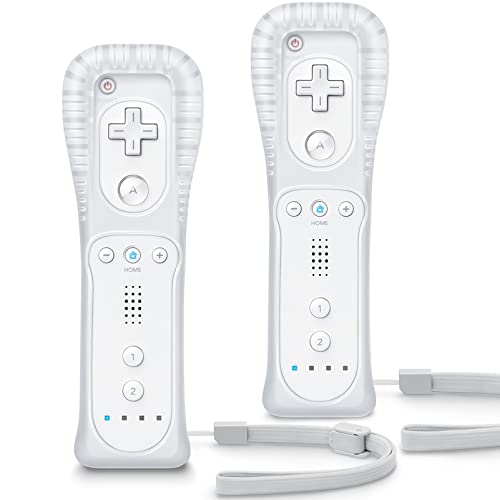
The TIANHOO pair specifically calls out a pointer, speaker, and shock vibration, distinguishing it from the simpler accessory-focused bundle. It includes silicone cases and wrist straps, while the maker’s sync steps use the controller and console buttons; if pairing fails, its instructions suggest clearing connected controllers by holding the console sync button for 15 seconds. Each remote takes two AA batteries, which are not included. The maker does not confirm MotionPlus or Nunchuk inclusion, so verify those requirements before choosing it for a game that needs either.
Bottom line: Pick this pair for the pointer, speaker, and vibration features.
How to choose a third-party Wii remote
Start with the motion feature and attachments a game requires, rather than the color or pack size. Wii Remote Plus-style motion controls incorporate MotionPlus sensing, while a standard Wii Remote may need a separate MotionPlus accessory for games that require it. A Nunchuk adds an analog stick and two trigger buttons, useful in games that use movement and pointing together. If two players need those controls, look for two Nunchuks in the bundle; a two-remote pack alone does not guarantee them.
For the products here, choose the TechKen pair when built-in MotionPlus is decisive, and prioritize the accessory list when cases or straps matter more. If a game specifically requires MotionPlus, do not assume a remote with ordinary motion sensing will substitute.
Wii remote syncing and batteries
Wii remotes typically use two AA batteries, and rechargeable AA cells can be used if they are compatible with the controller. The FASIGO and TIANHOO models specify two AA batteries per remote, so a two-controller setup needs four cells; the FASIGO bundle does not include them. Pairing generally uses the red SYNC buttons on the console and remote, with the console’s sync procedure varying slightly by model.
For reliable play, sync one remote at a time near the console and check the battery contacts if pairing repeatedly fails. Keep the wrist strap secured during motion games: Nintendo’s safety guidance emphasizes using the strap and leaving space around players, since swinging a remote can strike people or objects.
Third-party and original Wii remotes compared
Third-party Wii remotes can bundle features and accessories differently from original Nintendo hardware, so compare the exact game requirements and included attachments. A pointer or vibration feature does not establish that MotionPlus is built in, and a silicone case does not replace a wrist strap. The renewed original remote differs from the third-party models by being original hardware, but the package excludes batteries and manuals.
Use this quick decision table to match a need to the feature that matters.
| Need | Look for |
|---|---|
| MotionPlus-required games | Remote with built-in MotionPlus or compatible add-on |
| Analog stick and triggers | Nunchuk attachment |
| Motion-game safety | Secured wrist strap and clear play space |
| Two-player setup | Two remotes plus the required attachments for each player |
Common Wii remote buying mistakes
The most common mistake is treating every motion-capable remote as MotionPlus-compatible. Standard motion sensing and MotionPlus are different; check for the explicit feature when a game requires enhanced motion input. Another mistake is overlooking Nunchuks, since many games use the attachment’s analog stick and triggers in addition to the remote.
Also count batteries by remote, not by bundle: two AA cells per controller means four for a pair. For motion play, fasten the strap before starting and leave several feet between players and nearby screens or furniture; straps reduce the chance of a remote slipping from a hand but do not make crowded play safe.
Frequently Asked Questions
Do third-party Wii remotes work with Wii U?
Some third-party remotes are made for both Wii and Wii U, including the TechKen and FASIGO options here. Wii U games still need to support Wii Remote controls, so check the individual game’s controller requirements.
Does every Wii remote have MotionPlus built in?
No; standard Wii Remotes and Wii Remote Plus models differ. Choose a remote explicitly identified as having MotionPlus for games that require that feature.
How many AA batteries does a Wii remote use?
A Wii Remote typically uses two AA batteries. A pair therefore needs four cells, and rechargeable AA cells can be an option when compatible with the controller.
Can four Wii remotes connect at the same time?
The Wii and Wii U support up to four Wii Remotes for compatible games. The FASIGO maker also specifies up to four connected remotes; the game must support the number of players.
Why does a Wii remote keep losing sync?
Weak batteries or an incomplete pairing process can interrupt connection. Replace or recharge the two AA cells and sync the remote with the console one at a time; on the TIANHOO model, its reset step holds the console SYNC button for 15 seconds.