
Xbox One Controller Joystick Replacement: 3 Parts Compared

For a general Xbox One controller joystick replacement, Onyehn 3D Analog Joysticks, 8-Pack is the broadest match because it specifies wired and wireless Xbox One compatibility and supplies eight joystick modules. Choose Xbox One S/X Joysticks, 4-Pack instead if you have an Xbox One S or X controller; RGEEK Xbox One Joysticks, 4-Pack is another Xbox One option that includes a repair-tool assortment.
These are internal analog modules, not just thumbstick caps: replacing one requires soldering, so buyers without soldering tools or experience should choose a repair service.
We earn a commission if you buy through links on this page. As an Amazon Associate I earn from qualifying purchases. Products are compared on manufacturer specifications, not hands-on testing.
- Best overall: Onyehn 3D Analog Joysticks, 8-Pack – Specifies Xbox One wired and wireless compatibility and includes eight modules.
- Best for tool coverage: RGEEK Xbox One Joysticks, 4-Pack – Includes four modules, screwdrivers, replacement screws and pry tools.
- Best for One S/X: Xbox One S/X Joysticks, 4-Pack – Specifies Xbox One S/X compatibility and includes four modules and screwdriver tools.
| Product | Best for | Xbox compatibility | Modules included | Repair tools | Shop |
|---|---|---|---|---|---|
| Onyehn 3D Analog Joysticks, 8-Pack | General Xbox One | Xbox One wired/wireless; Elite; PS4 | 8 | None included | Check Price on Amazon |
| RGEEK Xbox One Joysticks, 4-Pack | Tool assortment | Xbox One wired/wireless | 4 | T6/T8/T10 drivers, screws, pry tools, caps | Check Price on Amazon |
| Xbox One S/X Joysticks, 4-Pack | One S or X | Xbox One S/X | 4 | T6/T8/T10 drivers, tweezer, pry tool, caps | Check Price on Amazon |
Xbox One Controller Joystick Replacements
Match the module to your controller version, then check whether the included tools cover the repair you plan to do.
Onyehn 3D Analog Joysticks, 8-Pack

The eight-module pack stands apart for its compatibility with Xbox One wired and wireless controllers, Xbox Elite controllers and PS4 controllers. These are replacement 3D analog joystick modules intended to address problems such as drift, dead zones and loose sticks. The maker says moderate soldering is needed and recommends professional installation; the package contains no tools or instructions. That makes this set a fit for repairers who already have soldering equipment and want several modules, but a poor choice for someone expecting a plug-in swap or a complete tool kit.
Bottom line: Pick this if your controller is an Xbox One wired or wireless model and you have soldering tools.
RGEEK Xbox One Joysticks, 4-Pack
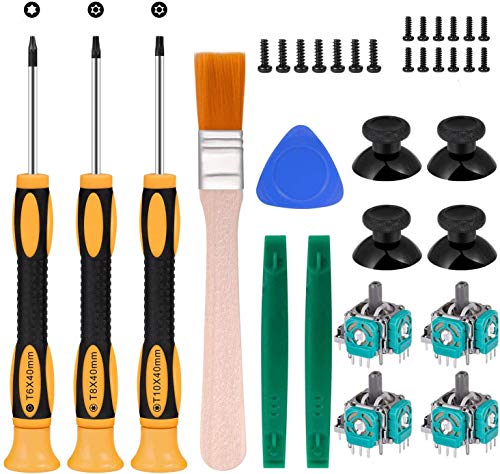
The RGEEK set pairs four replacement modules with the broadest repair-tool assortment among these Xbox One-compatible choices: T6, T8 and T10 screwdrivers, replacement screws, pry tools, four thumbstick caps and a brush. Its modules are specified for Xbox One wired and wireless controllers, and the maker says moderate soldering is required and recommends professional installation. The tools can help with opening and reassembling a controller, but they do not remove the need for soldering equipment or skill. Choose this set when you want the extra disassembly accessories alongside replacement modules.
Bottom line: Pick this if you want screwdrivers and pry tools packaged with the modules.
Xbox One S/X Joysticks, 4-Pack

The Xbox One S/X-specific set is the clearest fit when your controller belongs to those named versions. It contains four analog joystick modules, four thumbstick caps, T6/T8/T10 screwdrivers, tweezers and a pry tool. The maker says basic soldering skills and soldering tools are needed, even though the repair is described as easy otherwise. Its compatibility wording is narrower than a general Xbox One wired/wireless claim, so do not assume it fits every Xbox One revision; verify the controller version before ordering if you are unsure.
Bottom line: Pick this for a confirmed Xbox One S or X controller when you need the tools.
How to choose an Xbox One joystick module
Start with the controller version, then decide whether the problem is in the cap or the internal module. A thumbstick cap is the part your thumb touches; an analog module is soldered to the circuit board and reads movement on two axes. A cap that is worn or missing does not by itself mean the module needs replacement. If the stick drifts, fails to center, or has inconsistent movement, a module repair may be relevant, but these symptoms can also have other causes. Match the compatibility wording to the controller you own: original Xbox One, Xbox One S/X and Elite models should not be treated as interchangeable without confirmation. For uncertain versions, check the controller model identifier before buying.
Soldering and controller repair safety
Joystick-module replacement is a board-level repair, not a screw-only repair: soldered electrical connections must be removed and the replacement module attached. A screwdriver kit helps open the shell but does not substitute for a soldering iron, solder and suitable desoldering tools. Disconnect the controller from power and remove batteries before opening it; keep soldering heat away from plastic parts, and use eye protection because solder can splatter. Work with ventilation and avoid pulling on a module while solder remains attached, which can damage board pads. If you do not already solder small electronics confidently, the decision rule is straightforward: use a repair service rather than attempting a first soldering project on the controller.
Controller fit and replacement parts
Controller version is the key fit check because joystick modules can differ across generations and board revisions. This comparison includes a broad Xbox One wired/wireless claim, an Xbox One S/X-specific kit and an Xbox One wired/wireless kit; the Xbox One S/X wording is the most explicit choice when that is your controller. Caps included in a kit are separate from the soldered module and can be useful when the contact surface is also worn. Before opening the shell, compare the controller identifier and internal module shape with the replacement part where possible.
Common joystick replacement mistakes
The most common mistake is buying an internal joystick module when only a cap needs replacement, or buying a cap when the controller has an electrical fault. Another is assuming that all Xbox controllers share the same module: compatibility varies by controller generation and revision, so confirm the exact model first. Tool counts also matter; T6/T8/T10 screwdrivers and pry tools help with shell disassembly, but soldering equipment is still needed for the module itself. Avoid forcing the analog stick or levering against circuit-board components during removal. After reassembly, check that the stick moves freely and returns to center before regular play; persistent drift may point to a different fault than the replaced module.
Frequently Asked Questions
Can I replace an Xbox One joystick without soldering?
No, these internal analog modules require soldering to install. A screwdriver or pry-tool kit helps open the shell but does not make the electrical replacement solder-free.
How do I know whether my controller needs a cap or module?
A worn or missing surface cap may need only a cap replacement; drift, poor centering or erratic movement can involve the internal module. If movement problems remain after checking the cap, the fault may still need diagnosis before replacing a soldered part.
Do Xbox One and Xbox Series controllers use the same joystick?
Do not assume they do: controller generations and board revisions can use different parts. Match the module to the exact controller model rather than relying on the Xbox name alone.
What tools are needed to replace an analog joystick?
A module swap requires soldering and desoldering equipment as well as tools to open the controller. T6/T8/T10 drivers and a pry tool help with shell access, but they cannot detach soldered connections.
Is stick drift always caused by a bad joystick module?
No; drift can have causes beyond the module, so replacing the part is not a guaranteed fix. If a fresh, correctly matched module does not resolve the problem, stop and diagnose the controller board or another fault.