
TV Remote Control Cover: Roku and Samsung Fits Compared

For most Roku households, Roku Silicone Covers, 4-Pack is a practical pick because its four covers fit a range of Roku TV and player remotes; Samsung owners should choose Samsung BN59 Silicone Covers, 2-Pack for listed BN59-series compatibility instead. A remote cover is a flexible sleeve that adds grip and a protective layer, but the right choice depends on the exact remote shape and model.
Choose a different option when you need covers for a particular remote family or want a different pack size or color mix.
We earn a commission if you buy through links on this page. As an Amazon Associate I earn from qualifying purchases. Products are compared on manufacturer specifications, not hands-on testing.
- Best overall: Roku Silicone Covers, 4-Pack – Four glow-in-the-dark silicone sleeves are included for a range of Roku TV and streaming-player remotes.
- Best for Samsung BN59 remotes: Samsung BN59 Silicone Covers, 2-Pack – The two sleeves list compatibility with multiple Samsung BN59-series model numbers.
- Best for three Roku remotes: Climberer Roku Remote Cases, 3-Pack – The three-case set specifies fit for TCL, Hisense, and Sharp Roku TVs and Roku Express 4K+.
| Product | Best for | Pack count | Remote fit | Colors | Shop |
|---|---|---|---|---|---|
| Roku Silicone Covers, 4-Pack | Roku households | 4 covers | Roku TVs and players | Green, sky, purple, red | Check Price on Amazon |
| Samsung BN59 Silicone Covers, 2-Pack | Samsung BN59 remotes | 2 covers | Samsung BN59 series | Glow green, glow blue | Check Price on Amazon |
| Climberer Roku Remote Cases, 3-Pack | Three Roku remotes | 3 covers | TCL, Hisense, Sharp Roku; Express 4K+ | Luminous green, blue, pink | Check Price on Amazon |
| Roku Silicone Covers with Lanyards, 2-Pack | Roku lanyard use | 2 covers | Roku TVs and players | Glow green, glow purple | Check Price on Amazon |
| Roku Silicone Covers, Blue and Green 2-Pack | Blue-green Roku pair | 2 covers | Roku, TCL, Onn, Hisense Roku | Blue, green | Check Price on Amazon |
TV remote control covers
Match the cover to the model number and shape of your remote before choosing a pack or color.
Roku Silicone Covers, 4-Pack

The four-cover set stands apart for its range of Roku-compatible remotes and four distinct colors. The silicone sleeves are designed for Roku TV remotes across brands including TCL and Hisense, as well as several Roku streaming players. The maker says the sleeves glow for about half an hour after exposure to light, in a dark enough room. This pack suits homes with several Roku remotes or a need to distinguish them by color. Its fit is Roku-specific, so it is not the choice for a Samsung remote; verify your remote model against the compatible families before ordering.
Bottom line: Choose this set for multiple compatible Roku remotes and color coding.
Samsung BN59 Silicone Covers, 2-Pack

The Samsung-specific fit is the key distinction here: the two sleeves list a substantial set of BN59 remote model numbers, including BN59-01357 variants and BN59-01265A. The pack includes glow-green and glow-blue silicone covers, intended to make a compatible remote easier to spot in dim surroundings. It suits Samsung owners who can match their remote’s BN59 model number to the supported list. The package does not include the remote itself, and a similar-looking Samsung controller may have a different button layout, so confirm the exact model number rather than relying on the TV brand alone.
Bottom line: Pick this when your Samsung remote model matches the BN59 series.
Climberer Roku Remote Cases, 3-Pack

The Climberer set gives three silicone sleeves in luminous green, blue, and pink, with compatibility specifically naming TCL, Hisense, and Sharp Roku TVs and Roku Express 4K+. The glow feature is intended to help locate a remote in low light after the material absorbs light. This set suits a household with multiple remotes in the named Roku families, and flexible silicone provides a cover around the controller. Its compatibility claim is narrower than a general Roku-family list, so Roku owners with another player or remote should check the model before choosing this three-pack.
Bottom line: Choose this set for three remotes in its named Roku families.
Roku Silicone Covers with Lanyards, 2-Pack

The included lanyards distinguish this two-pack from the other Roku sleeves, which focus on colored covers alone. These silicone cases are designed for Roku TV remotes and Roku streaming-player remotes, including TCL and Hisense Roku models; the green and purple colors are described as glow-in-the-dark. This option suits buyers who want a way to attach or carry a compatible remote using the included lanyard. The fit still depends on the remote’s shape and button arrangement, and the product’s compatibility language does not replace checking a specific model number.
Bottom line: Select this pair if the included lanyards are useful with your Roku remote.
Roku Silicone Covers, Blue and Green 2-Pack
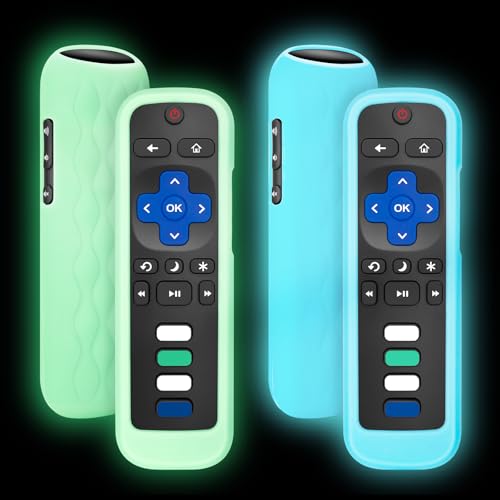
The blue-and-green color pairing sets this two-pack apart, and the compatibility covers Roku, TCL Roku, Onn Roku, and Hisense Roku remotes. Its silicone construction is intended to add grip and help shield the controller from scratches and impacts; the maker says the sleeves can glow after being exposed to sufficient light. This pair suits someone seeking two color-coded sleeves for compatible Roku remotes. Compatibility is expressed broadly, so match the cover opening and buttons to the exact controller before buying, especially when a remote has an unusual layout or extra controls.
Bottom line: Choose this pair for compatible Roku remotes when blue and green are preferred.
How to choose a TV remote cover
Start with the remote’s model number, not only the television brand. Roku remotes vary by player and generation, while Samsung BN59 is a family with multiple model numbers; a case for one remote shape may not align with another controller’s buttons. Compare the model marking on the remote or in its battery compartment with the compatibility, then check the case openings against the power, volume, and navigation controls. When a remote is not named, confirm the exact fit before ordering.
Silicone sleeves add an outer layer and grip but do not make a remote waterproof or drop-proof. A case should sit without covering a button or sensor. If a cover shifts or presses controls at rest, it is the wrong fit rather than a sign to force it onto the remote.
Roku and Samsung cover fit
Roku and Samsung remote covers are not interchangeable just because both are made from silicone. Roku fit claims may name television brands, streaming players, or both; Samsung fit claims commonly use BN59 model numbers. Use the narrowest identifier available: the exact remote model is more useful than a brand name, and the remote itself matters more than the TV model when the same television brand ships different controllers.
The table summarizes the fit categories represented by these choices; a category match still does not establish fit for every controller within a brand family.
| Remote family | Useful fit identifier | What to match |
|---|---|---|
| Roku TV or player | Remote/player model | Controller shape and button positions |
| Samsung | BN59 model number | Full model number and control layout |
Glow-in-the-dark cover use
Glow sleeves need light exposure before they can be seen in darkness; a glow claim is not the same as a continuously lit indicator. One Roku set gives a glow duration of about half an hour after exposure, while other sleeves describe the effect without a duration. Ambient light, how long a sleeve is exposed, and how dark the room is affect visibility.
For reliable locating, pick a bright color and keep the remote in a consistent place rather than depending on glow alone. Do not assume a glowing cover makes the remote easier to see in a lit room, and do not use a sleeve to justify leaving the controller where it can be stepped on or reached by small children.
Putting on and caring for a remote sleeve
Remove the batteries before fitting or cleaning a sleeve, then align its openings with the buttons and sensor area before stretching it over the remote. This reduces the chance of a button being trapped under the edge. Silicone sleeves can be wiped with a lightly damp cloth; dry the sleeve and remote fully before reinstalling batteries, since moisture around battery contacts can cause corrosion.
Check that the sleeve does not block the infrared window or make buttons stay pressed. If the remote uses another signaling method, unobstructed controls still matter. A snug fit should stay in place during normal handling without distorting the case or requiring force to remove it.
Frequently Asked Questions
How do I find my TV remote model number?
Look for the model marking on the back of the remote or inside its battery compartment. Samsung remotes often use a BN59-prefixed identifier; use the complete number to compare compatibility.
Will any Roku cover fit every Roku remote?
No, Roku remotes differ in shape and button layout across players and TV families. Match the exact remote model or compare its button arrangement with the compatible models before selecting a cover.
Do glow-in-the-dark remote covers glow all night?
Glow duration varies by sleeve and exposure; one option specifies about half an hour after exposure to light. Charge the sleeve under light and expect less visibility in a room that is not fully dark.
Can a silicone cover protect a remote from water?
A silicone cover should not be treated as waterproof because the sleeves are protective covers, not sealed cases. Keep the remote and battery compartment dry, and remove batteries before cleaning the sleeve.
Can a remote cover block the signal?
A properly aligned cover should leave the remote’s sensor area unobstructed, but a poorly fitted sleeve can interfere. Check operation after fitting and reposition or remove the sleeve if commands do not register.